justfile
Compare original and translation side by side
🇺🇸
Original
English🇨🇳
Translation
ChineseWriting Justfiles
编写Justfile
The below readme is pulled from: https://github.com/casey/just/blob/master/README.md
It fully documents the Justfile syntax and system.
<h1 align=center><code>just</code></h1>
justThis readme is also available as a book. The
book reflects the latest release, whereas the
readme on GitHub
reflects latest master.
(中文文档在 这里,
快看过来!)
Commands, called recipes, are stored in a file called with syntax
inspired by :
justfilemake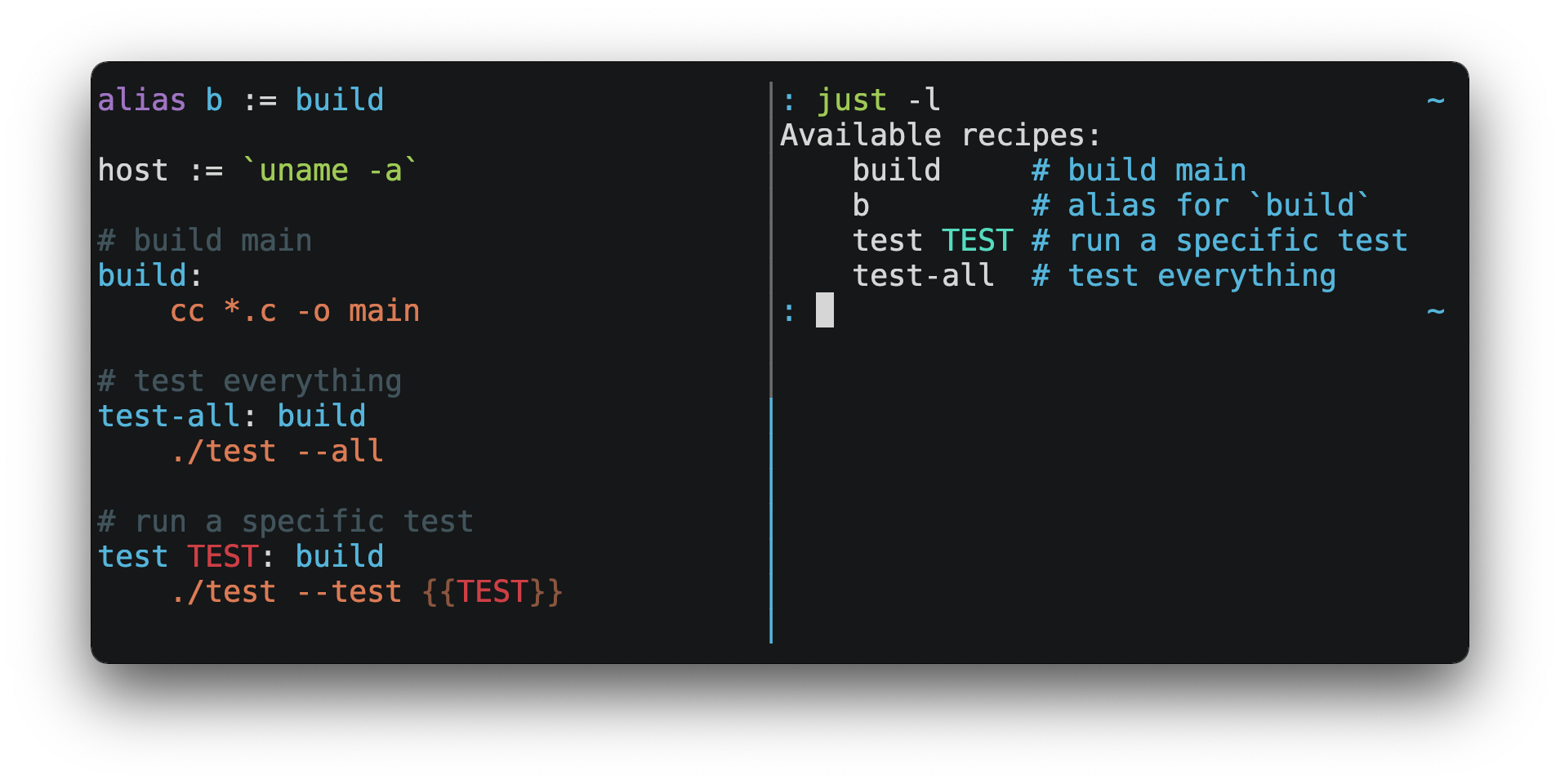
You can then run them with :
just RECIPEconsole
$ just test-all
cc *.c -o main
./test --all
Yay, all your tests passed!justmake- is a command runner, not a build system, so it avoids much of
just's complexity and idiosyncrasies. No need formakerecipes!.PHONY - Linux, MacOS, Windows, and other reasonable unices are supported with no
additional dependencies. (Although if your system doesn't have an , you'll need to choose a different shell.)
sh - Errors are specific and informative, and syntax errors are reported along with their source context.
- Recipes can accept command line arguments.
- Wherever possible, errors are resolved statically. Unknown recipes and circular dependencies are reported before anything runs.
- loads
justfiles, making it easy to populate environment variables..env - Recipes can be listed from the command line.
- Command line completion scripts are available for most popular shells.
- Recipes can be written in arbitrary languages, like Python or NodeJS.
- can be invoked from any subdirectory, not just the directory that contains the
just.justfile - And much more!
If you need help with please feel free to open an issue or ping me on
Discord. Feature requests and bug reports are
always welcome!
just以下README内容取自:https://github.com/casey/just/blob/master/README.md
它完整记录了Justfile的语法和系统。
<h1 align=center><code>just</code></h1>
just本README也有书籍版本,书籍内容对应最新的正式发布版,而GitHub上的README对应最新的master分支代码。
(中文文档在 这里, 快看过来!)
被称为recipe的命令存储在名为的文件中,语法灵感来源于:
justfilemake你可以使用来运行这些命令:
just RECIPEconsole
$ just test-all
cc *.c -o main
./test --all
Yay, all your tests passed!justmake- 是命令运行工具,而非构建系统,因此避免了
just的诸多复杂性和特殊特性,无需编写makerecipe!.PHONY - 无需额外依赖即可支持Linux、MacOS、Windows和其他主流Unix系统。(如果你的系统没有,你需要选择其他shell。)
sh - 错误提示具体明确,语法错误会附带源码上下文报告。
- Recipe可以接收命令行参数。
- 尽可能静态解析错误,未知recipe和循环依赖会在任何命令运行前被报告。
- 支持加载
just文件,可以轻松填充环境变量。.env - 可以从命令行列出所有可用recipe。
- 为绝大多数主流shell提供了命令补全脚本。
- Recipe可以用任意编程语言编写,比如Python或NodeJS。
- 可以从任意子目录调用,不局限于包含
just的目录。justfile - 还有更多功能!
如果你需要相关的帮助,欢迎提交Issue或者在Discord上联系我。功能建议和Bug报告一直都非常欢迎!
justQuick Start
快速入门
See the installation section for how to install on your computer. Try
running to make sure that it's installed correctly.
justjust --versionFor an overview of the syntax, check out
this cheatsheet.
Once is installed and working, create a file named in the
root of your project with the following contents:
justjustfilejust
recipe-name:
echo 'This is a recipe!'请参考安装章节了解如何在你的电脑上安装。尝试运行确认安装正确。
justjust --version要了解语法概览,可以查看这份速查表。
安装并确认可用后,在项目根目录创建名为的文件,内容如下:
justjustfilejust
recipe-name:
  echo 'This is a recipe!'
this is a comment
this is a comment
another-recipe:
@echo 'This is another recipe.'
When you invoke `just` it looks for file `justfile` in the current directory
and upwards, so you can invoke it from any subdirectory of your project.

The search for a `justfile` is case insensitive, so any case, like `Justfile`,
`JUSTFILE`, or `JuStFiLe`, will work. `just` will also look for files with the
name `.justfile`, in case you'd like to hide a `justfile`.

Running `just` with no arguments runs the first recipe in the `justfile`:

```console
$ just
echo 'This is a recipe!'
This is a recipe!
One or more arguments specify the recipe(s) to run:
console
$ just another-recipe
This is another recipe.justecho 'This is a recipe!'@echo 'This is another recipe.'Recipes stop running if a command fails. Here will only run if
succeeds:
cargo publishcargo testjust
publish:
  cargo test
  # tests passed, time to publish!
  cargo publish
Recipes can depend on other recipes. Here the recipe depends on the
recipe, so will run before :
testbuildbuildtestjust
build:
  cc main.c foo.c bar.c -o main

test: build
  ./test

sloc:
  @echo "`wc -l *.c` lines of code"
console
$ just test
cc main.c foo.c bar.c -o main
./test
testing… all tests passed!
Recipes without dependencies will run in the order they're given on the command
line:
console
$ just build sloc
cc main.c foo.c bar.c -o main
1337 lines of code
Dependencies will always run first, even if they are passed after a recipe that
depends on them:
console
$ just test build
cc main.c foo.c bar.c -o main
./test
testing… all tests passed!
Recipes may depend on recipes in submodules:
justfile
mod foo

baz: foo::bar
another-recipe:
@echo 'This is another recipe.'
当你调用`just`时,它会从当前目录向上搜索`justfile`文件,因此你可以从项目的任意子目录调用它。

搜索`justfile`时不区分大小写,所以任何大小写形式比如`Justfile`、`JUSTFILE`、`JuStFiLe`都可以生效。`just`也会查找名为`.justfile`的文件,适合你想要隐藏`justfile`的场景。

不带参数运行`just`会执行`justfile`中的第一个recipe:

```console
$ just
echo 'This is a recipe!'
This is a recipe!
传入一个或多个参数可以指定要运行的recipe:
console
$ just another-recipe
This is another recipe.justecho 'This is a recipe!'@echo 'This is another recipe.'如果命令执行失败,recipe会停止运行。下面的示例中只会在执行成功后运行:
cargo publishcargo testjust
publish:
  cargo test
  # tests passed, time to publish!
  cargo publish
Recipe可以依赖其他recipe。下面的示例中 recipe依赖 recipe,所以会在之前运行:
testbuildbuildtestjust
build:
  cc main.c foo.c bar.c -o main

test: build
  ./test

sloc:
  @echo "`wc -l *.c` lines of code"
console
$ just test
cc main.c foo.c bar.c -o main
./test
testing… all tests passed!
没有依赖的recipe会按照命令行中传入的顺序运行:
console
$ just build sloc
cc main.c foo.c bar.c -o main
1337 lines of code
依赖总是会优先运行,即使它们被放在依赖它们的recipe之后传入:
console
$ just test build
cc main.c foo.c bar.c -o main
./test
testing… all tests passed!
Recipe可以依赖子模块中的recipe:
justfile
mod foo

baz: foo::bar
Examples
示例
Features
功能
The Default Recipe
默认Recipe
When is invoked without a recipe, it runs the recipe with the
attribute, or the first recipe in the if no recipe has
the attribute.
just[default]justfile[default]This recipe might be the most frequently run command in the project, like
running the tests:
just
test:
  cargo test
You can also use dependencies to run multiple recipes by default:
just
default: lint build test

build:
  echo Building…

test:
  echo Testing…

lint:
  echo Linting…
If no recipe makes sense as the default recipe, you can add a recipe to the
beginning of your that lists the available recipes:
justfilejust
default:
just --list当调用时没有指定recipe,它会运行带有属性的recipe,如果没有recipe带有该属性则运行中的第一个recipe。
just[default]justfile这个recipe通常是项目中最常运行的命令,比如运行测试:
just
test:
  cargo test
你也可以使用依赖来默认运行多个recipe:
just
default: lint build test

build:
  echo Building…

test:
  echo Testing…

lint:
echo Linting…如果没有适合作为默认的recipe,你可以在开头添加一个列出所有可用recipe的recipe:
justfilejust
default:
  just --list
Listing Available Recipes
列出可用Recipe
Recipes can be listed in alphabetical order with :
just --listconsole
$ just --list
Available recipes:
    build
    test
    deploy
    lint
Recipes in submodules can be listed with ,
where is a space- or -separated module path:
just --list PATHPATH::$ cat justfile
mod foo
$ cat foo.just
mod bar
$ cat bar.just
baz:
$ just --list foo bar
Available recipes:
baz
$ just --list foo::bar
Available recipes:
bazjust --summaryconsole
$ just --summary
build test deploy lint
Pass to print recipes in the order they appear in the :
--unsortedjustfilejust
test:
  echo 'Testing!'

build:
  echo 'Building!'
console
$ just --list --unsorted
Available recipes:
    test
    build
console
$ just --summary --unsorted
test build
If you'd like to default to listing the recipes in the , you
can use this as your default recipe:
justjustfilejust
default:
  @just --list
Note that you may need to add to the line above.
Without it, if you executed or
, the plain inside the recipe
would not necessarily use the file you provided. It would try to find a
justfile in your current path, maybe even resulting in a
error.
--justfile {{justfile()}}just -f /some/distant/justfile -d .just -f ./non-standard-justfilejust --listNo justfile foundThe heading text can be customized with :
--list-headingconsole
$ just --list --list-heading $'Cool stuff…\n'
Cool stuff…
    test
    build
And the indentation can be customized with :
--list-prefixconsole
$ just --list --list-prefix ····
Available recipes:
····test
····build
The argument to replaces both the heading and the newline
following it, so it should contain a newline if non-empty. It works this way so
you can suppress the heading line entirely by passing the empty string:
--list-headingconsole
$ just --list --list-heading ''
    test
build使用可以按字母顺序列出所有recipe:
just --listconsole
$ just --list
Available recipes:
    build
    test
    deploy
lint$ cat justfile
mod foo
$ cat foo.just
mod bar
$ cat bar.just
baz:
$ just --list foo bar
Available recipes:
baz
$ just --list foo::bar
Available recipes:
bazjust --summaryconsole
$ just --summary
build test deploy lint传入参数可以按recipe在中出现的顺序打印:
--unsortedjustfilejust
test:
  echo 'Testing!'

build:
  echo 'Building!'
console
$ just --list --unsorted
Available recipes:
    test
    build
console
$ just --summary --unsorted
test build如果你希望默认列出中的recipe,可以使用以下默认recipe:
justjustfilejust
default:
@just --list注意你可能需要在上面的命令中添加。如果没有的话,当你执行或者时,recipe中的不一定会使用你指定的文件,它会尝试在当前路径查找justfile,甚至可能返回错误。
--justfile {{justfile()}}just -f /some/distant/justfile -d .just -f ./non-standard-justfilejust --listNo justfile found可以使用自定义标题文本:
--list-headingconsole
$ just --list --list-heading $'Cool stuff…\
'
Cool stuff…
    test
build可以使用自定义缩进:
--list-prefixconsole
$ just --list --list-prefix ····
Available recipes:
····test
····build--list-headingconsole
$ just --list --list-heading ''
    test
    build
Invoking Multiple Recipes
调用多个Recipe
Multiple recipes may be invoked on the command line at once:
just
build:
  make web

serve:
  python3 -m http.server -d out 8000
console
$ just build serve
make web
python3 -m http.server -d out 8000
Keep in mind that recipes with parameters will swallow arguments, even if they
match the names of other recipes:
just
build project:
  make {{project}}

serve:
  python3 -m http.server -d out 8000
console
$ just build serve
make: *** No rule to make target `serve'.  Stop.
The flag can be used to restrict command-line invocations to a single
recipe:
--oneconsole
$ just --one build serve
error: Expected 1 command-line recipe invocation but found 2.
可以在命令行一次调用多个recipe:
just
build:
  make web

serve:
  python3 -m http.server -d out 8000
console
$ just build serve
make web
python3 -m http.server -d out 8000
请注意,带参数的recipe会吸收后续参数,即使这些参数匹配其他recipe的名称:
just
build project:
  make {{project}}

serve:
  python3 -m http.server -d out 8000
console
$ just build serve
make: *** No rule to make target `serve'.  Stop.
可以使用 flag限制命令行只能调用单个recipe:
--oneconsole
$ just --one build serve
error: Expected 1 command-line recipe invocation but found 2.
Working Directory
工作目录
By default, recipes run with the working directory set to the directory that
contains the .
justfileThe attribute can be used to make recipes run with the working
directory set to directory in which was invoked.
[no-cd]justjust
@foo:
  pwd

[no-cd]
@bar:
  pwd
console
$ cd subdir
$ just foo
/
$ just bar
/subdir
You can override the working directory for all recipes with
:
set working-directory := '…'just
set working-directory := 'bar'

@foo:
  pwd
console
$ pwd
/home/bob
$ just foo
/home/bob/bar
You can override the working directory for a specific recipe with the
attribute<sup>1.38.0</sup>:
working-directoryjust
[working-directory: 'bar']
@foo:
  pwd
console
$ pwd
/home/bob
$ just foo
/home/bob/bar
The argument to the setting or
attribute may be absolute or relative. If it is relative it is interpreted
relative to the default working directory.
working-directoryworking-directory默认情况下,recipe运行时的工作目录被设置为包含的目录。
justfile可以使用属性让recipe运行时的工作目录为调用时的目录:
[no-cd]justjust
@foo:
  pwd

[no-cd]
@bar:
  pwd
console
$ cd subdir
$ just foo
/
$ just bar
/subdir你可以使用覆盖所有recipe的工作目录:
set working-directory := '…'just
set working-directory := 'bar'

@foo:
  pwd
console
$ pwd
/home/bob
$ just foo
/home/bob/bar你可以使用属性<sup>1.38.0</sup>覆盖单个recipe的工作目录:
working-directoryjust
[working-directory: 'bar']
@foo:
  pwd
console
$ pwd
/home/bob
$ just foo
/home/bob/barworking-directoryworking-directoryAliases
别名
Aliases allow recipes to be invoked on the command line with alternative names:
just
alias b := build

build:
  echo 'Building!'
console
$ just b
echo 'Building!'
Building!
The target of an alias may be a recipe in a submodule:
justfile
mod foo

alias baz := foo::bar
别名允许你在命令行使用其他名称调用recipe:
just
alias b := build

build:
  echo 'Building!'
console
$ just b
echo 'Building!'
Building!
别名的目标可以是子模块中的recipe:
justfile
mod foo

alias baz := foo::bar
Settings
设置
Settings control interpretation and execution. Each setting may be specified at
most once, anywhere in the .
justfileFor example:
just
set shell := ["zsh", "-cu"]

foo:
  # this line will be run as `zsh -cu 'ls **/*.txt'`
ls **/*.txt设置控制解释和执行行为。每个设置最多只能指定一次,可以放在的任意位置。
justfile例如:
just
set shell := ["zsh", "-cu"]

foo:
  # this line will be run as `zsh -cu 'ls **/*.txt'`
  ls **/*.txt
Table of Settings
设置表
| Name | Value | Default | Description |
|---|---|---|---|
| boolean | | Allow recipes appearing later in a |
| boolean | | Allow variables appearing later in a |
| string | - | Load a |
| boolean | | Load a |
| boolean | | Override existing environment variables with values from the |
| string | - | Load a |
| boolean | | Error if a |
| boolean | | Export all variables as environment variables. |
| boolean | | Search |
| boolean | | Ignore recipe lines beginning with |
| boolean | | Pass positional arguments. |
| boolean | | Disable echoing recipe lines before executing. |
| | | Set command used to invoke recipes with empty |
| | - | Set command used to invoke recipes and evaluate backticks. |
| string | - | Create temporary directories in |
| boolean | | Enable unstable features. |
| boolean | | Use PowerShell on Windows as default shell. (Deprecated. Use |
| | - | Set the command used to invoke recipes and evaluate backticks. |
| string | - | Set the working directory for recipes and backticks, relative to the default working directory. |
Boolean settings can be written as:
justfile
set NAMEWhich is equivalent to:
justfile
set NAME := trueNon-boolean settings can be set to both strings and
expressions.<sup>1.46.0</sup>
However, because settings affect the behavior of backticks and many functions,
those expressions may not contain backticks or function calls, directly or
transitively via reference.
| 名称 | 取值类型 | 默认值 | 描述 |
|---|---|---|---|
| 布尔值 | | 允许 |
| 布尔值 | | 允许 |
| 字符串 | - | 如果存在的话加载指定名称的 |
| 布尔值 | | 如果存在的话加载 |
| 布尔值 | | 使用 |
| 字符串 | - | 从指定路径加载 |
| 布尔值 | | 如果未找到 |
| 布尔值 | | 将所有变量导出为环境变量 |
| 布尔值 | | 如果命令行的第一个recipe在当前 |
| 布尔值 | | 忽略以 |
| 布尔值 | | 传递位置参数 |
| 布尔值 | | 执行前禁用recipe行的打印输出 |
| | | 设置用于执行带有空 |
| | - | 设置用于调用recipe和计算反引号表达式的命令 |
| 字符串 | - | 在 |
| 布尔值 | | 启用不稳定特性 |
| 布尔值 | | 在Windows上使用PowerShell作为默认shell(已废弃,请使用 |
| | - | 设置Windows上用于调用recipe和计算反引号表达式的命令 |
| 字符串 | - | 设置recipe和反引号表达式的工作目录,相对于默认工作目录 |
布尔设置可以这样写:
justfile
set NAME等价于:
justfile
set NAME := true非布尔设置可以设置为字符串和表达式<sup>1.46.0</sup>。
但是因为设置会影响反引号和很多函数的行为,这些表达式不能直接或间接通过引用包含反引号或函数调用。
Allow Duplicate Recipes
允许重复Recipe
If is set to , defining multiple recipes with
the same name is not an error and the last definition is used. Defaults to
.
allow-duplicate-recipestruefalsejust
set allow-duplicate-recipes

@foo:
  echo foo

@foo:
  echo bar
console
$ just foo
bar如果设置为,定义多个同名recipe不会报错,会使用最后一个定义,默认值为。
allow-duplicate-recipestruefalsejust
set allow-duplicate-recipes

@foo:
  echo foo

@foo:
  echo bar
console
$ just foo
bar
Allow Duplicate Variables
允许重复变量
If is set to , defining multiple variables
with the same name is not an error and the last definition is used. Defaults to
.
allow-duplicate-variablestruefalsejust
set allow-duplicate-variables

a := "foo"
a := "bar"

@foo:
  echo {{a}}
console
$ just foo
bar如果设置为,定义多个同名变量不会报错,会使用最后一个定义,默认值为。
allow-duplicate-variablestruefalsejust
set allow-duplicate-variables

a := "foo"
a := "bar"

@foo:
  echo {{a}}
console
$ just foo
bar
Dotenv Settings
Dotenv设置
If any of , , , ,
or are set, will try to load environment variables
from a file.
dotenv-loaddotenv-filenamedotenv-overridedotenv-pathdotenv-requiredjustIf is set, will look for a file at the given path, which
may be absolute, or relative to the working directory.
dotenv-pathjustThe command-line option , short form , can be used to set or
override at runtime.
--dotenv-path-Edotenv-pathIf is set will look for a file at the given path,
relative to the working directory and each of its ancestors.
dotenv-filenamejustIf is not set, but or are
set, just will look for a file named , relative to the working directory
and each of its ancestors.
dotenv-filenamedotenv-loaddotenv-required.envdotenv-filenamedotenv-pathdotenv-pathdotenv-filenameIt is not an error if an environment file is not found, unless
is set.
dotenv-requiredThe loaded variables are environment variables, not variables, and so
must be accessed using in recipes and backticks.
just$VARIABLE_NAMEIf is set, variables from the environment file will override
existing environment variables.
dotenv-overrideFor example, if your file contains:
.envconsole
undefined如果设置了、、、或中的任意一个,会尝试从文件加载环境变量。
dotenv-loaddotenv-filenamedotenv-overridedotenv-pathdotenv-requiredjust如果设置了,会查找指定路径的文件,可以是绝对路径,也可以是相对于工作目录的路径。
dotenv-pathjust命令行选项(简写)可以在运行时设置或覆盖。
--dotenv-path-Edotenv-path如果设置了,会从工作目录及其每个上级目录查找指定路径的文件。
dotenv-filenamejust如果没有设置,但设置了或,just会从工作目录及其每个上级目录查找名为的文件。
dotenv-filenamedotenv-loaddotenv-required.envdotenv-filenamedotenv-pathdotenv-pathdotenv-filename除非设置了,否则未找到环境文件不会报错。
dotenv-required加载的变量是环境变量,而非变量,因此必须在recipe和反引号中使用访问。
just$VARIABLE_NAME如果设置了,环境文件中的变量会覆盖已有的环境变量。
dotenv-override例如,如果你的文件包含:
.envconsole
undefineda comment, will be ignored
a comment, will be ignored
DATABASE_ADDRESS=localhost:6379
SERVER_PORT=1337
And your `justfile` contains:

```just
set dotenv-load

serve:
  @echo "Starting server with database $DATABASE_ADDRESS on port $SERVER_PORT…"
  ./server --database $DATABASE_ADDRESS --port $SERVER_PORT
just serveconsole
$ just serve
Starting server with database localhost:6379 on port 1337…
./server --database $DATABASE_ADDRESS --port $SERVER_PORT
DATABASE_ADDRESS=localhost:6379
SERVER_PORT=1337
你的`justfile`包含:

```just
set dotenv-load

serve:
  @echo "Starting server with database $DATABASE_ADDRESS on port $SERVER_PORT…"
  ./server --database $DATABASE_ADDRESS --port $SERVER_PORT
just serveconsole
$ just serve
Starting server with database localhost:6379 on port 1337…
./server --database $DATABASE_ADDRESS --port $SERVER_PORT
Export
导出
The setting causes all variables to be exported as environment
variables. Defaults to .
exportjustfalsejust
set export

a := "hello"

@foo b:
  echo $a
  echo $b
console
$ just foo goodbye
hello
goodbyeexportjustfalsejust
set export

a := "hello"

@foo b:
  echo $a
  echo $b
console
$ just foo goodbye
hello
goodbye
Positional Arguments
位置参数
If is , recipe arguments will be passed as
positional arguments to commands. For linewise recipes, argument will be
the name of the recipe.
positional-argumentstrue$0For example, running this recipe:
just
set positional-arguments

@foo bar:
  echo $0
  echo $1
Will produce the following output:
console
$ just foo hello
foo
hello
When using an -compatible shell, such as or , expands to
the positional arguments given to the recipe, starting from one. When used
within double quotes as , arguments including whitespace will be passed
on as if they were double-quoted. That is, is equivalent to …
When there are no positional parameters, and expand to nothing
(i.e., they are removed).
shbashzsh$@"$@""$@""$1" "$2""$@"$@This example recipe will print arguments one by one on separate lines:
just
set positional-arguments

@test *args='':
  bash -c 'while (( "$#" )); do echo - $1; shift; done' -- "$@"
Running it with two arguments:
console
$ just test foo "bar baz"
- foo
- bar baz
Positional arguments may also be turned on on a per-recipe basis with the
attribute<sup>1.29.0</sup>:
[positional-arguments]just
[positional-arguments]
@foo bar:
  echo $0
  echo $1
Note that PowerShell does not handle positional arguments in the same way as
other shells, so turning on positional arguments will likely break recipes that
use PowerShell.
If using PowerShell 7.4 or better, the flag will make
positional arguments work as expected:
-CommandWithArgsjust
set shell := ['pwsh.exe', '-CommandWithArgs']
set positional-arguments

print-args a b c:
Write-Output @($args[1..($args.Count - 1)])如果为,recipe参数会作为位置参数传递给命令。对于逐行执行的recipe,是recipe的名称。
positional-argumentstrue$0例如,运行这个recipe:
just
set positional-arguments

@foo bar:
  echo $0
  echo $1
会产生以下输出:
console
$ just foo hello
foo
hello当使用兼容的shell(比如或)时,会展开为传递给recipe的位置参数,从第一个开始。当在双引号中使用时,包含空格的参数会被正确传递,相当于。当没有位置参数时,和会展开为空(即被移除)。
shbashzsh$@"$@""$1" "$2"…"$@"$@这个示例recipe会逐行打印每个参数:
just
set positional-arguments

@test *args='':
  bash -c 'while (( "$#" )); do echo - $1; shift; done' -- "$@"
传入两个参数运行:
console
$ just test foo "bar baz"
- foo
- bar baz也可以使用属性为单个recipe开启位置参数<sup>1.29.0</sup>:
[positional-arguments]just
[positional-arguments]
@foo bar:
  echo $0
  echo $1
注意PowerShell处理位置参数的方式和其他shell不同,所以开启位置参数可能会破坏使用PowerShell的recipe。
如果使用PowerShell 7.4或更高版本, flag可以让位置参数正常工作:
-CommandWithArgsjust
set shell := ['pwsh.exe', '-CommandWithArgs']
set positional-arguments

print-args a b c:
  Write-Output @($args[1..($args.Count - 1)])
Shell
Shell
The setting controls the command used to invoke recipe lines and
backticks. Shebang recipes are unaffected. The default shell is .
shellsh -cujust
undefinedshellsh -cujust
undefineduse python3 to execute recipe lines and backticks
use python3 to execute recipe lines and backticks
set shell := ["python3", "-c"]
set shell := ["python3", "-c"]
use print to capture result of evaluation
use print to capture result of evaluation
foos :=
print("foo" * 4)foo:
print("Snake snake snake snake.")
print("{{foos}}")
`just` passes the command to be executed as an argument. Many shells will need
an additional flag, often `-c`, to make them evaluate the first argument.
foos :=
print("foo" * 4)foo:
print("Snake snake snake snake.")
print("{{foos}}")
`just`将要执行的命令作为参数传递。很多shell需要额外的flag(通常是`-c`)来让它们计算第一个参数。Windows Shell
Windows Shell
justshwindows-shelljust
set windows-shell := ["powershell.exe", "-NoLogo", "-Command"]

hello:
  Write-Host "Hello, world!"
See
powershell.just
for a justfile that uses PowerShell on all platforms.
justshwindows-shelljust
set windows-shell := ["powershell.exe", "-NoLogo", "-Command"]

hello:
Write-Host "Hello, world!"查看powershell.just了解在所有平台使用PowerShell的justfile示例。
Windows PowerShell
Windows PowerShell
set windows-powershellpowershell.exewindows-shelljustshpowershell.exewindows-powershelljust
set windows-powershell := true

hello:
  Write-Host "Hello, world!"
set windows-powershellpowershell.exewindows-shelljustshpowershell.exewindows-powershelljust
set windows-powershell := true

hello:
  Write-Host "Hello, world!"
Python 3
Python 3
just
set shell := ["python3", "-c"]just
set shell := ["python3", "-c"]Bash
Bash
just
set shell := ["bash", "-uc"]just
set shell := ["bash", "-uc"]Z Shell
Z Shell
just
set shell := ["zsh", "-uc"]just
set shell := ["zsh", "-uc"]Fish
Fish
just
set shell := ["fish", "-c"]just
set shell := ["fish", "-c"]Nushell
Nushell
just
set shell := ["nu", "-c"]If you want to change the default table mode to :
lightjust
set shell := ['nu', '-m', 'light', '-c']Nushell was written in Rust, and has
cross-platform support for Windows / macOS and Linux.
just
set shell := ["nu", "-c"]如果你想将默认表格模式改为:
lightjust
set shell := ['nu', '-m', 'light', '-c']Nushell使用Rust编写,支持Windows/macOS和Linux跨平台。
Documentation Comments
文档注释
Comments immediately preceding a recipe will appear in :
just --listjust
undefined紧邻recipe之前的注释会出现在的输出中:
just --listjust
undefinedbuild stuff
build stuff
build:
./bin/build
build:
./bin/build
test stuff
test stuff
test:
./bin/test
```console
$ just --list
Available recipes:
    build # build stuff
    test # test stuff
The attribute can be used to set or suppress a recipe's doc comment:
[doc]just
undefinedtest:
./bin/test
```console
$ just --list
Available recipes:
    build # build stuff
test # test stuff可以使用属性设置或隐藏recipe的文档注释:
[doc]just
undefinedThis comment won't appear
This comment won't appear
[doc('Build stuff')]
build:
./bin/build
[doc('Build stuff')]
build:
./bin/build
This one won't either
This one won't either
[doc]
test:
./bin/test
```console
$ just --list
Available recipes:
    build # Build stuff
    test
[doc]
test:
./bin/test
```console
$ just --list
Available recipes:
    build # Build stuff
    test
Expressions and Substitutions
表达式和替换
Various operators and function calls are supported in expressions, which may be
used in assignments, default recipe arguments, and inside recipe body
substitutions.
{{…}}just
tmpdir  := `mktemp -d`
version := "0.2.7"
tardir  := tmpdir / "awesomesauce-" + version
tarball := tardir + ".tar.gz"
config  := quote(config_dir() / ".project-config")

publish:
  rm -f {{tarball}}
  mkdir {{tardir}}
  cp README.md *.c {{ config }} {{tardir}}
  tar zcvf {{tarball}} {{tardir}}
  scp {{tarball}} me@server.com:release/
rm -rf {{tarball}} {{tardir}}表达式支持多种运算符和函数调用,可以用于赋值、默认recipe参数,以及recipe体中的替换。
{{…}}just
tmpdir  := `mktemp -d`
version := "0.2.7"
tardir  := tmpdir / "awesomesauce-" + version
tarball := tardir + ".tar.gz"
config  := quote(config_dir() / ".project-config")

publish:
  rm -f {{tarball}}
  mkdir {{tardir}}
  cp README.md *.c {{ config }} {{tardir}}
  tar zcvf {{tarball}} {{tardir}}
  scp {{tarball}} me@server.com:release/
  rm -rf {{tarball}} {{tardir}}
Concatenation
拼接
The operator returns the left-hand argument concatenated with the
right-hand argument:
+just
foobar := 'foo' + 'bar'+just
foobar := 'foo' + 'bar'Logical Operators
逻辑运算符
The logical operators and can be used to coalesce string
values<sup>1.37.0</sup>, similar to Python's and . These operators
consider the empty string to be false, and all other strings to be true.
&&||andor''These operators are currently unstable.
The operator returns the empty string if the left-hand argument is the
empty string, otherwise it returns the right-hand argument:
&&justfile
foo := '' && 'goodbye'      # ''
bar := 'hello' && 'goodbye' # 'goodbye'
The operator returns the left-hand argument if it is non-empty, otherwise
it returns the right-hand argument:
||justfile
foo := '' || 'goodbye'      # 'goodbye'
bar := 'hello' || 'goodbye' # 'hello'逻辑运算符和可以用于合并字符串值<sup>1.37.0</sup>,类似于Python的和。这些运算符将空字符串视为假,其他所有字符串视为真。
&&||andor''这些运算符目前是不稳定特性。
如果左参数是空字符串,运算符返回空字符串,否则返回右参数:
&&justfile
foo := '' && 'goodbye'      # ''
bar := 'hello' && 'goodbye' # 'goodbye'如果左参数非空,运算符返回左参数,否则返回右参数:
||justfile
foo := '' || 'goodbye'      # 'goodbye'
bar := 'hello' || 'goodbye' # 'hello'
Joining Paths
路径拼接
The operator can be used to join two strings with a slash:
/just
foo := "a" / "b"$ just --evaluate foo
a/bNote that a is added even if one is already present:
/just
foo := "a/"
bar := foo / "b"
$ just --evaluate bar
a//bAbsolute paths can also be constructed<sup>1.5.0</sup>:
just
foo := / "b"$ just --evaluate foo
/bThe operator uses the character, even on Windows. Thus, using the
operator should be avoided with paths that use universal naming convention
(UNC), i.e., those that start with , since forward slashes are not
supported with UNC paths.
///\?/just
foo := "a" / "b"$ just --evaluate foo
a/b注意即使已经存在斜杠也会再添加一个:
just
foo := "a/"
bar := foo / "b"
$ just --evaluate bar
a//b也可以构造绝对路径<sup>1.5.0</sup>:
just
foo := / "b"$ just --evaluate foo
/b//\\\\?/Escaping {{
{{转义{{
{{To write a recipe containing , use :
{{{{{{just
braces:
  echo 'I {{{{LOVE}} curly braces!'
(An unmatched is ignored, so it doesn't need to be escaped.)
}}Another option is to put all the text you'd like to escape inside of an
interpolation:
just
braces:
  echo '{{'I {{LOVE}} curly braces!'}}'
Yet another option is to use :
{{ "{{" }}just
braces:
echo 'I {{ "{{" }}LOVE}} curly braces!'要编写包含的recipe,请使用:
{{{{{{just
braces:
echo 'I {{{{LOVE}} curly braces!'(未匹配的会被忽略,所以不需要转义。)
}}另一种选择是将所有要转义的文本放在插值中:
just
braces:
echo '{{'I {{LOVE}} curly braces!'}}'还有一种选择是使用:
{{ "{{" }}just
braces:
  echo 'I {{ "{{" }}LOVE}} curly braces!'
Strings
字符串
'single'"double"'''triple'''{{…}}Double-quoted strings support escape sequences:
just
carriage-return   := "\r"
double-quote      := "\""
newline           := "\n"
no-newline        := "\
"
slash             := "\\"
tab               := "\t"
unicode-codepoint := "\u{1F916}"
console
$ just --evaluate
"arriage-return   := "
double-quote      := """
newline           := "
"
no-newline        := ""
slash             := "\"
tab               := "     "
unicode-codepoint := "🤖"
The unicode character escape sequence <sup>1.36.0</sup> accepts up to
six hex digits.
\u{…}Strings may contain line breaks:
just
single := '
hello
'

double := "
goodbye
"
Single-quoted strings do not recognize escape sequences:
just
escapes := '\t\n\r\"\\'console
$ just --evaluate
escapes := "\t\n\r\"\\"
Indented versions of both single- and double-quoted strings, delimited by
triple single- or double-quotes, are supported. Indented string lines are
stripped of a leading line break, and leading whitespace common to all
non-blank lines:
just
undefined支持、和字符串字面量。与recipe体不同,字符串内部不支持插值。
'单引号'"双引号"'''三引号'''{{…}}双引号字符串支持转义序列:
just
carriage-return   := "\\r"
double-quote      := "\\""
newline           := "\
"
no-newline        := "\\
"
slash             := "\\\\"
tab               := "\\t"
unicode-codepoint := "\\u{1F916}"
console
$ just --evaluate
"arriage-return   := "
double-quote      := """
newline           := "
"
no-newline        := ""
slash             := "\\"
tab               := "     "
unicode-codepoint := "🤖"Unicode字符转义序列<sup>1.36.0</sup>接受最多六位十六进制数字。
\\u{…}字符串可以包含换行符:
just
single := '
hello
'

double := "
goodbye
"
单引号字符串不识别转义序列:
just
escapes := '\\t\
\\r\\"\\\\'
console
$ just --evaluate
escapes := "\\t\
\\r\\"\\\\"
支持使用三个单引号或双引号分隔的缩进版单双引号字符串。缩进字符串行的开头换行符会被移除,所有非空行共有的前导空格也会被移除:
just
undefinedthis string will evaluate to foo\nbar\n
foo\nbar\nthis string will evaluate to `foo\
x := '''
foo
bar
'''
bar
` x := ''' foo bar '''
` x := ''' foo bar '''
this string will evaluate to abc\n wuv\nxyz\n
abc\n wuv\nxyz\nthis string will evaluate to `abc\
y := """
abc
wuv
xyz
"""
Similar to unindented strings, indented double-quoted strings process escape
sequences, and indented single-quoted strings ignore escape sequences. Escape
sequence processing takes place after unindentation. The unindentation
algorithm does not take escape-sequence produced whitespace or newlines into
account.
wuv
xyz
` y := """ abc wuv xyz """
xyz
` y := """ abc wuv xyz """
与非缩进字符串类似,缩进的双引号字符串会处理转义序列,缩进的单引号字符串会忽略转义序列。转义序列处理在去除缩进之后进行。去除缩进的算法不会考虑转义序列产生的空格或换行符。Shell-expanded strings
Shell扩展字符串
Strings prefixed with are shell expanded<sup>1.27.0</sup>:
xjustfile
foobar := x'~/$FOO/${BAR}'| Value | Replacement |
|---|---|
| value of environment variable |
| value of environment variable |
| value of environment variable |
Leading | path to current user's home directory |
Leading | path to |
This expansion is performed at compile time, so variables from files and
exported variables cannot be used. However, this allows shell expanded
strings to be used in places like settings and import paths, which cannot
depend on variables and files.
.envjustjust.env以为前缀的字符串会进行Shell扩展<sup>1.27.0</sup>:
xjustfile
foobar := x'~/$FOO/${BAR}'| 值 | 替换为 |
|---|---|
| 环境变量 |
| 环境变量 |
| 环境变量 |
开头的 | 当前用户的主目录路径 |
开头的 | |
这种扩展在编译时执行,因此无法使用文件中的变量和导出的变量。但这允许Shell扩展字符串用于设置和导入路径等不依赖变量和文件的场景。
.envjustjust.envFormat strings
格式字符串
Strings prefixed with are format strings<sup>1.44.0</sup>:
fjustfile
name := "world"
message := f'Hello, {{name}}!'
Format strings may contain interpolations delimited with that contain
expressions. Format strings evaluate to the concatenated string fragments and
evaluated expressions.
{{…}}Use to include a literal in a format string:
{{{{{{justfile
foo := f'I {{{{LOVE} curly braces!'以为前缀的字符串是格式字符串<sup>1.44.0</sup>:
fjustfile
name := "world"
message := f'Hello, {{name}}!'格式字符串可以包含用分隔的插值,插值内部是表达式。格式字符串的计算结果是字符串片段和计算后的表达式拼接的结果。
{{…}}要在格式字符串中包含字面量,请使用:
{{{{{{justfile
foo := f'I {{{{LOVE} curly braces!'Ignoring Errors
忽略错误
Normally, if a command returns a non-zero exit status, execution will stop. To
continue execution after a command, even if it fails, prefix the command with
:
-just
foo:
  -cat foo
  echo 'Done!'
console
$ just foo
cat foo
cat: foo: No such file or directory
echo 'Done!'
Done!通常情况下,如果命令返回非零退出状态,执行会停止。要在命令失败后继续执行,即使它失败了,可以在命令前加上:
-just
foo:
  -cat foo
  echo 'Done!'
console
$ just foo
cat foo
cat: foo: No such file or directory
echo 'Done!'
Done!
Functions
函数
just{{…}}All functions ending in can be abbreviated to . So
can also be written as . In addition,
can be abbreviated to
.
_directory_dirhome_directory()home_dir()invocation_directory_native()invocation_dir_native()just{{…}}所有以结尾的函数都可以缩写为,因此也可以写为。此外,可以缩写为。
_directory_dirhome_directory()home_dir()invocation_directory_native()invocation_dir_native()System Information
系统信息
- — Instruction set architecture. Possible values are:
arch(),"aarch64","arm","asmjs","hexagon","mips","msp430","powerpc","powerpc64","s390x","sparc","wasm32","x86", and"x86_64"."xcore" - <sup>1.15.0</sup> - Number of logical CPUs.
num_cpus() - — Operating system. Possible values are:
os(),"android","bitrig","dragonfly","emscripten","freebsd","haiku","ios","linux","macos","netbsd","openbsd", and"solaris"."windows" - — Operating system family; possible values are:
os_family()and"unix"."windows"
For example:
just
system-info:
  @echo "This is an {{arch()}} machine".
console
$ just system-info
This is an x86_64 machine
The function can be used to create cross-platform s
that work on various operating systems. For an example, see
cross-platform.just
file.
os_family()justfile- — 指令集架构。可能的取值有:
arch()、"aarch64"、"arm"、"asmjs"、"hexagon"、"mips"、"msp430"、"powerpc"、"powerpc64"、"s390x"、"sparc"、"wasm32"、"x86"和"x86_64"。"xcore" - <sup>1.15.0</sup> — 逻辑CPU数量。
num_cpus() - — 操作系统。可能的取值有:
os()、"android"、"bitrig"、"dragonfly"、"emscripten"、"freebsd"、"haiku"、"ios"、"linux"、"macos"、"netbsd"、"openbsd"和"solaris"。"windows" - — 操作系统家族。可能的取值有:
os_family()和"unix"。"windows"
例如:
just
system-info:
  @echo "This is an {{arch()}} machine".
console
$ just system-info
This is an x86_64 machineExternal Commands
外部命令
-
<sup>1.27.0</sup> returns the standard output of shell script
shell(command, args...)with zero or more positional argumentscommand. The shell used to interpretargsis the same shell that is used to evaluate recipe lines, and can be changed withcommand.set shell := […]is passed as the first argument, so if the command iscommand, the full command line, with the default shell command'echo $@'andsh -cuargsand'foo'will be:'bar''sh' '-cu' 'echo $@' 'echo $@' 'foo' 'bar'This is so thatworks as expected, and$@refers to the first argument.$1does not include the first positional argument, which is expected to be the name of the program being run.$@
just
undefined-
<sup>1.27.0</sup> 返回Shell脚本
shell(command, args...)的标准输出,可以传入零个或多个位置参数command。解释args使用的Shell与计算recipe行使用的Shell相同,可以通过command更改。set shell := […]作为第一个参数传递,因此如果命令是command,使用默认Shell命令'echo $@',参数为sh -cu和'foo'时,完整的命令行是:'bar''sh' '-cu' 'echo $@' 'echo $@' 'foo' 'bar'这样可以正常工作,$@指向第一个参数。$1不包含第一个位置参数,该参数预计是正在运行的程序的名称。$@
just
undefinedarguments can be variables or expressions
arguments can be variables or expressions
file := '/sys/class/power_supply/BAT0/status'
bat0stat := shell('cat $1', file)
file := '/sys/class/power_supply/BAT0/status'
bat0stat := shell('cat $1', file)
commands can be variables or expressions
commands can be variables or expressions
command := 'wc -l'
output := shell(command + ' "$1"', 'main.c')
command := 'wc -l'
output := shell(command + ' "$1"', 'main.c')
arguments referenced by the shell command must be used
arguments referenced by the shell command must be used
empty := shell('echo', 'foo')
full := shell('echo $1', 'foo')
error := shell('echo $1')
```justempty := shell('echo', 'foo')
full := shell('echo $1', 'foo')
error := shell('echo $1')
```justUsing python as the shell. Since python -c
sets sys.argv[0]
to '-c'
,
python -csys.argv[0]'-c'Using python as the shell. Since python -c
sets sys.argv[0]
to '-c'
,
python -csys.argv[0]'-c'the first "real" positional argument will be sys.argv[2]
.
sys.argv[2]the first "real" positional argument will be sys.argv[2]
.
sys.argv[2]set shell := ["python3", "-c"]
olleh := shell('import sys; print(sys.argv[2][::-1])', 'hello')
undefinedset shell := ["python3", "-c"]
olleh := shell('import sys; print(sys.argv[2][::-1])', 'hello')
undefinedEnvironment Variables
环境变量
- <sup>1.15.0</sup> — Retrieves the environment variable with name
env(key), aborting if it is not present.key
just
home_dir := env('HOME')

test:
  echo "{{home_dir}}"
console
$ just
/home/user1- <sup>1.15.0</sup> — Retrieves the environment variable with name
env(key, default), returningkeyif it is not present.default - — Deprecated alias for
env_var(key).env(key) - — Deprecated alias for
env_var_or_default(key, default).env(key, default)
A default can be substituted for an empty environment variable value with the
operator, currently unstable:
||just
set unstable

foo := env('FOO', '') || 'DEFAULT_VALUE'- <sup>1.15.0</sup> — 获取名为
env(key)的环境变量,如果不存在则终止执行。key
just
home_dir := env('HOME')

test:
  echo "{{home_dir}}"
console
$ just
/home/user1- <sup>1.15.0</sup> — 获取名为
env(key, default)的环境变量,如果不存在则返回key。default - —
env_var(key)的废弃别名。env(key) - —
env_var_or_default(key, default)的废弃别名。env(key, default)
可以使用运算符为空环境变量值替换默认值,该功能目前不稳定:
||just
set unstable

foo := env('FOO', '') || 'DEFAULT_VALUE'
Executables
可执行文件
-
<sup>1.39.0</sup> — Search directories in the
require(name)environment variable for the executablePATHand return its full path, or halt with an error if no executable withnameexists.namejustbash := require("bash") @test: echo "bash: '{{bash}}'"console$ just bash: '/bin/bash' -
<sup>1.39.0</sup> — Search directories in the
which(name)environment variable for the executablePATHand return its full path, or the empty string if no executable withnameexists. Currently unstable.namejustset unstable bosh := which("bosh") @test: echo "bosh: '{{bosh}}'"console$ just bosh: ''
-
<sup>1.39.0</sup> — 在
require(name)环境变量的目录中搜索可执行文件PATH并返回其完整路径,如果不存在则报错终止。namejustbash := require("bash") @test: echo "bash: '{{bash}}'"console$ just bash: '/bin/bash' -
<sup>1.39.0</sup> — 在
which(name)环境变量的目录中搜索可执行文件PATH并返回其完整路径,如果不存在则返回空字符串,目前不稳定。namejustset unstable bosh := which("bosh") @test: echo "bosh: '{{bosh}}'"console$ just bosh: ''
Invocation Information
调用信息
- - Returns the string
is_dependency()if the current recipe is being run as a dependency of another recipe, rather than being run directly, otherwise returns the stringtrue.false
- - 如果当前recipe作为另一个recipe的依赖运行,而非直接运行,则返回字符串
is_dependency(),否则返回字符串true。false
Invocation Directory
调用目录
- - Retrieves the absolute path to the current directory when
invocation_directory()was invoked, beforejustchanged it (chdir'd) prior to executing commands. On Windows,justusesinvocation_directory()to convert the invocation directory to a Cygwin-compatiblecygpath-separated path. Use/to return the verbatim invocation directory on all platforms.invocation_directory_native()
For example, to call on files just under the "current directory"
(from the user/invoker's perspective), use the following rule:
rustfmtjust
rustfmt:
  find {{invocation_directory()}} -name \*.rs -exec rustfmt {} \;
Alternatively, if your command needs to be run from the current directory, you
could use (e.g.):
just
build:
cd {{invocation_directory()}}; ./some_script_that_needs_to_be_run_from_here- - Retrieves the absolute path to the current directory when
invocation_directory_native()was invoked, beforejustchanged it (chdir'd) prior to executing commands.just
- - 获取调用
invocation_directory()时当前目录的绝对路径,即just在执行命令前切换目录之前的路径。在Windows上,just使用invocation_directory()将调用目录转换为Cygwin兼容的cygpath分隔路径。要在所有平台上返回原生的调用目录,请使用/。invocation_directory_native()
例如,要对用户/调用者视角下的"当前目录"下的文件调用,可以使用以下规则:
rustfmtjust
rustfmt:
  find {{invocation_directory()}} -name \\*.rs -exec rustfmt {} \\;
或者,如果你的命令需要从当前目录运行,你可以使用:
just
build:
cd {{invocation_directory()}}; ./some_script_that_needs_to_be_run_from_here- - 获取调用
invocation_directory_native()时当前目录的绝对路径,即just在执行命令前切换目录之前的路径。just
Justfile and Justfile Directory
Justfile和Justfile目录
- - Retrieves the path of the current
justfile().justfile - - Retrieves the path of the parent directory of the current
justfile_directory().justfile
For example, to run a command relative to the location of the current
:
justfilejust
script:
{{justfile_directory()}}/scripts/some_script- - 获取当前
justfile()的路径。justfile - - 获取当前
justfile_directory()父目录的路径。justfile
例如,要运行相对于当前位置的命令:
justfilejust
script:
  {{justfile_directory()}}/scripts/some_script
Source and Source Directory
源文件和源目录
- <sup>1.27.0</sup> - Retrieves the path of the current source file.
source_file() - <sup>1.27.0</sup> - Retrieves the path of the parent directory of the current source file.
source_directory()
source_file()source_directory()justfile()justfile_directory()justfileimportmod- <sup>1.27.0</sup> - 获取当前源文件的路径。
source_file() - <sup>1.27.0</sup> - 获取当前源文件父目录的路径。
source_directory()
在根中,和的行为与和相同,但当在导入或子模块中调用时,会分别返回当前或源文件的路径和目录。
justfilesource_file()source_directory()justfile()justfile_directory()importmodJust Executable
Just可执行文件
- - Absolute path to the
just_executable()executable.just
For example:
just
executable:
  @echo The executable is at: {{just_executable()}}
console
$ just
The executable is at: /bin/just- -
just_executable()可执行文件的绝对路径。just
例如:
just
executable:
  @echo The executable is at: {{just_executable()}}
console
$ just
The executable is at: /bin/just
Just Process ID
Just进程ID
- - Process ID of the
just_pid()executable.just
For example:
just
pid:
  @echo The process ID is: {{ just_pid() }}
console
$ just
The process ID is: 420- -
just_pid()可执行文件的进程ID。just
例如:
just
pid:
  @echo The process ID is: {{ just_pid() }}
console
$ just
The process ID is: 420
String Manipulation
字符串操作
- <sup>1.27.0</sup> Append
append(suffix, s)to whitespace-separated strings insuffix.s→append('/src', 'foo bar baz')'foo/src bar/src baz/src' - <sup>1.27.0</sup> Prepend
prepend(prefix, s)to whitespace-separated strings inprefix.s→prepend('src/', 'foo bar baz')'src/foo src/bar src/baz' - <sup>1.27.0</sup> - Percent-encode characters in
encode_uri_component(s)excepts, matching the behavior of the JavaScript[A-Za-z0-9_.!~*'()-]function.encodeURIComponent - - Replace all single quotes with
quote(s)and prepend and append single quotes to'\''. This is sufficient to escape special characters for many shells, including most Bourne shell descendants.s - - Replace all occurrences of
replace(s, from, to)infromtos.to - - Replace all occurrences of
replace_regex(s, regex, replacement)inregextos. Regular expressions are provided by the Rustreplacementcrate. See the syntax documentation for usage examples. Capture groups are supported. Theregexstring uses Replacement string syntax.replacement - - Remove leading and trailing whitespace from
trim(s).s - - Remove trailing whitespace from
trim_end(s).s - - Remove suffix of
trim_end_match(s, substring)matchings.substring - - Repeatedly remove suffixes of
trim_end_matches(s, substring)matchings.substring - - Remove leading whitespace from
trim_start(s).s - - Remove prefix of
trim_start_match(s, substring)matchings.substring - - Repeatedly remove prefixes of
trim_start_matches(s, substring)matchings.substring
- <sup>1.27.0</sup> 将
append(suffix, s)追加到suffix中以空格分隔的每个字符串后面。s→append('/src', 'foo bar baz')'foo/src bar/src baz/src' - <sup>1.27.0</sup> 将
prepend(prefix, s)添加到prefix中以空格分隔的每个字符串前面。s→prepend('src/', 'foo bar baz')'src/foo src/bar src/baz' - <sup>1.27.0</sup> - 对
encode_uri_component(s)中的字符进行百分号编码,除了s,与JavaScript[A-Za-z0-9_.!~*'()-]函数的行为一致。encodeURIComponent - - 将所有单引号替换为
quote(s),并在'\\''前后添加单引号。这足以转义大多数Shell(包括大多数Bourne Shell衍生版本)的特殊字符。s - - 将
replace(s, from, to)中所有s的出现替换为from。to - - 将
replace_regex(s, regex, replacement)中所有匹配s的出现替换为regex。正则表达式由Rustreplacementcrate提供,语法示例请参考语法文档。支持捕获组,regex字符串使用替换字符串语法。replacement - - 移除
trim(s)的前导和尾随空格。s - - 移除
trim_end(s)的尾随空格。s - - 移除
trim_end_match(s, substring)中匹配s的后缀。substring - - 重复移除
trim_end_matches(s, substring)中匹配s的后缀。substring - - 移除
trim_start(s)的前导空格。s - - 移除
trim_start_match(s, substring)中匹配s的前缀。substring - - 重复移除
trim_start_matches(s, substring)中匹配s的前缀。substring
Case Conversion
大小写转换
- <sup>1.7.0</sup> - Convert first character of
capitalize(s)to uppercase and the rest to lowercase.s - <sup>1.7.0</sup> - Convert
kebabcase(s)tos.kebab-case - <sup>1.7.0</sup> - Convert
lowercamelcase(s)tos.lowerCamelCase - - Convert
lowercase(s)to lowercase.s - <sup>1.7.0</sup> - Convert
shoutykebabcase(s)tos.SHOUTY-KEBAB-CASE - <sup>1.7.0</sup> - Convert
shoutysnakecase(s)tos.SHOUTY_SNAKE_CASE - <sup>1.7.0</sup> - Convert
snakecase(s)tos.snake_case - <sup>1.7.0</sup> - Convert
titlecase(s)tos.Title Case - <sup>1.7.0</sup> - Convert
uppercamelcase(s)tos.UpperCamelCase - - Convert
uppercase(s)to uppercase.s
- <sup>1.7.0</sup> - 将
capitalize(s)的第一个字符转换为大写,其余字符转换为小写。s - <sup>1.7.0</sup> - 将
kebabcase(s)转换为s格式。kebab-case - <sup>1.7.0</sup> - 将
lowercamelcase(s)转换为s格式。lowerCamelCase - - 将
lowercase(s)转换为小写。s - <sup>1.7.0</sup> - 将
shoutykebabcase(s)转换为s格式。SHOUTY-KEBAB-CASE - <sup>1.7.0</sup> - 将
shoutysnakecase(s)转换为s格式。SHOUTY_SNAKE_CASE - <sup>1.7.0</sup> - 将
snakecase(s)转换为s格式。snake_case - <sup>1.7.0</sup> - 将
titlecase(s)转换为s格式。Title Case - <sup>1.7.0</sup> - 将
uppercamelcase(s)转换为s格式。UpperCamelCase - - 将
uppercase(s)转换为大写。s
Path Manipulation
路径操作
Fallible
可失败
- - Absolute path to relative
absolute_path(path)in the working directory.pathin directoryabsolute_path("./bar.txt")is/foo./foo/bar.txt - <sup>1.24.0</sup> - Canonicalize
canonicalize(path)by resolving symlinks and removingpath,., and extra..s where possible./ - - Extension of
extension(path).pathisextension("/foo/bar.txt").txt - - File name of
file_name(path)with any leading directory components removed.pathisfile_name("/foo/bar.txt").bar.txt - - File name of
file_stem(path)without extension.pathisfile_stem("/foo/bar.txt").bar - - Parent directory of
parent_directory(path).pathisparent_directory("/foo/bar.txt")./foo - -
without_extension(path)without extension.pathiswithout_extension("/foo/bar.txt")./foo/bar
These functions can fail, for example if a path does not have an extension,
which will halt execution.
- - 工作目录中相对路径
absolute_path(path)的绝对路径。目录path中的/foo是absolute_path("./bar.txt")。/foo/bar.txt - <sup>1.24.0</sup> - 规范化
canonicalize(path),尽可能解析符号链接并移除path、.和多余的..。/ - -
extension(path)的扩展名。path是extension("/foo/bar.txt")。txt - -
file_name(path)的文件名,移除所有前导目录组件。path是file_name("/foo/bar.txt")。bar.txt - -
file_stem(path)不带扩展名的文件名。path是file_stem("/foo/bar.txt")。bar - -
parent_directory(path)的父目录。path是parent_directory("/foo/bar.txt")。/foo - - 不带扩展名的
without_extension(path)。path是without_extension("/foo/bar.txt")。/foo/bar
这些函数可能会失败,例如路径没有扩展名,这会终止执行。
Infallible
不可失败
- - Simplify
clean(path)by removing extra path separators, intermediatepathcomponents, and.where possible...isclean("foo//bar"),foo/barisclean("foo/.."),.isclean("foo/./bar").foo/bar - - This function uses
join(a, b…)on Unix and/on Windows, which can be lead to unwanted behavior. The\operator, e.g.,/, which always usesa / b, should be considered as a replacement unless/s are specifically desired on Windows. Join path\with patha.bisjoin("foo/bar", "baz"). Accepts two or more arguments.foo/bar/baz
- - 简化
clean(path),移除多余的路径分隔符、中间的path组件,以及尽可能移除.。..是clean("foo//bar"),foo/bar是clean("foo/.."),.是clean("foo/./bar")。foo/bar - - 该函数在Unix上使用
join(a, b…),在Windows上使用/,可能会导致意外行为。除非你确实需要在Windows上使用\\,否则应该考虑使用\\运算符(例如/),它总是使用a / b。 将路径/与路径a拼接。b是join("foo/bar", "baz")。接受两个或更多参数。foo/bar/baz
Filesystem Access
文件系统访问
- - Returns
path_exists(path)if the path points at an existing entity andtrueotherwise. Traverses symbolic links, and returnsfalseif the path is inaccessible or points to a broken symlink.false - <sup>1.39.0</sup> - Returns the content of file at
read(path)as string.path
- - 如果路径指向存在的实体则返回
path_exists(path),否则返回true。遍历符号链接,如果路径不可访问或指向损坏的符号链接则返回false。false - <sup>1.39.0</sup> - 以字符串形式返回
read(path)处文件的内容。path
Error Reporting
错误报告
- - Abort execution and report error
error(message)to user.message
- - 中止执行并向用户报告错误
error(message)。message
UUID and Hash Generation
UUID和哈希生成
- <sup>1.25.0</sup> - Return BLAKE3 hash of
blake3(string)as hexadecimal string.string - <sup>1.25.0</sup> - Return BLAKE3 hash of file at
blake3_file(path)as hexadecimal string.path - - Return the SHA-256 hash of
sha256(string)as hexadecimal string.string - - Return SHA-256 hash of file at
sha256_file(path)as hexadecimal string.path - - Generate a random version 4 UUID.
uuid()
Random
随机
- <sup>1.27.0</sup> - Generate a string of
choose(n, alphabet)randomly selected characters fromn, which may not contain repeated characters. For example,alphabetwill generate a random 64-character lowercase hex string.choose('64', HEX)
- <sup>1.27.0</sup> - 从
choose(n, alphabet)中随机选择alphabet个字符生成字符串,n不能包含重复字符。例如,alphabet会生成随机的64字符小写十六进制字符串。choose('64', HEX)
Datetime
日期时间
- <sup>1.30.0</sup> - Return local time with
datetime(format).format - <sup>1.30.0</sup> - Return UTC time with
datetime_utc(format).format
The arguments to and are -style format
strings, see the
library docs
for details.
datetimedatetime_utcstrftimechrono- <sup>1.30.0</sup> - 按
datetime(format)格式返回本地时间。format - <sup>1.30.0</sup> - 按
datetime_utc(format)格式返回UTC时间。format
Semantic Versions
语义化版本
- <sup>1.16.0</sup> - Check whether a semantic
semver_matches(version, requirement), e.g.,versionmatches a"0.1.0", e.g.,requirement, returning">=0.1.0"if so and"true"otherwise."false"
- <sup>1.16.0</sup> - 检查语义化
semver_matches(version, requirement)(例如version)是否匹配"0.1.0"(例如requirement),匹配则返回">=0.1.0",否则返回"true"。"false"
Style
样式
-
<sup>1.37.0</sup> - Return a named terminal display attribute escape sequence used by
style(name). Unlike terminal display attribute escape sequence constants, which contain standard colors and styles,justreturns an escape sequence used bystyle(name)itself, and can be used to make recipe output matchjust's own output.justRecognized values forarename, for echoed recipe lines,'command', anderror.warningFor example, to style an error message:justscary: @echo '{{ style("error") }}OH NO{{ NORMAL }}'
-
<sup>1.37.0</sup> - 返回
style(name)使用的命名终端显示属性转义序列。与包含标准颜色和样式的终端显示属性转义序列常量不同,just返回style(name)自身使用的转义序列,可用于让recipe的输出与just自身的输出风格一致。just的可识别值有:name(用于回显的recipe行)、'command'和error。warning例如,设置错误消息的样式:justscary: @echo '{{ style("error") }}OH NO{{ NORMAL }}'
User Directories<sup>1.23.0</sup>
用户目录<sup>1.23.0</sup>
These functions return paths to user-specific directories for things like
configuration, data, caches, executables, and the user's home directory.
On Unix, these functions follow the
XDG Base Directory Specification.
On MacOS and Windows, these functions return the system-specified user-specific
directories. For example, returns on
MacOS and on Windows.
cache_directory()~/Library/Caches{FOLDERID_LocalAppData}See the crate for more
details.
dirs- - The user-specific cache directory.
cache_directory() - - The user-specific configuration directory.
config_directory() - - The local user-specific configuration directory.
config_local_directory() - - The user-specific data directory.
data_directory() - - The local user-specific data directory.
data_local_directory() - - The user-specific executable directory.
executable_directory() - - The user's home directory.
home_directory()
If you would like to use XDG base directories on all platforms you can use the
function with the appropriate environment variable and fallback,
although note that the XDG specification requires ignoring non-absolute paths,
so for full compatibility with spec-compliant applications, you would need to
do:
env(…)just
xdg_config_dir := if env('XDG_CONFIG_HOME', '') =~ '^/' {
  env('XDG_CONFIG_HOME')
} else {
  home_directory() / '.config'
}
这些函数返回用户特定目录的路径,用于存储配置、数据、缓存、可执行文件和用户主目录等内容。
在Unix上,这些函数遵循XDG基础目录规范。
在MacOS和Windows上,这些函数返回系统指定的用户特定目录。例如,在MacOS上返回,在Windows上返回。
cache_directory()~/Library/Caches{FOLDERID_LocalAppData}更多详情请参考 crate。
dirs- - 用户特定的缓存目录。
cache_directory() - - 用户特定的配置目录。
config_directory() - - 用户特定的本地配置目录。
config_local_directory() - - 用户特定的数据目录。
data_directory() - - 用户特定的本地数据目录。
data_local_directory() - - 用户特定的可执行文件目录。
executable_directory() - - 用户的主目录。
home_directory()
如果你想在所有平台上使用XDG基础目录,可以使用函数配合相应的环境变量和回退值,但请注意XDG规范要求忽略非绝对路径,因此要与符合规范的应用程序完全兼容,你需要这样做:
env(…)just
xdg_config_dir := if env('XDG_CONFIG_HOME', '') =~ '^/' {
  env('XDG_CONFIG_HOME')
} else {
  home_directory() / '.config'
}
Constants
常量
A number of constants are predefined:
| Name | Value | Value on Windows |
|---|---|---|
| | |
| | |
| | |
| | |
| | |
| | |
| | |
| | |
| | |
| | |
| | |
| | |
| | |
| | |
| | |
| | |
| | |
| | |
| | |
| | |
| | |
| | |
| | |
| | |
| | |
| | |
| | |
| | |
| |
just
@foo:
  echo {{HEX}}
console
$ just foo
0123456789abcdef
Constants starting with are
ANSI escape sequences.
\eCLEARclear\e[NmNTerminal display attribute escape sequences can be combined, for example text
weight , text style , foreground color , and
background color . They should be followed by , to reset the
terminal back to normal.
BOLDSTRIKETHROUGHCYANBG_BLUENORMALEscape sequences should be quoted, since is treated as a special character
by some shells.
[just
@foo:
  echo '{{BOLD + STRIKETHROUGH + CYAN + BG_BLUE}}Hi!{{NORMAL}}'
预定义了许多常量:
| 名称 | 取值 | Windows上的取值 |
|---|---|---|
| | |
| | |
| | |
| | |
| | |
| | |
| | |
| | |
| | |
| | |
| | |
| | |
| | |
| | |
| | |
| | |
| | |
| | |
| | |
| | |
| | |
| | |
| | |
| | |
| | |
| | |
| | |
| | |
| |
just
@foo:
  echo {{HEX}}
console
$ just foo
0123456789abcdef以开头的常量是ANSI转义序列。
\\eCLEARclear\\e[NmN终端显示属性转义序列可以组合使用,例如字重、文本样式、前景色和背景色。使用后应该跟随,将终端重置为正常状态。
BOLDSTRIKETHROUGHCYANBG_BLUENORMAL转义序列应该加引号,因为会被一些Shell视为特殊字符。
[just
@foo:
  echo '{{BOLD + STRIKETHROUGH + CYAN + BG_BLUE}}Hi!{{NORMAL}}'
Attributes
属性
Recipes, statements, and aliases may be annotated with attributes that
change their behavior.
mod| Name | Type | Description |
|---|---|---|
| recipe | Print help string |
| recipe | Require values of argument |
| recipe | Require values of argument |
| recipe | Makes option |
| recipe | Require values of argument |
| recipe | Require confirmation prior to executing recipe. |
| recipe | Require confirmation prior to executing recipe with a custom prompt. |
| recipe | Use recipe as module's default recipe. |
| module, recipe | Set recipe or module's documentation comment to |
| recipe | Set shebang recipe script's file extension to |
| module, recipe | Put recipe or module in in group |
| recipe | Enable recipe on Linux. |
| recipe | Enable recipe on MacOS. |
| recipe | Attach |
| recipe | Don't change directory before executing recipe. |
| recipe | Don't print an error message if recipe fails. |
| recipe | Override globally quiet recipes and always echo out the recipe. |
| recipe | Enable recipe on OpenBSD. |
| recipe | Run this recipe's dependencies in parallel. |
| recipe | Turn on positional arguments for this recipe. |
| alias, recipe | Make recipe, alias, or variable private. See Private Recipes. |
| recipe | Execute recipe as script. See script recipes for more details. |
| recipe | Execute recipe as a script interpreted by |
| recipe | Enable recipe on Unixes. (Includes MacOS). |
| recipe | Enable recipe on Windows. |
| recipe | Set recipe working directory. |
A recipe can have multiple attributes, either on multiple lines:
just
[no-cd]
[private]
foo:
    echo "foo"
Or separated by commas on a single line<sup>1.14.0</sup>:
just
[no-cd, private]
foo:
    echo "foo"
Attributes with a single argument may be written with a colon:
just
[group: 'bar']
foo:Recipe、语句和别名可以添加属性注解来改变它们的行为。
mod| 名称 | 类型 | 描述 |
|---|---|---|
| recipe | 在使用信息中打印参数 |
| recipe | 要求通过 |
| recipe | 要求通过短选项 |
| recipe | 将选项 |
| recipe | 要求参数 |
| recipe | 执行recipe前需要确认 |
| recipe | 执行recipe前需要确认,使用自定义提示语 |
| recipe | 将该recipe作为模块的默认recipe |
| 模块, recipe | 将recipe或模块的文档注释设置为 |
| recipe | 设置shebang recipe脚本的文件扩展名为 |
| 模块, recipe | 将recipe或模块放入分组 |
| recipe | 在Linux上启用该recipe |
| recipe | 在MacOS上启用该recipe |
| recipe | 为recipe附加 |
| recipe | 执行recipe前不切换目录 |
| recipe | 如果recipe失败,不打印错误消息 |
| recipe | 覆盖全局的quiet设置,始终回显recipe内容 |
| recipe | 在OpenBSD上启用该recipe |
| recipe | 并行运行该recipe的依赖 |
| recipe | 为该recipe开启位置参数 |
| 别名, recipe | 将recipe、别名或变量设为私有,参考私有Recipe |
| recipe | 将recipe作为脚本执行,更多细节参考脚本Recipe |
| recipe | 将recipe作为由 |
| recipe | 在Unix系统上启用该recipe(包含MacOS) |
| recipe | 在Windows上启用该recipe |
| recipe | 设置recipe的工作目录, |
一个recipe可以有多个属性,可以写在多行:
just
[no-cd]
[private]
foo:
echo "foo"也可以在一行用逗号分隔<sup>1.14.0</sup>:
just
[no-cd, private]
foo:
    echo "foo"
带单个参数的属性可以用冒号编写:
just
[group: 'bar']
foo:
Enabling and Disabling Recipes<sup>1.8.0</sup>
启用和禁用Recipe<sup>1.8.0</sup>
The , , , and attributes are
configuration attributes. By default, recipes are always enabled. A recipe with
one or more configuration attributes will only be enabled when one or more of
those configurations is active.
[linux][macos][unix][windows]This can be used to write s that behave differently depending on
which operating system they run on. The recipe in this will
compile and run , using a different C compiler and using the correct
output binary name for that compiler depending on the operating system:
justfilerunjustfilemain.cjust
[unix]
run:
  cc main.c
  ./a.out

[windows]
run:
  cl main.c
main.exe[linux][macos][unix][windows]这可以用于编写在不同操作系统上表现不同的。下面这个中的 recipe会编译并运行,根据操作系统使用不同的C编译器并使用正确的输出二进制文件名:
justfilejustfilerunmain.cjust
[unix]
run:
  cc main.c
  ./a.out

[windows]
run:
  cl main.c
  main.exe
Disabling Changing Directory<sup>1.9.0</sup>
禁用切换目录<sup>1.9.0</sup>
justjustfile[no-cd]For example, this recipe:
commitjust
[no-cd]
commit file:
  git add {{file}}
  git commit
Can be used with paths that are relative to the current directory, because
prevents from changing the current directory when executing
.
[no-cd]justcommitjustjustfile[no-cd]例如,这个 recipe:
commitjust
[no-cd]
commit file:
git add {{file}}
git commit可以与相对于当前目录的路径一起使用,因为阻止在执行时切换当前目录。
[no-cd]justcommitRequiring Confirmation for Recipes<sup>1.17.0</sup>
Recipe需要确认<sup>1.17.0</sup>
just[confirm]--yesjustRecipes dependent on a recipe that requires confirmation will not be run if the
relied upon recipe is not confirmed, as well as recipes passed after any recipe
that requires confirmation.
just
[confirm]
delete-all:
rm -rf *just[confirm]just--yes如果依赖的recipe未被确认,依赖于它的recipe不会运行,任何需要确认的recipe之后传入的recipe也不会运行。
just
[confirm]
delete-all:
rm -rf *Custom Confirmation Prompt<sup>1.23.0</sup>
自定义确认提示<sup>1.23.0</sup>
The default confirmation prompt can be overridden with :
[confirm(PROMPT)]just
[confirm("Are you sure you want to delete everything?")]
delete-everything:
rm -rf *可以使用覆盖默认的确认提示:
[confirm(PROMPT)]just
[confirm("Are you sure you want to delete everything?")]
delete-everything:
rm -rf *Groups
分组
Recipes and modules may be annotated with one or more group names:
just
[group('lint')]
js-lint:
echo 'Running JS linter…'
[group('rust recipes')]
[group('lint')]
rust-lint:
echo 'Running Rust linter…'
[group('lint')]
cpp-lint:
echo 'Running C++ linter…'Recipe和模块可以添加一个或多个组名注解:
just
[group('lint')]
js-lint:
echo 'Running JS linter…'
[group('rust recipes')]
[group('lint')]
rust-lint:
echo 'Running Rust linter…'
[group('lint')]
cpp-lint:
echo 'Running C++ linter…'not in any group
not in any group
email-everyone:
echo 'Sending mass email…'
Recipes are listed by group:
$ just --list
Available recipes:
email-everyone # not in any group
[lint]
cpp-lint
js-lint
rust-lint
[rust recipes]
rust-lint
`just --list --unsorted` prints recipes in their justfile order within each group:
$ just --list --unsorted
Available recipes:
(no group)
email-everyone # not in any group
[lint]
js-lint
rust-lint
cpp-lint
[rust recipes]
rust-lint
Groups can be listed with `--groups`:
$ just --groups
Recipe groups:
lint
rust recipes
Use `just --groups --unsorted` to print groups in their justfile order.email-everyone:
echo 'Sending mass email…'
Recipe按分组列出:
$ just --list
Available recipes:
email-everyone # not in any group
[lint]
cpp-lint
js-lint
rust-lint
[rust recipes]
rust-lint
`just --list --unsorted`按每个分组内recipe在justfile中的顺序打印:
$ just --list --unsorted
Available recipes:
(no group)
email-everyone # not in any group
[lint]
js-lint
rust-lint
cpp-lint
[rust recipes]
rust-lint
可以使用`--groups`列出分组:
$ just --groups
Recipe groups:
lint
rust recipes
使用`just --groups --unsorted`按分组在justfile中出现的顺序打印。Command Evaluation Using Backticks
使用反引号进行命令求值
Backticks can be used to store the result of commands:
just
localhost := `dumpinterfaces | cut -d: -f2 | sed 's/\/.*//' | sed 's/ //g'`
serve:
./serve {{localhost}} 8080Indented backticks, delimited by three backticks, are de-indented in the same
manner as indented strings:
just
undefined反引号可以用于存储命令的结果:
just
localhost := `dumpinterfaces | cut -d: -f2 | sed 's/\\/.*//' | sed 's/ //g'`
serve:
./serve {{localhost}} 8080由三个反引号分隔的缩进反引号会以与缩进字符串相同的方式去除缩进:
just
undefinedThis backtick evaluates the command echo foo\necho bar\n
, which produces the value foo\nbar\n
.
echo foo\necho bar\nfoo\nbar\nThis backtick evaluates the command `echo foo\
stuff := ```
echo foo
echo bar
undefinedSee the Strings section for details on unindenting.
Backticks may not start with . This syntax is reserved for a future
upgrade.
#!The function provides a more general mechanism
to invoke external commands, including the ability to execute the contents of a
variable as a command, and to pass arguments to a command.
shell(…)echo bar
foo
bar
`. stuff := ``` echo foo echo bar
, which produces the value bar
`. stuff := ``` echo foo echo bar
undefined关于去除缩进的详情请参考字符串部分。
反引号不能以开头,该语法保留用于未来的功能升级。
#!shell(…)Conditional Expressions
条件表达式
ifelsejust
foo := if "2" == "2" { "Good!" } else { "1984" }
bar:
@echo "{{foo}}"console
$ just bar
Good!It is also possible to test for inequality:
just
foo := if "hello" != "goodbye" { "xyz" } else { "abc" }
bar:
@echo {{foo}}console
$ just bar
xyzAnd match against regular expressions:
just
foo := if "hello" =~ 'hel+o' { "match" } else { "mismatch" }
bar:
@echo {{foo}}console
$ just bar
matchRegular expressions are provided by the
regex crate, whose syntax is documented on
docs.rs. Since regular expressions
commonly use backslash escape sequences, consider using single-quoted string
literals, which will pass slashes to the regex parser unmolested.
Conditional expressions short-circuit, which means they only evaluate one of
their branches. This can be used to make sure that backtick expressions don't
run when they shouldn't.
just
foo := if env_var("RELEASE") == "true" { `get-something-from-release-database` } else { "dummy-value" }Conditionals can be used inside of recipes:
just
bar foo:
echo {{ if foo == "bar" { "hello" } else { "goodbye" } }}Multiple conditionals can be chained:
just
foo := if "hello" == "goodbye" {
"xyz"
} else if "a" == "a" {
"abc"
} else {
"123"
}
bar:
@echo {{foo}}console
$ just bar
abcifelsejust
foo := if "2" == "2" { "Good!" } else { "1984" }
bar:
@echo "{{foo}}"console
$ just bar
Good!也可以测试不相等:
just
foo := if "hello" != "goodbye" { "xyz" } else { "abc" }
bar:
@echo {{foo}}console
$ just bar
xyz还可以匹配正则表达式:
just
foo := if "hello" =~ 'hel+o' { "match" } else { "mismatch" }
bar:
@echo {{foo}}console
$ just bar
match正则表达式由regex crate提供,其语法在docs.rs上有文档说明。由于正则表达式通常使用反斜杠转义序列,建议使用单引号字符串字面量,它会将斜杠原封不动地传递给正则表达式解析器。
条件表达式会短路,这意味着它们只会计算其中一个分支。这可以用于确保反引号表达式在不应该运行的时候不会运行。
just
foo := if env_var("RELEASE") == "true" { `get-something-from-release-database` } else { "dummy-value" }条件可以在recipe内部使用:
just
bar foo:
echo {{ if foo == "bar" { "hello" } else { "goodbye" } }}多个条件可以链式使用:
just
foo := if "hello" == "goodbye" {
"xyz"
} else if "a" == "a" {
"abc"
} else {
"123"
}
bar:
@echo {{foo}}console
$ just bar
abcStopping execution with error
报错终止执行
Execution can be halted with the function. For example:
errorjust
foo := if "hello" == "goodbye" {
"xyz"
} else if "a" == "b" {
"abc"
} else {
error("123")
}Which produce the following error when run:
error: Call to function `error` failed: 123
|
16 | error("123")可以使用函数终止执行。例如:
errorjust
foo := if "hello" == "goodbye" {
"xyz"
} else if "a" == "b" {
"abc"
} else {
error("123")
}运行时会产生以下错误:
error: Call to function `error` failed: 123
|
16 | error("123")Setting Variables from the Command Line
从命令行设置变量
Variables can be overridden from the command line.
just
os := "linux"
test: build
./test --test {{os}}
build:
./build {{os}}console
$ just
./build linux
./test --test linuxAny number of arguments of the form can be passed before recipes:
NAME=VALUEconsole
$ just os=plan9
./build plan9
./test --test plan9Or you can use the flag:
--setconsole
$ just --set os bsd
./build bsd
./test --test bsd可以从命令行覆盖变量。
just
os := "linux"
test: build
./test --test {{os}}
build:
./build {{os}}console
$ just
./build linux
./test --test linux可以在recipe之前传递任意数量的格式的参数:
NAME=VALUEconsole
$ just os=plan9
./build plan9
./test --test plan9或者你可以使用 flag:
--setconsole
$ just --set os bsd
./build bsd
./test --test bsdGetting and Setting Environment Variables
获取和设置环境变量
Exporting just
Variables
just导出just
变量
justAssignments prefixed with the keyword will be exported to recipes as
environment variables:
exportjust
export RUST_BACKTRACE := "1"
test:
# will print a stack trace if it crashes
cargo testParameters prefixed with a will be exported as environment variables:
$just
test $RUST_BACKTRACE="1":
# will print a stack trace if it crashes
cargo testExported variables and parameters are not exported to backticks in the same scope.
just
export WORLD := "world"以关键字为前缀的赋值会作为环境变量导出给recipe:
exportjust
export RUST_BACKTRACE := "1"
test:
# will print a stack trace if it crashes
cargo test以为前缀的参数会作为环境变量导出:
$just
test $RUST_BACKTRACE="1":
# will print a stack trace if it crashes
cargo test导出的变量和参数不会导出到同一作用域的反引号中。
just
export WORLD := "world"This backtick will fail with "WORLD: unbound variable"
This backtick will fail with "WORLD: unbound variable"
BAR :=
echo hello $WORLD
```justBAR :=
echo hello $WORLD
```justRunning just a foo
will fail with "A: unbound variable"
just a fooRunning just a foo
will fail with "A: unbound variable"
just a fooa $A $B=:
echo $A $B
echo $A
When [export](#export) is set, all `just` variables are exported as environment
variables.a $A $B=:
echo $A $B
echo $A
当设置了[export](#export)时,所有`just`变量都会作为环境变量导出。Unexporting Environment Variables<sup>1.29.0</sup>
取消导出环境变量<sup>1.29.0</sup>
Environment variables can be unexported with the :
unexport keywordjust
unexport FOO
@foo:
echo $FOO$ export FOO=bar
$ just foo
sh: FOO: unbound variable可以使用关键字取消导出环境变量:
unexportjust
unexport FOO
@foo:
echo $FOO$ export FOO=bar
$ just foo
sh: FOO: unbound variableGetting Environment Variables from the environment
从环境中获取环境变量
Environment variables from the environment are passed automatically to the
recipes.
just
print_home_folder:
echo "HOME is: '${HOME}'"console
$ just
HOME is '/home/myuser'来自环境的环境变量会自动传递给recipe。
just
print_home_folder:
echo "HOME is: '${HOME}'"console
$ just
HOME is '/home/myuser'Setting just
Variables from Environment Variables
just从环境变量设置just
变量
justEnvironment variables can be propagated to variables using the function.
See
environment-variables.
justenv()Recipe Parameters
Recipe参数
Recipes may have parameters. Here recipe has a parameter called
:
buildtargetjust
build target:
@echo 'Building {{target}}…'
cd {{target}} && makeTo pass arguments on the command line, put them after the recipe name:
console
$ just build my-awesome-project
Building my-awesome-project…
cd my-awesome-project && makeTo pass arguments to a dependency, put the dependency in parentheses along with
the arguments:
just
default: (build "main")
build target:
@echo 'Building {{target}}…'
cd {{target}} && makeVariables can also be passed as arguments to dependencies:
just
target := "main"
_build version:
@echo 'Building {{version}}…'
cd {{version}} && make
build: (_build target)A command's arguments can be passed to dependency by putting the dependency in
parentheses along with the arguments:
just
build target:
@echo "Building {{target}}…"
push target: (build target)
@echo 'Pushing {{target}}…'Parameters may have default values:
just
default := 'all'
test target tests=default:
@echo 'Testing {{target}}:{{tests}}…'
./test --tests {{tests}} {{target}}Parameters with default values may be omitted:
console
$ just test server
Testing server:all…
./test --tests all serverOr supplied:
console
$ just test server unit
Testing server:unit…
./test --tests unit serverDefault values may be arbitrary expressions, but expressions containing the
, , , or operators must be parenthesized:
+&&||/just
arch := "wasm"
test triple=(arch + "-unknown-unknown") input=(arch / "input.dat"):
./test {{triple}}The last parameter of a recipe may be variadic, indicated with either a or
a before the argument name:
+*just
backup +FILES:
scp {{FILES}} me@server.com:Variadic parameters prefixed with accept one or more arguments and expand
to a string containing those arguments separated by spaces:
+console
$ just backup FAQ.md GRAMMAR.md
scp FAQ.md GRAMMAR.md me@server.com:
FAQ.md 100% 1831 1.8KB/s 00:00
GRAMMAR.md 100% 1666 1.6KB/s 00:00Variadic parameters prefixed with accept zero or more arguments and
expand to a string containing those arguments separated by spaces, or an empty
string if no arguments are present:
*just
commit MESSAGE *FLAGS:
git commit {{FLAGS}} -m "{{MESSAGE}}"Variadic parameters can be assigned default values. These are overridden by
arguments passed on the command line:
just
test +FLAGS='-q':
cargo test {{FLAGS}}{{…}}just
search QUERY:
lynx https://www.google.com/?q={{QUERY}}And you type:
console
$ just search "cat toupee"justlynx https://www.google.com/?q=cat toupeeshlynxhttps://www.google.com/?q=cattoupeelynxhttps://www.google.com/?q=cat toupeeYou can fix this by adding quotes:
just
search QUERY:
lynx 'https://www.google.com/?q={{QUERY}}'Parameters prefixed with a will be exported as environment variables:
$just
foo $bar:
echo $barParameters may be constrained to match regular expression patterns using the
attribute<sup>1.45.0</sup>:
[arg("name", pattern="pattern")]just
[arg('n', pattern='\d+')]
double n:
echo $(({{n}} * 2))A leading and trailing are added to the pattern, so it must match the
entire argument value.
^$You may constrain the pattern to a number of alternatives using the
operator:
|just
[arg('flag', pattern='--help|--version')]
info flag:
just {{flag}}Regular expressions are provided by the
Rust crate. See the
syntax documentation for usage
examples.
regexUsage information for a recipe may be printed with the
subcommand<sup>1.46.0</sup>:
--usageconsole
$ just --usage foo
Usage: just foo [OPTIONS] bar
Arguments:
barHelp strings may be added to arguments using the attribute:
[arg(ARG, help=HELP)]just
[arg("bar", help="hello")]
foo bar:console
$ just --usage foo
Usage: just foo bar
Arguments:
bar helloRecipe可以有参数。下面的 recipe有一个名为的参数:
buildtargetjust
build target:
@echo 'Building {{target}}…'
cd {{target}} && make要在命令行传递参数,请将它们放在recipe名称后面:
console
$ just build my-awesome-project
Building my-awesome-project…
cd my-awesome-project && make要向依赖传递参数,请将依赖和参数放在括号中:
just
default: (build "main")
build target:
@echo 'Building {{target}}…'
cd {{target}} && make变量也可以作为参数传递给依赖:
just
target := "main"
_build version:
@echo 'Building {{version}}…'
cd {{version}} && make
build: (_build target)命令的参数可以传递给依赖,方法是将依赖和参数放在括号中:
just
build target:
@echo "Building {{target}}…"
push target: (build target)
@echo 'Pushing {{target}}…'参数可以有默认值:
just
default := 'all'
test target tests=default:
@echo 'Testing {{target}}:{{tests}}…'
./test --tests {{tests}} {{target}}带有默认值的参数可以省略:
console
$ just test server
Testing server:all…
./test --tests all server也可以提供值:
console
$ just test server unit
Testing server:unit…
./test --tests unit server默认值可以是任意表达式,但包含、、或运算符的表达式必须放在括号中:
+&&||/just
arch := "wasm"
test triple=(arch + "-unknown-unknown") input=(arch / "input.dat"):
./test {{triple}}Recipe的最后一个参数可以是可变参数,用或加参数名表示:
+*just
backup +FILES:
scp {{FILES}} me@server.com:带有前缀的可变参数接受一个或多个参数,展开为用空格分隔的这些参数的字符串:
+console
$ just backup FAQ.md GRAMMAR.md
scp FAQ.md GRAMMAR.md me@server.com:
FAQ.md 100% 1831 1.8KB/s 00:00
GRAMMAR.md 100% 1666 1.6KB/s 00:00带有前缀的可变参数接受零个或多个参数,展开为用空格分隔的这些参数的字符串,如果没有参数则展开为空字符串:
*just
commit MESSAGE *FLAGS:
git commit {{FLAGS}} -m "{{MESSAGE}}"可变参数可以设置默认值,这些默认值会被命令行传递的参数覆盖:
just
test +FLAGS='-q':
cargo test {{FLAGS}}如果替换包含空格,可能需要加引号。例如,如果你有以下recipe:
{{…}}just
search QUERY:
lynx https://www.google.com/?q={{QUERY}}然后你输入:
console
$ just search "cat toupee"justlynx https://www.google.com/?q=cat toupeeshlynxhttps://www.google.com/?q=cattoupeelynxhttps://www.google.com/?q=cat toupee你可以通过添加引号来解决这个问题:
just
search QUERY:
lynx 'https://www.google.com/?q={{QUERY}}'以为前缀的参数会作为环境变量导出:
$just
foo $bar:
echo $bar可以使用属性限制参数匹配正则表达式模式<sup>1.45.0</sup>:
[arg("name", pattern="pattern")]just
[arg('n', pattern='\\d+')]
double n:
echo $(({{n}} * 2))模式会自动添加开头的和结尾的,因此必须匹配整个参数值。
^$你可以使用运算符将模式限制为多个备选值:
|just
[arg('flag', pattern='--help|--version')]
info flag:
just {{flag}}正则表达式由Rust crate提供,语法示例请参考语法文档。
regex可以使用子命令打印recipe的使用信息<sup>1.46.0</sup>:
--usageconsole
$ just --usage foo
Usage: just foo [OPTIONS] bar
Arguments:
bar可以使用属性为参数添加帮助字符串:
[arg(ARG, help=HELP)]just
[arg("bar", help="hello")]
foo bar:console
$ just --usage foo
Usage: just foo bar
Arguments:
bar helloRecipe Flags and Options
Recipe Flag和选项
Recipe parameters are positional by default.
In this :
justfilejust
@foo bar:
echo bar={{bar}}The parameter is positional:
barconsole
$ just foo hello
bar=helloThe <sup>1.46.0</sup> attribute can be used to make a
parameter a long option.
[arg(ARG, long=OPTION)]In this :
justfilejust
[arg("bar", long="bar")]
foo bar:The parameter is given with the option:
bar--barconsole
$ just foo --bar hello
bar=helloOptions may also be passed with syntax:
--name=valueconsole
$ just foo --bar=hello
bar=helloThe value of can be omitted, in which case the option defaults to the
name of the parameter:
longjust
[arg("bar", long)]
foo bar:The <sup>1.46.0</sup> attribute can be used to make a
parameter a short option.
[arg(ARG, short=OPTION)]In this :
justfilejust
[arg("bar", short="b")]
foo bar:The parameter is given with the option:
bar-bconsole
$ just foo -b hello
bar=helloIf a parameter has both a long and short option, it may be passed using either.
Variadic and parameters cannot be options.
+?The <sup>1.46.0</sup> attribute can be used with
or to make a parameter a flag which does not take a value.
[arg(ARG, value=VALUE, …)]longshortIn this :
justfilejust
[arg("bar", long="bar", value="hello")]
foo bar:The parameter is given with the option, but does not take a
value, and instead takes the value given in the attribute:
bar--bar[arg]console
$ just foo --bar
bar=helloThis is useful for unconditionally requiring a flag like on dangerous
commands.
--forceA flag is optional if its parameter has a default:
just
[arg("bar", long="bar", value="hello")]
foo bar="goodbye":Causing it to receive the default when not passed in the invocation:
console
$ just foo
bar=goodbyeRecipe参数默认是位置参数。
在这个中:
justfilejust
@foo bar:
echo bar={{bar}}参数是位置参数:
barconsole
$ just foo hello
bar=hello可以使用<sup>1.46.0</sup>属性将参数设置为长选项。
[arg(ARG, long=OPTION)]在这个中:
justfilejust
[arg("bar", long="bar")]
foo bar:参数通过选项传递:
bar--barconsole
$ just foo --bar hello
bar=hello选项也可以使用语法传递:
--name=valueconsole
$ just foo --bar=hello
bar=hellolongjust
[arg("bar", long)]
foo bar:可以使用<sup>1.46.0</sup>属性将参数设置为短选项。
[arg(ARG, short=OPTION)]在这个中:
justfilejust
[arg("bar", short="b")]
foo bar:参数通过选项传递:
bar-bconsole
$ just foo -b hello
bar=hello如果一个参数同时有长选项和短选项,可以使用任意一种方式传递。
可变的和参数不能是选项。
+?可以将<sup>1.46.0</sup>属性与或一起使用,将参数设置为不需要值的flag。
[arg(ARG, value=VALUE, …)]longshort在这个中:
justfilejust
[arg("bar", long="bar", value="hello")]
foo bar:参数通过选项提供,但不需要值,而是使用属性中给出的值:
bar--bar[arg]console
$ just foo --bar
bar=hello这对于危险命令强制需要之类的flag非常有用。
--force如果flag的参数有默认值,则该flag是可选的:
just
[arg("bar", long="bar", value="hello")]
foo bar="goodbye":调用时如果不传递则接收默认值:
console
$ just foo
bar=goodbyeDependencies
依赖
Dependencies run before recipes that depend on them:
just
a: b
@echo A
b:
@echo B$ just a
B
AIn a given invocation of , a recipe with the same arguments will only run
once, regardless of how many times it appears in the command-line invocation,
or how many times it appears as a dependency:
justjust
a:
@echo A
b: a
@echo B
c: a
@echo C$ just a a a a a
A
$ just b c
A
B
CMultiple recipes may depend on a recipe that performs some kind of setup, and
when those recipes run, that setup will only be performed once:
just
build:
cc main.c
test-foo: build
./a.out --test foo
test-bar: build
./a.out --test bar$ just test-foo test-bar
cc main.c
./a.out --test foo
./a.out --test barRecipes in a given run are only skipped when they receive the same arguments:
just
build:
cc main.c
test TEST: build
./a.out --test {{TEST}}$ just test foo test bar
cc main.c
./a.out --test foo
./a.out --test bar依赖在依赖它们的recipe之前运行:
just
a: b
@echo A
b:
@echo B$ just a
B
A在一次调用中,带有相同参数的recipe只会运行一次,无论它在命令行调用中出现多少次,或者作为依赖出现多少次:
justjust
a:
@echo A
b: a
@echo B
c: a
@echo C$ just a a a a a
A
$ just b c
A
B
C多个recipe可以依赖于执行某种设置的recipe,当这些recipe运行时,该设置只会执行一次:
just
build:
cc main.c
test-foo: build
./a.out --test foo
test-bar: build
./a.out --test bar$ just test-foo test-bar
cc main.c
./a.out --test foo
./a.out --test bar只有当接收到相同的参数时,给定运行中的recipe才会被跳过:
just
build:
cc main.c
test TEST: build
./a.out --test {{TEST}}$ just test foo test bar
cc main.c
./a.out --test foo
./a.out --test barRunning Recipes at the End of a Recipe
在Recipe结束时运行Recipe
Normal dependencies of a recipes always run before a recipe starts. That is to
say, the dependee always runs before the depender. These dependencies are
called "prior dependencies".
A recipe can also have subsequent dependencies, which run immediately after the
recipe and are introduced with an :
&&just
a:
echo 'A!'
b: a && c d
echo 'B!'
c:
echo 'C!'
d:
echo 'D!'…running b prints:
console
$ just b
echo 'A!'
A!
echo 'B!'
B!
echo 'C!'
C!
echo 'D!'
D!Recipe的普通依赖总是在recipe开始之前运行,也就是说被依赖项总是在依赖项之前运行。这些依赖被称为"前置依赖"。
Recipe也可以有后续依赖,它们会在recipe结束后立即运行,用引入:
&&just
a:
echo 'A!'
b: a && c d
echo 'B!'
c:
echo 'C!'
d:
echo 'D!'…运行b会打印:
console
$ just b
echo 'A!'
A!
echo 'B!'
B!
echo 'C!'
C!
echo 'D!'
D!Running Recipes in the Middle of a Recipe
在Recipe中间运行Recipe
justjustjustfilejust
a:
echo 'A!'
b: a
echo 'B start!'
just c
echo 'B end!'
c:
echo 'C!'…running b prints:
console
$ just b
echo 'A!'
A!
echo 'B start!'
B start!
echo 'C!'
C!
echo 'B end!'
B end!This has limitations, since recipe is run with an entirely new invocation
of : Assignments will be recalculated, dependencies might run twice, and
command line arguments will not be propagated to the child process.
cjustjustjustjustjustfilejust
a:
echo 'A!'
b: a
echo 'B start!'
just c
echo 'B end!'
c:
echo 'C!'…运行b会打印:
console
$ just b
echo 'A!'
A!
echo 'B start!'
B start!
echo 'C!'
C!
echo 'B end!'
B end!这有局限性,因为recipe是在全新的调用中运行的:赋值会被重新计算,依赖可能会运行两次,命令行参数不会传递给子进程。
cjustjustShebang Recipes
Shebang Recipe
Recipes that start with are called shebang recipes, and are executed by
saving the recipe body to a file and running it. This lets you write recipes in
different languages:
#!just
polyglot: python js perl sh ruby nu
python:
#!/usr/bin/env python3
print('Hello from python!')
js:
#!/usr/bin/env node
console.log('Greetings from JavaScript!')
perl:
#!/usr/bin/env perl
print "Larry Wall says Hi!\n";
sh:
#!/usr/bin/env sh
hello='Yo'
echo "$hello from a shell script!"
nu:
#!/usr/bin/env nu
let hello = 'Hola'
echo $"($hello) from a nushell script!"
ruby:
#!/usr/bin/env ruby
puts "Hello from ruby!"console
$ just polyglot
Hello from python!
Greetings from JavaScript!
Larry Wall says Hi!
Yo from a shell script!
Hola from a nushell script!
Hello from ruby!On Unix-like operating systems, including Linux and MacOS, shebang recipes are
executed by saving the recipe body to a file in a temporary directory, marking
the file as executable, and executing it. The OS then parses the shebang line
into a command line and invokes it, including the path to the file. For
example, if a recipe starts with , the final command that
the OS runs will be something like .
#!/usr/bin/env bash/usr/bin/env bash /tmp/PATH_TO_SAVED_RECIPE_BODYShebang line splitting is operating system dependent. When passing a command
with arguments, you may need to tell to split them explicitly by using
the flag:
env-Sjust
run:
#!/usr/bin/env -S bash -x
lsWindows does not support shebang lines. On Windows, splits the shebang
line into a command and arguments, saves the recipe body to a file, and invokes
the split command and arguments, adding the path to the saved recipe body as
the final argument. For example, on Windows, if a recipe starts with ,
the final command the OS runs will be something like
.
just#! pypy C:\Temp\PATH_TO_SAVED_RECIPE_BODY以开头的recipe称为shebang recipe,执行方式是将recipe体保存到文件中然后运行它。这允许你用不同的编程语言编写recipe:
#!just
polyglot: python js perl sh ruby nu
python:
#!/usr/bin/env python3
print('Hello from python!')
js:
#!/usr/bin/env node
console.log('Greetings from JavaScript!')
perl:
#!/usr/bin/env perl
print "Larry Wall says Hi!\
";
sh:
#!/usr/bin/env sh
hello='Yo'
echo "$hello from a shell script!"
nu:
#!/usr/bin/env nu
let hello = 'Hola'
echo $"($hello) from a nushell script!"
ruby:
#!/usr/bin/env ruby
puts "Hello from ruby!"console
$ just polyglot
Hello from python!
Greetings from JavaScript!
Larry Wall says Hi!
Yo from a shell script!
Hola from a nushell script!
Hello from ruby!在类Unix操作系统上,包括Linux和MacOS,shebang recipe的执行方式是将recipe体保存到临时目录的文件中,标记文件为可执行,然后执行它。操作系统会将shebang行解析为命令行并调用它,包含保存的recipe体的路径。例如,如果recipe以开头,操作系统最终运行的命令会类似于。
#!/usr/bin/env bash/usr/bin/env bash /tmp/PATH_TO_SAVED_RECIPE_BODYShebang行的拆分取决于操作系统。传递带参数的命令时,你可能需要使用 flag告诉显式拆分它们:
-Senvjust
run:
#!/usr/bin/env -S bash -x
lsWindows不支持shebang行。在Windows上,会将shebang行拆分为命令和参数,将recipe体保存到文件中,然后调用拆分后的命令和参数,将保存的recipe体的路径作为最后一个参数添加。例如,在Windows上,如果recipe以开头,操作系统最终运行的命令会类似于。
just#! pypy C:\\Temp\\PATH_TO_SAVED_RECIPE_BODYScript Recipes
脚本Recipe
Recipes with a <sup>1.32.0</sup> attribute are run as
scripts interpreted by . This avoids some of the issues with shebang
recipes, such as the use of on Windows, the need to use
, inconsistencies in shebang line splitting across Unix OSs, and
requiring a temporary directory from which files can be executed.
[script(COMMAND)]COMMANDcygpath/usr/bin/envRecipes with an empty attribute are executed with the value of <sup>1.33.0</sup>, defaulting to , and not
the value of .
[script]set script-interpreter := […]sh -euset shellThe body of the recipe is evaluated, written to disk in the temporary
directory, and run by passing its path as an argument to .
COMMAND带有<sup>1.32.0</sup>属性的recipe作为由解释的脚本运行。这避免了shebang recipe的一些问题,例如Windows上的使用、需要使用、不同Unix操作系统上shebang行拆分的不一致,以及需要允许执行的临时目录。
[script(COMMAND)]COMMANDcygpath/usr/bin/env带有空属性的recipe使用<sup>1.33.0</sup>的值执行,默认为,而不是的值。
[script]set script-interpreter := […]sh -euset shellRecipe体会被计算,写入临时目录的磁盘,然后通过将其路径作为参数传递给来运行。
COMMANDScript and Shebang Recipe Temporary Files
脚本和Shebang Recipe临时文件
Both script and shebang recipes write the recipe body to a temporary file for
execution. Script recipes execute that file by passing it to a command, while
shebang recipes execute the file directly. Shebang recipe execution will fail
if the filesystem containing the temporary file is mounted with or is
otherwise non-executable.
noexecThe directory that writes temporary files to may be configured in a
number of ways, from highest to lowest precedence:
just- Globally with the command-line option or the
--tempdirenvironment variable<sup>1.41.0</sup>.JUST_TEMPDIR - On a per-module basis with the setting.
tempdir - Globally on Linux with the environment variable.
XDG_RUNTIME_DIR - Falling back to the directory returned by std::env::temp_dir.
脚本和shebang recipe都会将recipe体写入临时文件以便执行。脚本recipe通过将文件传递给命令来执行,而shebang recipe直接执行文件。如果包含临时文件的文件系统以挂载或者不可执行,shebang recipe的执行会失败。
noexecjust- 全局通过命令行选项或
--tempdir环境变量<sup>1.41.0</sup>。JUST_TEMPDIR - 每个模块通过设置。
tempdir - Linux上全局通过环境变量。
XDG_RUNTIME_DIR - 回退到std::env::temp_dir返回的目录。
Python Recipes with uv
uv使用uv
的Python Recipe
uvuvUsing the attribute and setting, can
easily be configured to run Python recipes with :
[script]script-interpreterjustuvjust
set unstable
set script-interpreter := ['uv', 'run', '--script']
[script]
hello:
print("Hello from Python!")
[script]
goodbye:
# /// script
# requires-python = ">=3.11"
# dependencies=["sh"]
# ///
import sh
print(sh.echo("Goodbye from Python!"), end='')Of course, a shebang also works:
just
hello:
#!/usr/bin/env -S uv run --script
print("Hello from Python!")uv使用属性和设置,可以轻松配置用运行Python recipe:
[script]script-interpreterjustuvjust
set unstable
set script-interpreter := ['uv', 'run', '--script']
[script]
hello:
print("Hello from Python!")
[script]
goodbye:
# /// script
# requires-python = ">=3.11"
# dependencies=["sh"]
# ///
import sh
print(sh.echo("Goodbye from Python!"), end='')当然,使用shebang也可以:
just
hello:
#!/usr/bin/env -S uv run --script
print("Hello from Python!")Safer Bash Shebang Recipes
更安全的Bash Shebang Recipe
If you're writing a shebang recipe, consider adding :
bashset -euxo pipefailjust
foo:
#!/usr/bin/env bash
set -euxo pipefail
hello='Yo'
echo "$hello from Bash!"It isn't strictly necessary, but turns on a few useful
features that make shebang recipes behave more like normal, linewise
recipe:
set -euxo pipefailbashjust- makes
set -eexit if a command fails.bash - makes
set -uexit if a variable is undefined.bash - makes
set -xprint each script line before it's run.bash - makes
set -o pipefailexit if a command in a pipeline fails. This isbash-specific, so isn't turned on in normal linewisebashrecipes.just
Together, these avoid a lot of shell scripting gotchas.
如果你正在编写 shebang recipe,考虑添加:
bashset -euxo pipefailjust
foo:
#!/usr/bin/env bash
set -euxo pipefail
hello='Yo'
echo "$hello from Bash!"这不是严格必需的,但开启了一些有用的功能,让 shebang recipe的行为更像普通的逐行 recipe:
set -euxo pipefailbashjust- 让
set -e在命令失败时退出。bash - 让
set -u在变量未定义时退出。bash - 让
set -x在运行每个脚本行之前打印它。bash - 让
set -o pipefail在管道中的命令失败时退出。这是bash特有的,因此在普通的逐行bashrecipe中不会开启。just
这些设置一起避免了很多Shell脚本的陷阱。
Shebang Recipe Execution on Windows
Windows上的Shebang Recipe执行
On Windows, shebang interpreter paths containing a are translated from
Unix-style paths to Windows-style paths using , a utility that ships
with Cygwin.
/cygpathFor example, to execute this recipe on Windows:
just
echo:
#!/bin/sh
echo "Hello!"The interpreter path will be translated to a Windows-style path using
before being executed.
/bin/shcygpathIf the interpreter path does not contain a it will be executed without
being translated. This is useful if is not available, or you wish to
pass a Windows-style path to the interpreter.
/cygpath例如,要在Windows上执行这个recipe:
just
echo:
#!/bin/sh
echo "Hello!"解释器路径会在执行前使用转换为Windows风格路径。
/bin/shcygpath如果解释器路径不包含,则不会进行转换直接执行。如果没有,或者你想向解释器传递Windows风格路径,这会很有用。
/cygpathSetting Variables in a Recipe
在Recipe中设置变量
Recipe lines are interpreted by the shell, not , so it's not possible to
set variables in the middle of a recipe:
justjustjustfile
foo:
x := "hello" # This doesn't work!
echo {{x}}It is possible to use shell variables, but there's another problem. Every
recipe line is run by a new shell instance, so variables set in one line won't
be set in the next:
just
foo:
x=hello && echo $x # This works!
y=bye
echo $y # This doesn't, `y` is undefined here!The best way to work around this is to use a shebang recipe. Shebang recipe
bodies are extracted and run as scripts, so a single shell instance will run
the whole thing:
just
foo:
#!/usr/bin/env bash
set -euxo pipefail
x=hello
echo $xRecipe行由Shell解释,而不是,因此无法在recipe中间设置变量:
justjustjustfile
foo:
x := "hello" # This doesn't work!
echo {{x}}可以使用Shell变量,但还有另一个问题。每个recipe行都由新的Shell实例运行,因此在一行中设置的变量在下一行中不存在:
just
foo:
x=hello && echo $x # This works!
y=bye
echo $y # This doesn't, `y` is undefined here!解决这个问题的最佳方法是使用shebang recipe。Shebang recipe的体会被提取并作为脚本运行,因此单个Shell实例会运行整个内容:
just
foo:
#!/usr/bin/env bash
set -euxo pipefail
x=hello
echo $xSharing Environment Variables Between Recipes
在Recipe之间共享环境变量
Each line of each recipe is executed by a fresh shell, so it is not possible to
share environment variables between recipes.
每个recipe的每一行都由新的Shell执行,因此无法在recipe之间共享环境变量。
Using Python Virtual Environments
使用Python虚拟环境
Some tools, like Python's venv,
require loading environment variables in order to work, making them challenging
to use with . As a workaround, you can execute the virtual environment
binaries directly:
justjust
venv:
[ -d foo ] || python3 -m venv foo
run: venv
./foo/bin/python3 main.py一些工具,比如Python的venv,需要加载环境变量才能工作,这使得它们很难与一起使用。作为解决方法,你可以直接执行虚拟环境的二进制文件:
justjust
venv:
[ -d foo ] || python3 -m venv foo
run: venv
./foo/bin/python3 main.pyChanging the Working Directory in a Recipe
在Recipe中更改工作目录
Each recipe line is executed by a new shell, so if you change the working
directory on one line, it won't have an effect on later lines:
just
foo:
pwd # This `pwd` will print the same directory…
cd bar
pwd # …as this `pwd`!There are a couple ways around this. One is to call on the same line as
the command you want to run:
cdjust
foo:
cd bar && pwdThe other is to use a shebang recipe. Shebang recipe bodies are extracted and
run as scripts, so a single shell instance will run the whole thing, and thus a
on one line will affect later lines, just like a shell script:
cdjust
foo:
#!/usr/bin/env bash
set -euxo pipefail
cd bar
pwd每个recipe行都由新的Shell执行,因此如果你在一行更改工作目录,对后面的行不会有影响:
just
foo:
pwd # This `pwd` will print the same directory…
cd bar
pwd # …as this `pwd`!有几种解决方法。一种是在要运行的命令同一行调用:
cdjust
foo:
cd bar && pwd另一种是使用shebang recipe。Shebang recipe的体会被提取并作为脚本运行,因此单个Shell实例会运行整个内容,因此一行的会影响后面的行,就像Shell脚本一样:
cdjust
foo:
#!/usr/bin/env bash
set -euxo pipefail
cd bar
pwdIndentation
缩进
Recipe lines can be indented with spaces or tabs, but not a mix of both. All of
a recipe's lines must have the same type of indentation, but different recipes
in the same may use different indentation.
justfileEach recipe must be indented at least one level from the but
after that may be further indented.
recipe-nameHere's a justfile with a recipe indented with spaces, represented as , and
tabs, represented as .
·→justfile
set windows-shell := ["pwsh", "-NoLogo", "-NoProfileLoadTime", "-Command"]
set ignore-comments
list-space directory:
··#!pwsh
··foreach ($item in $(Get-ChildItem {{directory}} )) {
····echo $item.Name
··}
··echo ""Recipe行可以用空格或制表符缩进,但不能混合使用。同一个recipe的所有行必须使用相同类型的缩进,但同一个中的不同recipe可以使用不同的缩进。
justfile每个recipe必须比至少缩进一级,之后可以进一步缩进。
recipe-name下面是一个justfile示例,其中一个recipe用空格缩进(用表示),另一个用制表符缩进(用表示)。
·→justfile
set windows-shell := ["pwsh", "-NoLogo", "-NoProfileLoadTime", "-Command"]
set ignore-comments
list-space directory:
··#!pwsh
··foreach ($item in $(Get-ChildItem {{directory}} )) {
····echo $item.Name
··}
··echo ""indentation nesting works even when newlines are escaped
indentation nesting works even when newlines are escaped
list-tab directory:
→ @foreach ($item in $(Get-ChildItem {{directory}} )) {
→ → echo $item.Name
→ } → @echo ""
→ → echo $item.Name
→ } → @echo ""
```pwsh
PS > just list-space ~
Desktop
Documents
Downloads
PS > just list-tab ~
Desktop
Documents
Downloadslist-tab directory:
→ @foreach ($item in $(Get-ChildItem {{directory}} )) { \
→ → echo $item.Name \
→ }
→ @echo ""
```pwsh
PS > just list-space ~
Desktop
Documents
Downloads
PS > just list-tab ~
Desktop
Documents
DownloadsMulti-Line Constructs
多行结构
Recipes without an initial shebang are evaluated and run line-by-line, which
means that multi-line constructs probably won't do what you want.
For example, with the following :
justfilejustfile
conditional:
if true; then
echo 'True!'
fiThe extra leading whitespace before the second line of the recipe
will produce a parse error:
conditionalconsole
$ just conditional
error: Recipe line has extra leading whitespace
|
3 | echo 'True!'
| ^^^^^^^^^^^^^^^^To work around this, you can write conditionals on one line, escape newlines
with slashes, or add a shebang to your recipe. Some examples of multi-line
constructs are provided for reference.
没有初始shebang的recipe会逐行计算和运行,这意味着多行结构可能不会按你预期的方式工作。
例如,对于以下:
justfilejustfile
conditional:
if true; then
echo 'True!'
ficonditionalconsole
$ just conditional
error: Recipe line has extra leading whitespace
|
3 | echo 'True!'
| ^^^^^^^^^^^^^^^^要解决这个问题,你可以将条件写在一行,用反斜杠转义换行符,或者为你的recipe添加shebang。下面提供了一些多行结构的示例供参考。
if
statements
ifif
语句
ifjust
conditional:
if true; then echo 'True!'; fijust
conditional:
if true; then \
echo 'True!'; \
fijust
conditional:
#!/usr/bin/env sh
if true; then
echo 'True!'
fijust
conditional:
if true; then echo 'True!'; fijust
conditional:
if true; then \\
echo 'True!'; \\
fijust
conditional:
#!/usr/bin/env sh
if true; then
echo 'True!'
fifor
loops
forfor
循环
forjust
for:
for file in `ls .`; do echo $file; donejust
for:
for file in `ls .`; do \
echo $file; \
donejust
for:
#!/usr/bin/env sh
for file in `ls .`; do
echo $file
donejust
for:
for file in `ls .`; do echo $file; donejust
for:
for file in `ls .`; do \\
echo $file; \\
donejust
for:
#!/usr/bin/env sh
for file in `ls .`; do
echo $file
donewhile
loops
whilewhile
循环
whilejust
while:
while `server-is-dead`; do ping -c 1 server; donejust
while:
while `server-is-dead`; do \
ping -c 1 server; \
donejust
while:
#!/usr/bin/env sh
while `server-is-dead`; do
ping -c 1 server
donejust
while:
while `server-is-dead`; do ping -c 1 server; donejust
while:
while `server-is-dead`; do \\
ping -c 1 server; \\
donejust
while:
#!/usr/bin/env sh
while `server-is-dead`; do
ping -c 1 server
doneOutside Recipe Bodies
Recipe体外部
Parenthesized expressions can span multiple lines:
just
abc := ('a' +
'b'
+ 'c')
abc2 := (
'a' +
'b' +
'c'
)
foo param=('foo'
+ 'bar'
):
echo {{param}}
bar: (foo
'Foo'
)
echo 'Bar!'Lines ending with a backslash continue on to the next line as if the lines were
joined by whitespace<sup>1.15.0</sup>:
just
a := 'foo' + \
'bar'
foo param1 \
param2='foo' \
*varparam='': dep1 \
(dep2 'foo')
echo {{param1}} {{param2}} {{varparam}}
dep1: \
# this comment is not part of the recipe body
echo 'dep1'
dep2 \
param:
echo 'Dependency with parameter {{param}}'Backslash line continuations can also be used in interpolations. The line
following the backslash must be indented.
just
recipe:
echo '{{ \
"This interpolation " + \
"has a lot of text." \
}}'
echo 'back to recipe body'括号中的表达式可以跨多行:
just
abc := ('a' +
'b'
+ 'c')
abc2 := (
'a' +
'b' +
'c'
)
foo param=('foo'
+ 'bar'
):
echo {{param}}
bar: (foo
'Foo'
)
echo 'Bar!'以反斜杠结尾的行会延续到下一行,就像行之间用空格连接一样<sup>1.15.0</sup>:
just
a := 'foo' + \\
'bar'
foo param1 \\
param2='foo' \\
*varparam='': dep1 \\
(dep2 'foo')
echo {{param1}} {{param2}} {{varparam}}
dep1: \\
# this comment is not part of the recipe body
echo 'dep1'
dep2 \\
param:
echo 'Dependency with parameter {{param}}'反斜杠行延续也可以在插值中使用。反斜杠后面的行必须缩进。
just
recipe:
echo '{{ \\
"This interpolation " + \\
"has a lot of text." \\
}}'
echo 'back to recipe body'Command-line Options
命令行选项
justconsole
$ just --list
Available recipes:
js
perl
polyglot
python
ruby
$ just --show perl
perl:
#!/usr/bin/env perl
print "Larry Wall says Hi!\n";
$ just --show polyglot
polyglot: python js perl sh rubyjustconsole
$ just --list
Available recipes:
js
perl
polyglot
python
ruby
$ just --show perl
perl:
#!/usr/bin/env perl
print "Larry Wall says Hi!\
";
$ just --show polyglot
polyglot: python js perl sh rubySetting Command-line Options with Environment Variables
使用环境变量设置命令行选项
Some command-line options can be set with environment variables
For example, unstable features can be enabled either with the
flag:
--unstableconsole
$ just --unstableOr by setting the environment variable:
JUST_UNSTABLEconsole
$ export JUST_UNSTABLE=1
$ justSince environment variables are inherited by child processes, command-line
options set with environment variables are inherited by recursive invocations
of , where as command line options set with arguments are not.
justConsult for which options can be set with environment variables.
just --help一些命令行选项可以通过环境变量设置。
例如,可以通过 flag启用不稳定特性:
--unstableconsole
$ just --unstable或者设置环境变量:
JUST_UNSTABLEconsole
$ export JUST_UNSTABLE=1
$ just由于环境变量会被子进程继承,使用环境变量设置的命令行选项会被递归调用的继承,而使用参数设置的命令行选项不会。
just请参考了解哪些选项可以通过环境变量设置。
just --helpPrivate Recipes
私有Recipe
Recipes and aliases whose name starts with a are omitted from :
_just --listjust
test: _test-helper
./bin/test
_test-helper:
./bin/super-secret-test-helper-stuffconsole
$ just --list
Available recipes:
testAnd from :
just --summaryconsole
$ just --summary
testThe attribute<sup>1.10.0</sup> may also be used to hide recipes or
aliases without needing to change the name:
[private]just
[private]
foo:
[private]
alias b := bar
bar:console
$ just --list
Available recipes:
barThis is useful for helper recipes which are only meant to be used as
dependencies of other recipes.
名称以开头的recipe和别名不会出现在中:
_just --listjust
test: _test-helper
./bin/test
_test-helper:
./bin/super-secret-test-helper-stuffconsole
$ just --list
Available recipes:
test也不会出现在中:
just --summaryconsole
$ just --summary
test也可以使用属性<sup>1.10.0</sup>隐藏recipe或别名,无需更改名称:
[private]just
[private]
foo:
[private]
alias b := bar
bar:console
$ just --list
Available recipes:
bar这对于仅用作其他recipe依赖的辅助recipe非常有用。
Quiet Recipes
静默Recipe
A recipe name may be prefixed with to invert the meaning of before each
line:
@@just
@quiet:
echo hello
echo goodbye
@# all done!Now only the lines starting with will be echoed:
@console
$ just quiet
hello
goodbyeRecipe名称可以以为前缀,反转每行开头的含义:
@@just
@quiet:
echo hello
echo goodbye
@# all done!现在只有以开头的行会被回显:
@console
$ just quiet
hello
goodbyeall done!
all done!
All recipes in a Justfile can be made quiet with `set quiet`:
```just
set quiet
foo:
echo "This is quiet"
@foo2:
echo "This is also quiet"The attribute overrides this setting:
[no-quiet]just
set quiet
foo:
echo "This is quiet"
[no-quiet]
foo2:
echo "This is not quiet"Shebang recipes are quiet by default:
just
foo:
#!/usr/bin/env bash
echo 'Foo!'console
$ just foo
Foo!Adding to a shebang recipe name makes print the recipe before
executing it:
@justjust
@bar:
#!/usr/bin/env bash
echo 'Bar!'console
$ just bar
#!/usr/bin/env bash
echo 'Bar!'
Bar!just[no-exit-message]just
git *args:
@git {{args}}console
$ just git status
fatal: not a git repository (or any of the parent directories): .git
error: Recipe `git` failed on line 2 with exit code 128Add the attribute to suppress the exit error message when the tool exits with a
non-zero code:
just
[no-exit-message]
git *args:
@git {{args}}console
$ just git status
fatal: not a git repository (or any of the parent directories): .git
使用`set quiet`可以让Justfile中的所有recipe变为静默:
```just
set quiet
foo:
echo "This is quiet"
@foo2:
echo "This is also quiet"[no-quiet]just
set quiet
foo:
echo "This is quiet"
[no-quiet]
foo2:
echo "This is not quiet"Shebang recipe默认是静默的:
just
foo:
#!/usr/bin/env bash
echo 'Foo!'console
$ just foo
Foo!在shebang recipe名称前添加会让在执行前打印recipe:
@justjust
@bar:
#!/usr/bin/env bash
echo 'Bar!'console
$ just bar
#!/usr/bin/env bash
echo 'Bar!'
Bar!当recipe行失败时,通常会打印错误消息。可以使用<sup>1.7.0</sup>属性抑制这些错误消息。对于包装工具的recipe,你可能会发现这个属性特别有用:
just[no-exit-message]just
git *args:
@git {{args}}console
$ just git status
fatal: not a git repository (or any of the parent directories): .git
error: Recipe `git` failed on line 2 with exit code 128添加该属性可以在工具以非零代码退出时抑制退出错误消息:
just
[no-exit-message]
git *args:
@git {{args}}console
$ just git status
fatal: not a git repository (or any of the parent directories): .gitSelecting Recipes to Run With an Interactive Chooser
使用交互式选择器选择要运行的Recipe
The subcommand makes invoke a chooser to select which recipes
to run. Choosers should read lines containing recipe names from standard input
and print one or more of those names separated by spaces to standard output.
--choosejustBecause there is currently no way to run a recipe that requires arguments with
, such recipes will not be given to the chooser. Private recipes and
aliases are also skipped.
--chooseThe chooser can be overridden with the flag. If is not
given, then first checks if is set. If it isn't, then
the chooser defaults to , a popular fuzzy finder.
--chooser--chooserjust$JUST_CHOOSERfzfArguments can be included in the chooser, i.e. .
fzf --exactThe chooser is invoked in the same way as recipe lines. For example, if the
chooser is , it will be invoked with , and if the shell, or
the shell arguments are overridden, the chooser invocation will respect those
overrides.
fzfsh -cu 'fzf'If you'd like to default to selecting recipes with a chooser, you can
use this as your default recipe:
justjust
default:
@just --choose--choosejust目前没有办法使用运行需要参数的recipe,因此这类recipe不会提供给选择器。私有recipe和别名也会被跳过。
--choose可以使用 flag覆盖选择器。如果没有提供,首先会检查是否设置了。如果没有设置,选择器默认为,一款流行的模糊查找器。
--chooser--chooserjust$JUST_CHOOSERfzf参数可以包含在选择器中,例如。
fzf --exact选择器的调用方式与recipe行相同。例如,如果选择器是,它会用调用,如果覆盖了shell或shell参数,选择器调用会尊重这些覆盖。
fzfsh -cu 'fzf'如果你希望默认使用选择器选择recipe,可以使用以下默认recipe:
justjust
default:
@just --chooseInvoking justfile
s in Other Directories
justfile调用其他目录中的justfile
justfileIf the first argument passed to contains a , then the following
occurs:
just/- The argument is split at the last .
/ - The part before the last is treated as a directory.
/will start its search for thejustthere, instead of in the current directory.justfile - The part after the last slash is treated as a normal argument, or ignored if it is empty.
This may seem a little strange, but it's useful if you wish to run a command in
a that is in a subdirectory.
justfileFor example, if you are in a directory which contains a subdirectory named
, which contains a with the recipe , which is also the
default recipe, the following are all equivalent:
foojustfilebuildconsole
$ (cd foo && just build)
$ just foo/build
$ just foo/Additional recipes after the first are sought in the same . For
example, the following are both equivalent:
justfileconsole
$ just foo/a b
$ (cd foo && just a b)And will both invoke recipes and in .
abfoo/justfile如果传递给的第一个参数包含,则会发生以下情况:
just/- 参数在最后一个处拆分。
/ - 最后一个之前的部分被视为目录。
/会从那里开始搜索just,而不是当前目录。justfile - 最后一个斜杠之后的部分被视为普通参数,如果为空则忽略。
这可能看起来有点奇怪,但如果你想运行子目录中的命令,这会很有用。
justfile例如,如果你在一个包含名为的子目录的目录中,子目录包含一个,其中有recipe,也是默认recipe,以下命令都是等价的:
foofoojustfilebuildconsole
$ (cd foo && just build)
$ just foo/build
$ just foo/第一个recipe之后的其他recipe会在同一个中查找。例如,以下两个命令是等价的:
justfileconsole
$ just foo/a b
$ (cd foo && just a b)两者都会调用中的recipe和。
foo/justfileabImports
导入
One can include the contents of another using statements.
justfileimportIf you have the following :
justfilejustfile
import 'foo/bar.just'
a: b
@echo AAnd the following text in :
foo/bar.justjust
b:
@echo Bfoo/bar.justjustfilebconsole
$ just b
B
$ just a
B
AThe path can be absolute or relative to the location of the justfile
containing it. A leading in the import path is replaced with the current
users home directory.
import~/Justfiles are insensitive to order, so included files can reference variables
and recipes defined after the statement.
importImported files can themselves contain s, which are processed
recursively.
importallow-duplicate-recipesallow-duplicate-variablesWithin a module, later definitions override earlier definitions:
just
set allow-duplicate-recipes
foo:
foo:
echo 'yes'When s are involved, things unfortunately get much more complicated and
hard to explain.
importShallower definitions always override deeper definitions, so recipes at the top
level will override recipes in imports, and recipes in an import will override
recipes in an import which itself imports those recipes.
When two duplicate definitions are imported and are at the same depth, the one
from the earlier import will override the one from the later import.
This is because uses a stack when processing imports, pushing imports
onto the stack in source-order, and always processing the top of the stack
next, so earlier imports are actually handled later by the compiler.
justThis is definitely a bug, but since has very strong backwards
compatibility guarantees and we take enormous pains not to break anyone's
, we have created issue #2540 to discuss whether or not we can
actually fix it.
justjustfileImports may be made optional by putting a after the keyword:
?importjust
import? 'foo/bar.just'Importing the same source file multiple times is not an error<sup>1.37.0</sup>.
This allows importing multiple justfiles, for example and
, which both import a third justfile containing shared recipes, for
example , without the duplicate import of being an error:
foo.justbar.justbaz.justbaz.justjustfile
undefined一个可以使用语句包含另一个的内容。
justfileimportjustfile如果你有以下:
justfilejustfile
import 'foo/bar.just'
a: b
@echo Afoo/bar.justjust
b:
@echo Bfoo/bar.justjustfilebconsole
$ just b
B
$ just a
B
Aimport~/Justfile对顺序不敏感,因此包含的文件可以引用语句之后定义的变量和recipe。
import导入的文件本身可以包含,会递归处理。
importallow-duplicate-recipesallow-duplicate-variables在一个模块中,后面的定义会覆盖前面的定义:
just
set allow-duplicate-recipes
foo:
foo:
echo 'yes'当涉及到时,情况会变得非常复杂且难以解释。
import较浅的定义总是覆盖较深的定义,因此顶层的recipe会覆盖导入中的recipe,导入中的recipe会覆盖它所导入的其他导入中的recipe。
当导入两个重复的定义且深度相同时,来自较早导入的定义会覆盖来自较晚导入的定义。
这是因为在处理导入时使用栈,按源代码顺序将导入压入栈,始终处理栈顶的导入,因此较早的导入实际上由编译器处理得更晚。
just这绝对是一个bug,但由于有非常强的向后兼容性保证,我们竭尽全力不破坏任何人的,我们创建了issue #2540来讨论是否可以实际修复它。
justjustfile可以在关键字后面加让导入变为可选:
import?just
import? 'foo/bar.just'多次导入同一个源文件不会报错<sup>1.37.0</sup>。这允许导入多个justfile,例如和,它们都导入包含共享recipe的第三个justfile,例如,而不会因为重复导入而报错:
foo.justbar.justbaz.justbaz.justjustfile
undefinedjustfile
justfile
import 'foo.just'
import 'bar.just'
```justfileimport 'foo.just'
import 'bar.just'
```justfilefoo.just
foo.just
import 'baz.just'
foo: baz
```justfileimport 'baz.just'
foo: baz
```justfilebar.just
bar.just
import 'baz.just'
bar: baz
```justimport 'baz.just'
bar: baz
```justbaz
baz
baz:
undefinedbaz:
undefinedModules<sup>1.19.0</sup>
模块<sup>1.19.0</sup>
A can declare modules using statements.
justfilemodmodjust--unstableset unstableJUST_UNSTABLEIf you have the following :
justfilejustfile
mod bar
a:
@echo AAnd the following text in :
bar.justjust
b:
@echo Bbar.justjustfileRecipes in submodules can be invoked as subcommands:
console
$ just bar b
BOr with path syntax:
console
$ just bar::b
BIf a module is named , just will search for the module file in ,
, , and . In the latter two cases,
the module file may have any capitalization.
foofoo.justfoo/mod.justfoo/justfilefoo/.justfileModule statements may be of the form:
justfile
mod foo 'PATH'Which loads the module's source file from , instead of from the usual
locations. A leading in is replaced with the current user's home
directory. may point to the module source file itself, or to a directory
containing the module source file with the name , , or
. In the latter two cases, the module file may have any
capitalization.
PATH~/PATHPATHmod.justjustfile.justfileEnvironment files are only loaded for the root justfile, and loaded environment
variables are available in submodules. Settings in submodules that affect
environment file loading are ignored.
Recipes in submodules without the attribute run with the working
directory set to the directory containing the submodule source file.
[no-cd]justfile()justfile_directory()Modules may be made optional by putting a after the keyword:
?modjust
mod? fooMissing source files for optional modules do not produce an error.
Optional modules with no source file do not conflict, so you can have multiple
mod statements with the same name, but with different source file paths, as
long as at most one source file exists:
just
mod? foo 'bar.just'
mod? foo 'baz.just'Modules may be given doc comments which appear in
output<sup>1.30.0</sup>:
--listjustfile
undefinedjustfilemodmodjust--unstableset unstableJUST_UNSTABLE如果你有以下:
justfilejustfile
mod bar
a:
@echo Abar.justjust
b:
@echo Bbar.justjustfile子模块中的recipe可以作为子命令调用:
console
$ just bar b
B或者使用路径语法:
console
$ just bar::b
B如果模块名为,just会在、、和中查找模块文件。后两种情况中,模块文件可以是任意大小写。
foofoo.justfoo/mod.justfoo/justfilefoo/.justfile模块语句可以是以下形式:
justfile
mod foo 'PATH'这会从加载模块的源文件,而不是从通常位置加载。中开头的会被替换为当前用户的主目录。可以指向模块源文件本身,或者指向包含名为、或的模块源文件的目录。后两种情况中,模块文件可以是任意大小写。
PATHPATH~/PATHmod.justjustfile.justfile环境文件仅为根justfile加载,加载的环境变量在子模块中可用。子模块中影响环境文件加载的设置会被忽略。
没有属性的子模块中的recipe运行时的工作目录设置为包含子模块源文件的目录。
[no-cd]justfile()justfile_directory()可以在关键字后面加让模块变为可选:
mod?just
mod? foo可选模块缺少源文件不会产生错误。
没有源文件的可选模块不会冲突,因此你可以有多个同名的mod语句,但具有不同的源文件路径,只要最多存在一个源文件即可:
just
mod? foo 'bar.just'
mod? foo 'baz.just'模块可以添加文档注释,会出现在输出中<sup>1.30.0</sup>:
--listjustfile
undefinedfoo is a great module!
foo is a great module!
mod foo
```console
$ just --list
Available recipes:
foo ... # foo is a great module!Modules are still missing a lot of features, for example, the ability to refer
to variables in other modules. See the module improvement tracking
issue for more information.
mod foo
```console
$ just --list
Available recipes:
foo ... # foo is a great module!模块仍然缺少很多功能,例如引用其他模块中变量的能力。更多信息请参考模块改进跟踪issue。
Hiding justfile
s
justfile隐藏justfile
justfilejustjustfilejustfile.justfilejustfilejustjustfile.justfilejustfilejustfileJust Scripts
Just脚本
By adding a shebang line to the top of a and making it executable,
can be used as an interpreter for scripts:
justfilejustconsole
$ cat > script <<EOF
#!/usr/bin/env just --justfile
foo:
echo foo
EOF
$ chmod +x script
$ ./script foo
echo foo
fooWhen a script with a shebang is executed, the system supplies the path to the
script as an argument to the command in the shebang. So, with a shebang of
, the command will be .
#!/usr/bin/env just --justfile/usr/bin/env just --justfile PATH_TO_SCRIPTWith the above shebang, will change its working directory to the
location of the script. If you'd rather leave the working directory unchanged,
use .
just#!/usr/bin/env just --working-directory . --justfileNote: Shebang line splitting is not consistent across operating systems. The
previous examples have only been tested on macOS. On Linux, you may need to
pass the flag to :
-Senvjust
#!/usr/bin/env -S just --justfile
default:
echo foo通过在顶部添加shebang行并使其可执行,可以用作脚本的解释器:
justfilejustconsole
$ cat > script <<EOF
#!/usr/bin/env just --justfile
foo:
echo foo
EOF
$ chmod +x script
$ ./script foo
echo foo
foo当执行带有shebang的脚本时,系统会将脚本的路径作为参数提供给shebang中的命令。因此,使用作为shebang时,命令会是。
#!/usr/bin/env just --justfile/usr/bin/env just --justfile PATH_TO_SCRIPT使用上述shebang时,会将其工作目录切换到脚本所在的位置。如果你希望保持工作目录不变,请使用。
just#!/usr/bin/env just --working-directory . --justfile注意:Shebang行的拆分在不同操作系统上不一致。前面的示例仅在macOS上测试过。在Linux上,你可能需要向传递 flag:
env-Sjust
#!/usr/bin/env -S just --justfile
default:
echo fooFormatting and dumping justfile
s
justfile格式化和转储justfile
justfileEach has a canonical formatting with respect to whitespace and
newlines.
justfileYou can overwrite the current justfile with a canonically-formatted version
using the currently-unstable flag:
--fmtconsole
$ cat justfile每个在空格和换行方面都有规范的格式化方式。
justfile你可以使用目前不稳定的 flag将当前justfile覆盖为规范格式化的版本:
--fmtconsole
$ cat justfileA lot of blank lines
A lot of blank lines
some-recipe:
echo "foo"
$ just --fmt --unstable
$ cat justfile
some-recipe:
echo "foo"
$ just --fmt --unstable
$ cat justfile
A lot of blank lines
A lot of blank lines
some-recipe:
echo "foo"
Invoking `just --fmt --check --unstable` runs `--fmt` in check mode. Instead of
overwriting the `justfile`, `just` will exit with an exit code of 0 if it is
formatted correctly, and will exit with 1 and print a diff if it is not.
You can use the `--dump` command to output a formatted version of the
`justfile` to stdout:
```console
$ just --dump > formatted-justfileThe command can be used with to print a JSON
representation of a .
--dump--dump-format jsonjustfilesome-recipe:
echo "foo"
调用`just --fmt --check --unstable`以检查模式运行`--fmt`。如果格式正确,`just`会以退出码0退出,如果格式不正确,会以1退出并打印差异。
你可以使用`--dump`命令将格式化版本的`justfile`输出到标准输出:
```console
$ just --dump > formatted-justfile可以将命令与一起使用,打印的JSON表示。
--dump--dump-format jsonjustfileFallback to parent justfile
s
justfile回退到父justfile
justfileIf a recipe is not found in a and the setting is set,
will look for s in the parent directory and up, until it
reaches the root directory. will stop after it reaches a in
which the setting is or unset.
justfilefallbackjustjustfilejustjustfilefallbackfalseAs an example, suppose the current directory contains this :
justfilejust
set fallback
foo:
echo fooAnd the parent directory contains this :
justfilejust
bar:
echo barconsole
$ just bar
Trying ../justfile
echo bar
bar如果在中未找到recipe且设置了设置,会在父目录及以上目录查找,直到到达根目录。会在到达设置为或未设置的后停止。
justfilefallbackjustjustfilejustfallbackfalsejustfile例如,假设当前目录包含这个:
justfilejust
set fallback
foo:
echo foo父目录包含这个:
justfilejust
bar:
echo barconsole
$ just bar
Trying ../justfile
echo bar
barAvoiding Argument Splitting
避免参数拆分
Given this :
justfilejust
foo argument:
touch {{argument}}The following command will create two files, and :
someargument.txtconsole
$ just foo "some argument.txt"The user's shell will parse as a single argument, but
when replaces with , the
quotes are not preserved, and will receive two arguments.
"some argument.txt"justtouch {{argument}}touch some argument.txttouchThere are a few ways to avoid this: quoting, positional arguments, and exported
arguments.
给定这个:
justfilejust
foo argument:
touch {{argument}}以下命令会创建两个文件和:
someargument.txtconsole
$ just foo "some argument.txt"用户的Shell会将解析为单个参数,但当将替换为时,引号不会保留,会收到两个参数。
"some argument.txt"justtouch {{argument}}touch some argument.txttouch有几种方法可以避免这种情况:引号、位置参数和导出参数。
Quoting
引号
Quotes can be added around the interpolation:
{{argument}}just
foo argument:
touch '{{argument}}'This preserves 's ability to catch variable name typos before running,
for example if you were to write , but will not do what you want
if the value of contains single quotes.
just{{argument}}argument可以在插值周围添加引号:
{{argument}}just
foo argument:
touch '{{argument}}'这保留了在运行前捕获变量名拼写错误的能力,例如你写错的情况,但如果的值包含单引号,就不会按预期工作。
just{{argument}}argumentPositional Arguments
位置参数
The setting causes all arguments to be passed as
positional arguments, allowing them to be accessed with , , …, and
, which can be then double-quoted to avoid further splitting by the shell:
positional-arguments$1$2$@just
set positional-arguments
foo argument:
touch "$1"This defeats 's ability to catch typos, for example if you type
instead of , but works for all possible values of , including
those with double quotes.
just$2$1argumentpositional-arguments$1$2$@just
set positional-arguments
foo argument:
touch "$1"这会削弱捕获拼写错误的能力,例如你输入而不是的情况,但适用于所有可能的值,包括包含双引号的值。
just$2$1argumentExported Arguments
导出参数
All arguments are exported when the setting is set:
exportjust
set export
foo argument:
touch "$argument"Or individual arguments may be exported by prefixing them with :
$just
foo $argument:
touch "$argument"This defeats 's ability to catch typos, for example if you type
, but works for all possible values of , including those
with double quotes.
just$argumentargument当设置了设置时,所有参数都会被导出:
exportjust
set export
foo argument:
touch "$argument"或者可以通过在参数前加单独导出参数:
$just
foo $argument:
touch "$argument"这会削弱捕获拼写错误的能力,例如你写错的情况,但适用于所有可能的值,包括包含双引号的值。
just$argumentargumentConfiguring the Shell
配置Shell
There are a number of ways to configure the shell for linewise recipes, which
are the default when a recipe does not start with a shebang. Their
precedence, from highest to lowest, is:
#!- The and
--shellcommand line options. Passing either of these will cause--shell-argto ignore any settings in the current justfile.just set windows-shell := [...]- (deprecated)
set windows-powershell set shell := [...]
Since has higher precedence than , you can use
to pick a shell on Windows, and to pick a shell
for all other platforms.
set windows-shellset shellset windows-shellset shell有多种方法可以为逐行recipe配置Shell,逐行recipe是recipe不以 shebang开头时的默认类型。它们的优先级从高到低为:
#!- 和
--shell命令行选项。传递其中任意一个都会导致--shell-arg忽略当前justfile中的任何设置。just set windows-shell := [...]- (已废弃)
set windows-powershell set shell := [...]
由于的优先级高于,你可以使用为Windows选择Shell,使用为所有其他平台选择Shell。
set windows-shellset shellset windows-shellset shellTimestamps
时间戳
justjust
recipe:
echo one
sleep 2
echo two$ just --timestamp recipe
[07:28:46] echo one
one
[07:28:46] sleep 2
[07:28:48] echo two
twoBy default, timestamps are formatted as . The format can be changed
with :
HH:MM:SS--timestamp-format$ just --timestamp recipe --timestamp-format '%H:%M:%S%.3f %Z'
[07:32:11:.349 UTC] echo one
one
[07:32:11:.350 UTC] sleep 2
[07:32:13:.352 UTC] echo two
twoThe argument to is a -style format string, see
the
library docs
for details.
--timestamp-formatstrftimechronojustjust
recipe:
echo one
sleep 2
echo two$ just --timestamp recipe
[07:28:46] echo one
one
[07:28:46] sleep 2
[07:28:48] echo two
two默认情况下,时间戳的格式为。可以使用更改格式:
HH:MM:SS--timestamp-format$ just --timestamp recipe --timestamp-format '%H:%M:%S%.3f %Z'
[07:32:11:.349 UTC] echo one
one
[07:32:11:.350 UTC] sleep 2
[07:32:13:.352 UTC] echo two
twoSignal Handling
信号处理
Signals are messsages sent to
running programs to trigger specific behavior. For example, is sent to
all processes in the terminal forground process group when is pressed.
SIGINTCTRL-CjustIf exits leaving behind child processes, the user will have no recourse
but to for the children and manually them, a tedious
endevour.
justps aux | grepkilljust如果退出时留下了子进程,用户别无选择,只能用查找子进程并手动它们,这是一项繁琐的工作。
justps aux | grepkillFatal Signals
致命信号
SIGHUPSIGINTSIGQUITctrl-cctrl-\SIGTERMkillWhen a child process is not running, will exit immediately on receipt of
any of the above signals.
justWhen a child process is running, will wait until it terminates, to
avoid leaving it behind.
justAdditionally, on receipt of , will forward to any
running children<sup>1.41.0</sup>, since unlike other fatal signals, ,
was likely sent to alone.
SIGTERMjustSIGTERMSIGTERMjustRegardless of whether a child process terminates successfully after
receives a fatal signal, halts execution.
justjust当用户关闭终端、输入或输入时,分别会生成、和,它们会发送到前台进程组中的所有进程。
ctrl-cctrl-\\SIGHUPSIGINTSIGQUITSIGTERMkill当没有子进程运行时,收到上述任何信号都会立即退出。
just当有子进程正在运行时,会等待它终止,以避免留下它。
just此外,收到时,会将转发给所有运行中的子进程<sup>1.41.0</sup>,因为与其他致命信号不同,可能只发送给本身。
SIGTERMjustSIGTERMSIGTERMjust无论子进程在收到致命信号后是否成功终止,都会中止执行。
justjustSIGINFO
SIGINFOSIGINFO
SIGINFOSIGINFOctrl-tjustjustWindows
Windows
On Windows, behaves as if it had received when the user types
. Other signals are unsupported.
justSIGINTctrl-c在Windows上,当用户输入时,的行为就像收到了。其他信号不受支持。
ctrl-cjustSIGINT",