lit-sheet-music
Compare original and translation side by side
🇺🇸
Original
English🇨🇳
Translation
ChineseLit Sheet Music
Lit 乐谱Web组件
In this article I will go over how to set up a Lit web component and use it to render musicxml from a src attribute or inline xml using opensheetmusicdisplay.

Now any sheet music can be rendered based on the browser width as an svg or canvas (and will resize when the viewport changes).
现在,任何乐谱都可以根据浏览器宽度以SVG或Canvas形式渲染(并且在视口变化时会自动调整大小)。
Prerequisites
前置要求
- Vscode
- Node >= 16
- Typescript
- Vscode
- Node >= 16
- Typescript
Getting Started
开始搭建
We can start off by navigating in terminal to the location of the project and run the following:
npm init @vitejs/app --template lit-tsThen enter a project name and now open the project in vscode and install the dependencies:
lit-sheet-musiccd lit-sheet-music
npm i lit opensheetmusicdisplay
npm i -D @types/node
code .Update the with the following:
vite.config.tsimport { defineConfig } from "vite";
import { resolve } from "path";
export default defineConfig({
base: "/lit-sheet-music/",
build: {
lib: {
entry: "src/lit-sheet-music.ts",
formats: ["es"],
},
rollupOptions: {
input: {
main: resolve(__dirname, "index.html"),
},
},
},
});我们可以先在终端导航到项目目录,然后运行以下命令:
npm init @vitejs/app --template lit-ts接着输入项目名称,然后在Vscode中打开项目并安装依赖:
lit-sheet-musiccd lit-sheet-music
npm i lit opensheetmusicdisplay
npm i -D @types/node
code .更新文件如下:
vite.config.tsimport { defineConfig } from "vite";
import { resolve } from "path";
export default defineConfig({
base: "/lit-sheet-music/",
build: {
lib: {
entry: "src/lit-sheet-music.ts",
formats: ["es"],
},
rollupOptions: {
input: {
main: resolve(__dirname, "index.html"),
},
},
},
});Template
模板配置
Open up the and update it with the following:
index.html<!DOCTYPE html>
<html lang="en">
<head>
<meta charset="UTF-8" />
<link rel="icon" type="image/svg+xml" href="/src/favicon.svg" />
<meta name="viewport" content="width=device-width, initial-scale=1.0" />
<title>Lit Sheet Music</title>
<script type="module" src="/src/sheet-music.ts"></script>
<style>
body {
margin: 0;
padding: 0;
}
</style>
</head>
<body>
<sheet-music
src="https://raw.githubusercontent.com/opensheetmusicdisplay/opensheetmusicdisplay/develop/demo/BrahWiMeSample.musicxml"
>
</sheet-music>
</body>
</html>If local musicxml is intended to be used update with the following:
index.html<!DOCTYPE html>
<html lang="en">
<head>
<meta charset="UTF-8" />
<link rel="icon" type="image/svg+xml" href="/src/favicon.svg" />
<meta name="viewport" content="width=device-width, initial-scale=1.0" />
<title>Lit Sheet Music</title>
<script type="module" src="/src/sheet-music.ts"></script>
<style>
body {
margin: 0;
padding: 0;
}
</style>
</head>
<body>
<sheet-music>
<script type="text/xml">
<?xml version="1.0" standalone="no"?>
<!DOCTYPE score-partwise PUBLIC
"-//Recordare//DTD MusicXML Partwise//EN"
"http://www.musicxml.org/dtds/partwise.dtd">
<score-partwise>
<part-list>
<score-part id="P1">
<part-name>Voice</part-name>
</score-part>
</part-list>
<part id="P1">
<measure number="0" implicit="yes">
<attributes>
<divisions>4</divisions>
<key>
<fifths>-3</fifths>
<mode>major</mode>
</key>
<time>
<beats>2</beats>
<beat-type>4</beat-type>
</time>
<clef>
<sign>G</sign>
<line>2</line>
</clef>
<directive>Langsam, innig.</directive>
</attributes>
<note>
<pitch>
<step>G</step>
<octave>4</octave>
</pitch>
<duration>2</duration>
<type>eighth</type>
<stem>up</stem>
<notations>
<dynamics>
<p/>
</dynamics>
</notations>
<lyric>
<syllabic>single</syllabic>
<text>Wärst</text>
</lyric>
</note>
</measure>
<measure number="1">
<note>
<pitch>
<step>F</step>
<octave>4</octave>
</pitch>
<duration>3</duration>
<type>eighth</type>
<dot/>
<stem>up</stem>
<lyric>
<syllabic>single</syllabic>
<text>du</text>
</lyric>
</note>
<note>
<pitch>
<step>E</step>
<alter>-1</alter>
<octave>4</octave>
</pitch>
<duration>1</duration>
<type>16th</type>
<stem>up</stem>
<lyric>
<syllabic>single</syllabic>
<text>nicht,</text>
</lyric>
</note>
<note>
<pitch>
<step>E</step>
<alter>-1</alter>
<octave>4</octave>
</pitch>
<duration>2</duration>
<type>eighth</type>
<stem>up</stem>
<lyric>
<syllabic>begin</syllabic>
<text>heil</text>
</lyric>
</note>
<note>
<pitch>
<step>B</step>
<alter>-1</alter>
<octave>4</octave>
</pitch>
<duration>1</duration>
<type>16th</type>
<stem>up</stem>
<beam number="1">begin</beam>
<beam number="2">begin</beam>
<notations>
<slur type="start" number="1"/>
</notations>
<lyric>
<syllabic>end</syllabic>
<text>ger</text>
<extend/>
</lyric>
</note>
<note>
<pitch>
<step>G</step>
<octave>4</octave>
</pitch>
<duration>1</duration>
<type>16th</type>
<stem>up</stem>
<beam number="1">end</beam>
<beam number="2">end</beam>
<notations>
<slur type="stop" number="1"/>
</notations>
<lyric>
<extend/>
</lyric>
</note>
</measure>
</part>
</score-partwise>
</script>
</sheet-music>
</body>
</html>We are passing a src attribute to the web component for this example but we can also add a script tag with the type attribute set to with the contents containing the json.
text/xml打开文件并更新为以下内容:
index.html<!DOCTYPE html>
<html lang="en">
<head>
<meta charset="UTF-8" />
<link rel="icon" type="image/svg+xml" href="/src/favicon.svg" />
<meta name="viewport" content="width=device-width, initial-scale=1.0" />
<title>Lit Sheet Music</title>
<script type="module" src="/src/sheet-music.ts"></script>
<style>
body {
margin: 0;
padding: 0;
}
</style>
</head>
<body>
<sheet-music
src="https://raw.githubusercontent.com/opensheetmusicdisplay/opensheetmusicdisplay/develop/demo/BrahWiMeSample.musicxml"
>
</sheet-music>
</body>
</html>如果打算使用本地的MusicXML文件,请将更新为以下内容:
index.html<!DOCTYPE html>
<html lang="en">
<head>
<meta charset="UTF-8" />
<link rel="icon" type="image/svg+xml" href="/src/favicon.svg" />
<meta name="viewport" content="width=device-width, initial-scale=1.0" />
<title>Lit Sheet Music</title>
<script type="module" src="/src/sheet-music.ts"></script>
<style>
body {
margin: 0;
padding: 0;
}
</style>
</head>
<body>
<sheet-music>
<script type="text/xml">
<?xml version="1.0" standalone="no"?>
<!DOCTYPE score-partwise PUBLIC
"-//Recordare//DTD MusicXML Partwise//EN"
"http://www.musicxml.org/dtds/partwise.dtd">
<score-partwise>
<part-list>
<score-part id="P1">
<part-name>Voice</part-name>
</score-part>
</part-list>
<part id="P1">
<measure number="0" implicit="yes">
<attributes>
<divisions>4</divisions>
<key>
<fifths>-3</fifths>
<mode>major</mode>
</key>
<time>
<beats>2</beats>
<beat-type>4</beat-type>
</time>
<clef>
<sign>G</sign>
<line>2</line>
</clef>
<directive>Langsam, innig.</directive>
</attributes>
<note>
<pitch>
<step>G</step>
<octave>4</octave>
</pitch>
<duration>2</duration>
<type>eighth</type>
<stem>up</stem>
<notations>
<dynamics>
<p/>
</dynamics>
</notations>
<lyric>
<syllabic>single</syllabic>
<text>Wärst</text>
</lyric>
</note>
</measure>
<measure number="1">
<note>
<pitch>
<step>F</step>
<octave>4</octave>
</pitch>
<duration>3</duration>
<type>eighth</type>
<dot/>
<stem>up</stem>
<lyric>
<syllabic>single</syllabic>
<text>du</text>
</lyric>
</note>
<note>
<pitch>
<step>E</step>
<alter>-1</alter>
<octave>4</octave>
</pitch>
<duration>1</duration>
<type>16th</type>
<stem>up</stem>
<lyric>
<syllabic>single</syllabic>
<text>nicht,</text>
</lyric>
</note>
<note>
<pitch>
<step>E</step>
<alter>-1</alter>
<octave>4</octave>
</pitch>
<duration>2</duration>
<type>eighth</type>
<stem>up</stem>
<lyric>
<syllabic>begin</syllabic>
<text>heil</text>
</lyric>
</note>
<note>
<pitch>
<step>B</step>
<alter>-1</alter>
<octave>4</octave>
</pitch>
<duration>1</duration>
<type>16th</type>
<stem>up</stem>
<beam number="1">begin</beam>
<beam number="2">begin</beam>
<notations>
<slur type="start" number="1"/>
</notations>
<lyric>
<syllabic>end</syllabic>
<text>ger</text>
<extend/>
</lyric>
</note>
<note>
<pitch>
<step>G</step>
<octave>4</octave>
</pitch>
<duration>1</duration>
<type>16th</type>
<stem>up</stem>
<beam number="1">end</beam>
<beam number="2">end</beam>
<notations>
<slur type="stop" number="1"/>
</notations>
<lyric>
<extend/>
</lyric>
</note>
</measure>
</part>
</score-partwise>
</script>
</sheet-music>
</body>
</html>在这个示例中,我们向Web组件传递了src属性,不过我们也可以添加一个type为的script标签,在标签内容中写入XML数据。
text/xmlWeb Component
Web组件实现
Before we update our component we need to rename to
my-element.tssheet-music.tsOpen up and update it with the following:
sheet-music.tsimport { html, css, LitElement } from "lit";
import { customElement, property, query } from "lit/decorators.js";
import { IOSMDOptions, OpenSheetMusicDisplay } from "opensheetmusicdisplay";
type BackendType = "svg" | "canvas";
type DrawingType = "compact" | "default";
@customElement("sheet-music")
export class SheetMusic extends LitElement {
_zoom = 1.0;
@property({ type: Boolean }) allowDrop = false;
@property() src = "";
@query("main") canvas!: HTMLElement;
controller?: OpenSheetMusicDisplay;
options: IOSMDOptions = {
autoResize: true,
backend: "canvas" as BackendType,
drawingParameters: "default" as DrawingType,
};
static styles = css`
main {
overflow-x: auto;
}
`;
render() {
return html`<main></main>`;
}
async renderMusic(content: string) {
if (!this.controller) return;
await this.controller.load(content);
this.controller.zoom = this._zoom;
this.controller.render();
this.requestUpdate();
}
private async getMusic(): Promise<string> {
// Check if src attribute is set and prefer it over the slot
if (this.src.length > 0) return fetch(this.src).then((res) => res.text());
// Check if slot children exist and return the xml
const elem = this.parentElement?.querySelector(
'script[type="text/xml"]'
) as HTMLScriptElement;
if (elem) return elem.innerHTML;
// Return nothing if neither is found
return "";
}
async firstUpdated() {
this.controller = new OpenSheetMusicDisplay(this.canvas, this.options);
this.requestUpdate();
// Check for any music and update if found
const music = await this.getMusic();
if (music.length > 0) this.renderMusic(music);
}
}
declare global {
interface HTMLElementTagNameMap {
"sheet-music": SheetMusic;
}
}Run and the following should appear if all went well:
npm run dev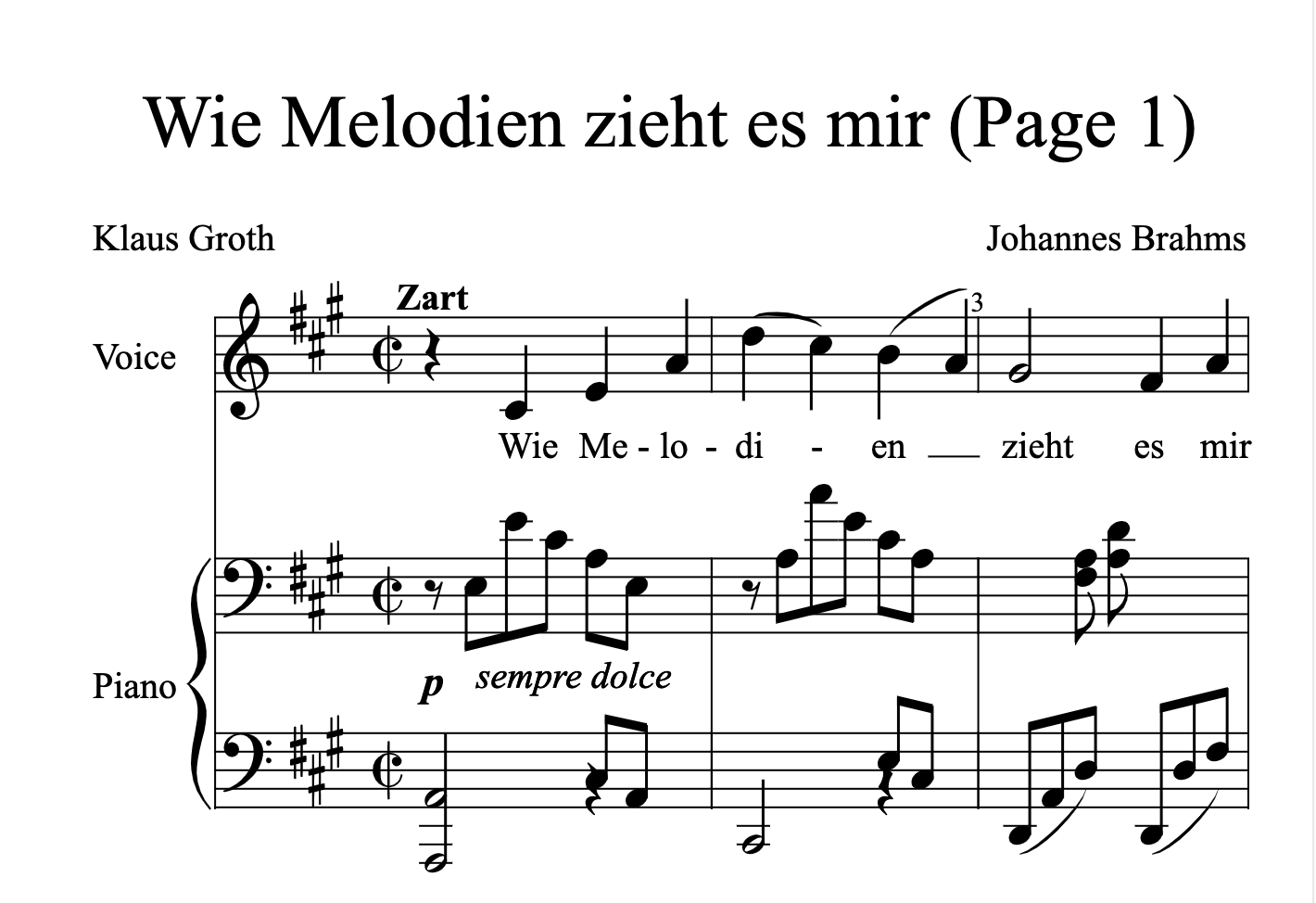
在更新组件之前,我们需要将重命名为
my-element.tssheet-music.ts打开文件并更新为以下内容:
sheet-music.tsimport { html, css, LitElement } from "lit";
import { customElement, property, query } from "lit/decorators.js";
import { IOSMDOptions, OpenSheetMusicDisplay } from "opensheetmusicdisplay";
type BackendType = "svg" | "canvas";
type DrawingType = "compact" | "default";
@customElement("sheet-music")
export class SheetMusic extends LitElement {
_zoom = 1.0;
@property({ type: Boolean }) allowDrop = false;
@property() src = "";
@query("main") canvas!: HTMLElement;
controller?: OpenSheetMusicDisplay;
options: IOSMDOptions = {
autoResize: true,
backend: "canvas" as BackendType,
drawingParameters: "default" as DrawingType,
};
static styles = css`
main {
overflow-x: auto;
}
`;
render() {
return html`<main></main>`;
}
async renderMusic(content: string) {
if (!this.controller) return;
await this.controller.load(content);
this.controller.zoom = this._zoom;
this.controller.render();
this.requestUpdate();
}
private async getMusic(): Promise<string> {
// 优先检查是否设置了src属性
if (this.src.length > 0) return fetch(this.src).then((res) => res.text());
// 检查是否存在slot子元素并返回XML内容
const elem = this.parentElement?.querySelector(
'script[type="text/xml"]'
) as HTMLScriptElement;
if (elem) return elem.innerHTML;
// 如果都没有找到则返回空字符串
return "";
}
async firstUpdated() {
this.controller = new OpenSheetMusicDisplay(this.canvas, this.options);
this.requestUpdate();
// 检查是否有乐谱数据并进行渲染
const music = await this.getMusic();
if (music.length > 0) this.renderMusic(music);
}
}
declare global {
interface HTMLElementTagNameMap {
"sheet-music": SheetMusic;
}
}运行,如果一切顺利,你将看到如下效果:
npm run dev