how-to-build-a-graph-database-with-flutter
Compare original and translation side by side
🇺🇸
Original
English🇨🇳
Translation
ChineseHow to build a graph database with Flutter
如何使用Flutter构建图数据库
In this article I will go over how to create and use a graph database with Flutter.
Prerequisites
前提条件
Overview
概述
First of all, why do we need a graph database when other storage options exist?
Why not use key value stores, document stores, or relational databases?
Well, the answer is that it depends on the problem you are trying to solve.
Graph databases are great for modeling relationships between data.
A couple examples:
- A social network app can model the relationships between users and posts
- A game can model the relationships between players and items
- A blog can model the relationships between posts and comments
The possibilities are endless.
Instead of storing data in a table for each collection we store the data as a graph in a nodes and edges table with some additional extensions in SQLite to make it easier.
Here is a page that goes in to detail about it and showcases what we are trying to build.
首先,既然有其他存储选项,我们为什么还需要图数据库呢?
为什么不使用键值存储、文档存储或关系型数据库?
答案取决于你要解决的问题。
图数据库非常适合建模数据之间的关系。
几个例子:
- 社交网络应用可以建模用户与帖子之间的关系
- 游戏可以建模玩家与物品之间的关系
- 博客可以建模帖子与评论之间的关系
可能性是无穷的。
我们不是为每个集合都在表中存储数据,而是将数据以图的形式存储在节点和边的表中,并在SQLite中添加一些扩展以简化操作。
这里有一个页面详细介绍了相关内容,也展示了我们要构建的目标。
Getting Started
开始入门
First we need to create a new Flutter project.
mkdir flutter_graph_database
cd flutter_graph_database
flutter create .
After the project is created open it in your favorite code editor.
code .首先我们需要创建一个新的Flutter项目。
mkdir flutter_graph_database
cd flutter_graph_database
flutter create .
创建项目后,在你喜欢的代码编辑器中打开它。
code .Creating the Database
创建数据库
We are going to use the drift package to create the database.
Update the pubspec.yaml file with the following:
name: flutter_graph_database
description: A new Flutter package project.
version: 0.0.1
publish_to: none

environment:
  sdk: ">=2.19.0-238.0.dev <3.0.0"
  flutter: ">=1.17.0"

dependencies:
  flutter:
    sdk: flutter
  drift: ^2.1.0
  sqlite3_flutter_libs: ^0.5.5
  http: ^0.13.5
  path_provider: ^2.0.0
  path: ^1.8.2
  sqlite3: ^1.7.0

dev_dependencies:
  flutter_test:
    sdk: flutter
  flutter_lints: ^2.0.0
  build_runner: ^2.2.0
  drift_dev: ^2.1.0

flutter:我们将使用drift包来创建数据库。
更新pubspec.yaml文件如下:
name: flutter_graph_database
description: A new Flutter package project.
version: 0.0.1
publish_to: none

environment:
  sdk: ">=2.19.0-238.0.dev <3.0.0"
  flutter: ">=1.17.0"

dependencies:
  flutter:
    sdk: flutter
  drift: ^2.1.0
  sqlite3_flutter_libs: ^0.5.5
  http: ^0.13.5
  path_provider: ^2.0.0
  path: ^1.8.2
  sqlite3: ^1.7.0

dev_dependencies:
  flutter_test:
    sdk: flutter
  flutter_lints: ^2.0.0
  build_runner: ^2.2.0
  drift_dev: ^2.1.0

flutter:
Database Connection
数据库连接
Next we need to create the database.
Create a new file at lib/database/connection/unsupported.dart and update it with the following:
import 'package:drift/drift.dart';
import 'package:drift/native.dart';

DatabaseConnection connect(
  String dbName, {
  bool useWebWorker = false,
  bool logStatements = false,
}) {
  return DatabaseConnection(NativeDatabase.memory(
    logStatements: logStatements,
  ));
}
Create a new file at lib/database/connection/native.dart and update it with the following:
import 'dart:io';
import 'dart:isolate';

import 'package:drift/drift.dart';
import 'package:drift/isolate.dart';
import 'package:drift/native.dart';
import 'package:path_provider/path_provider.dart';
import 'package:path/path.dart' as p;

DatabaseConnection connect(
  String dbName, {
  bool useWebWorker = false,
  bool logStatements = false,
}) {
  return DatabaseConnection.delayed(Future.sync(() async {
    final appDir = await getApplicationDocumentsDirectory();
    final dbPath = p.join(appDir.path, dbName);

    final receiveDriftIsolate = ReceivePort();
    await Isolate.spawn(_entrypointForDriftIsolate,
        _IsolateStartRequest(receiveDriftIsolate.sendPort, dbPath));

    final driftIsolate = await receiveDriftIsolate.first as DriftIsolate;
    return driftIsolate.connect();
  }));
}

class _IsolateStartRequest {
  final SendPort talkToMain;
  final String databasePath;

  _IsolateStartRequest(this.talkToMain, this.databasePath);
}

void _entrypointForDriftIsolate(_IsolateStartRequest request) {
  final databaseImpl = NativeDatabase(
    File(request.databasePath),
    logStatements: false,
  );

  final driftServer = DriftIsolate.inCurrent(
    () => DatabaseConnection(databaseImpl),
  );

  request.talkToMain.send(driftServer);
}
Create a new file at lib/database/connection/web.dart and update it with the following:
import 'dart:async';

// ignore: avoid_web_libraries_in_flutter
import 'dart:html';

import 'package:drift/drift.dart';
import 'package:drift/remote.dart';
import 'package:drift/web.dart';
import 'package:drift/wasm.dart';
import 'package:http/http.dart' as http;
import 'package:sqlite3/wasm.dart';

DatabaseConnection connect(
  String dbName, {
  bool useWebWorker = false,
  bool logStatements = false,
}) {
  if (useWebWorker) {
    final worker = SharedWorker('shared_worker.dart.js');
    return remote(worker.port!.channel());
  } else {
    return DatabaseConnection.delayed(Future.sync(() async {
      final response = await http.get(Uri.parse('sqlite3.wasm'));
      final fs = await IndexedDbFileSystem.open(dbName: '/db/');
      final path = '/drift/db/$dbName';
      final sqlite3 = await WasmSqlite3.load(
        response.bodyBytes,
        SqliteEnvironment(fileSystem: fs),
      );
      final databaseImpl = WasmDatabase(
        sqlite3: sqlite3,
        path: path,
        fileSystem: fs, // <- this is required but not documented
        logStatements: logStatements,
      );
      return DatabaseConnection(databaseImpl);
    }));
  }
}
Create a new file at lib/database/connection/connection.dart and update it with the following:
export 'unsupported.dart'
    if (dart.library.js) 'web.dart'
    if (dart.library.ffi) 'native.dart';
接下来我们需要创建数据库。
在lib/database/connection/unsupported.dart路径下创建一个新文件,并更新内容如下:
import 'package:drift/drift.dart';
import 'package:drift/native.dart';

DatabaseConnection connect(
  String dbName, {
  bool useWebWorker = false,
  bool logStatements = false,
}) {
  return DatabaseConnection(NativeDatabase.memory(
    logStatements: logStatements,
  ));
}在lib/database/connection/native.dart路径下创建一个新文件,并更新内容如下:
import 'dart:io';
import 'dart:isolate';

import 'package:drift/drift.dart';
import 'package:drift/isolate.dart';
import 'package:drift/native.dart';
import 'package:path_provider/path_provider.dart';
import 'package:path/path.dart' as p;

DatabaseConnection connect(
  String dbName, {
  bool useWebWorker = false,
  bool logStatements = false,
}) {
  return DatabaseConnection.delayed(Future.sync(() async {
    final appDir = await getApplicationDocumentsDirectory();
    final dbPath = p.join(appDir.path, dbName);

    final receiveDriftIsolate = ReceivePort();
    await Isolate.spawn(_entrypointForDriftIsolate,
        _IsolateStartRequest(receiveDriftIsolate.sendPort, dbPath));

    final driftIsolate = await receiveDriftIsolate.first as DriftIsolate;
    return driftIsolate.connect();
  }));
}

class _IsolateStartRequest {
  final SendPort talkToMain;
  final String databasePath;

  _IsolateStartRequest(this.talkToMain, this.databasePath);
}

void _entrypointForDriftIsolate(_IsolateStartRequest request) {
  final databaseImpl = NativeDatabase(
    File(request.databasePath),
    logStatements: false,
  );

  final driftServer = DriftIsolate.inCurrent(
    () => DatabaseConnection(databaseImpl),
  );

  request.talkToMain.send(driftServer);
}在lib/database/connection/web.dart路径下创建一个新文件,并更新内容如下:
import 'dart:async';

// ignore: avoid_web_libraries_in_flutter
import 'dart:html';

import 'package:drift/drift.dart';
import 'package:drift/remote.dart';
import 'package:drift/web.dart';
import 'package:drift/wasm.dart';
import 'package:http/http.dart' as http;
import 'package:sqlite3/wasm.dart';

DatabaseConnection connect(
  String dbName, {
  bool useWebWorker = false,
  bool logStatements = false,
}) {
  if (useWebWorker) {
    final worker = SharedWorker('shared_worker.dart.js');
    return remote(worker.port!.channel());
  } else {
    return DatabaseConnection.delayed(Future.sync(() async {
      final response = await http.get(Uri.parse('sqlite3.wasm'));
      final fs = await IndexedDbFileSystem.open(dbName: '/db/');
      final path = '/drift/db/$dbName';
      final sqlite3 = await WasmSqlite3.load(
        response.bodyBytes,
        SqliteEnvironment(fileSystem: fs),
      );
      final databaseImpl = WasmDatabase(
        sqlite3: sqlite3,
        path: path,
        fileSystem: fs, // <- this is required but not documented
        logStatements: logStatements,
      );
      return DatabaseConnection(databaseImpl);
    }));
  }
}在lib/database/connection/connection.dart路径下创建一个新文件,并更新内容如下:
export 'unsupported.dart'
    if (dart.library.js) 'web.dart'
    if (dart.library.ffi) 'native.dart';
Database SQL Files
数据库SQL文件
Schema
模式
Create a new file at lib/database/sql/schema.drift and update it with the following:
CREATE TABLE IF NOT EXISTS nodes (
    body TEXT,
    id   TEXT GENERATED ALWAYS AS (json_extract(body, '$.id')) VIRTUAL NOT NULL UNIQUE
);

CREATE INDEX IF NOT EXISTS id_idx ON nodes(id);

CREATE TABLE IF NOT EXISTS edges (
    source     TEXT,
    target     TEXT,
    properties TEXT,
    UNIQUE(source, target, properties) ON CONFLICT REPLACE,
    FOREIGN KEY(source) REFERENCES nodes(id),
    FOREIGN KEY(target) REFERENCES nodes(id)
);

CREATE INDEX IF NOT EXISTS source_idx ON edges(source);
CREATE INDEX IF NOT EXISTS target_idx ON edges(target);
The ID column is a virtual column that is generated from the body column. This is done so that we can query the database by ID without having to parse the JSON body column.
在lib/database/sql/schema.drift路径下创建一个新文件,并更新内容如下:
CREATE TABLE IF NOT EXISTS nodes (
    body TEXT,
    id   TEXT GENERATED ALWAYS AS (json_extract(body, '$.id')) VIRTUAL NOT NULL UNIQUE
);

CREATE INDEX IF NOT EXISTS id_idx ON nodes(id);

CREATE TABLE IF NOT EXISTS edges (
    source     TEXT,
    target     TEXT,
    properties TEXT,
    UNIQUE(source, target, properties) ON CONFLICT REPLACE,
    FOREIGN KEY(source) REFERENCES nodes(id),
    FOREIGN KEY(target) REFERENCES nodes(id)
);

CREATE INDEX IF NOT EXISTS source_idx ON edges(source);
CREATE INDEX IF NOT EXISTS target_idx ON edges(target);
ID列是从body列生成的虚拟列。这样我们就可以通过ID查询数据库,而无需解析JSON格式的body列。
Queries
查询
Create a new file at lib/database/sql/queries.drift and update it with the following:
import 'schema.drift';

getAllNodes:
    SELECT * FROM nodes;
getAllEdges:
SELECT * FROM edges;在lib/database/sql/queries.drift路径下创建一个新文件,并更新内容如下:
import 'schema.drift';

getAllNodes:
    SELECT * FROM nodes;
getAllEdges:
    SELECT * FROM edges;
Delete Edge
删除边
Create a new file at lib/database/sql/delete-edge.drift and update it with the following:
import 'schema.drift';

deleteEdge:
    DELETE FROM edges
WHERE source = ? OR target = ?;在lib/database/sql/delete-edge.drift路径下创建一个新文件,并更新内容如下:
import 'schema.drift';

deleteEdge:
    DELETE FROM edges
    WHERE source = ? OR target = ?;
Delete Node
删除节点
Create a new file at lib/database/sql/delete-node.drift and update it with the following:
import 'schema.drift';

deleteNode:
    DELETE FROM nodes
WHERE id = ?;在lib/database/sql/delete-node.drift路径下创建一个新文件,并更新内容如下:
import 'schema.drift';

deleteNode:
    DELETE FROM nodes
    WHERE id = ?;
Insert Edge
插入边
Create a new file at lib/database/sql/insert-edge.drift and update it with the following:
import 'schema.drift';

insertEdge(:source as TEXT, :target as TEXT, :body as TEXT):
INSERT INTO edges VALUES(:source, :target, json(:body));在lib/database/sql/insert-edge.drift路径下创建一个新文件,并更新内容如下:
import 'schema.drift';

insertEdge(:source as TEXT, :target as TEXT, :body as TEXT):
    INSERT INTO edges VALUES(:source, :target, json(:body));
Search Edges Inbound
搜索入边
Create a new file at lib/database/sql/search-edges-inbound.drift and update it with the following:
import 'schema.drift';

searchEdgesInbound:
    SELECT * FROM edges
WHERE source = ?;在lib/database/sql/search-edges-inbound.drift路径下创建一个新文件,并更新内容如下:
import 'schema.drift';

searchEdgesInbound:
    SELECT * FROM edges
    WHERE source = ?;
Search Edges Outbound
搜索出边
Create a new file at lib/database/sql/search-edges-outbound.drift and update it with the following:
import 'schema.drift';

searchEdgesOutbound:
    SELECT * FROM edges
WHERE target = ?;在lib/database/sql/search-edges-outbound.drift路径下创建一个新文件,并更新内容如下:
import 'schema.drift';

searchEdgesOutbound:
    SELECT * FROM edges
    WHERE target = ?;
Search Edges
搜索边
Create a new file at lib/database/sql/search-edges.drift and update it with the following:
import 'schema.drift';

searchEdges:
    SELECT * FROM edges WHERE source = ?
    UNION
SELECT * FROM edges WHERE target = ?;在lib/database/sql/search-edges.drift路径下创建一个新文件,并更新内容如下:
import 'schema.drift';

searchEdges:
    SELECT * FROM edges WHERE source = ?
    UNION
    SELECT * FROM edges WHERE target = ?;
Search Node By ID
通过ID搜索节点
Create a new file at lib/database/sql/search-node-by-id.drift and update it with the following:
import 'schema.drift';

searchNodeById:
    SELECT body FROM nodes
WHERE id = ?;在lib/database/sql/search-node-by-id.drift路径下创建一个新文件,并更新内容如下:
import 'schema.drift';

searchNodeById:
    SELECT body FROM nodes
    WHERE id = ?;
Search Node
搜索节点
Create a new file at lib/database/sql/search-node.drift and update it with the following:
import 'schema.drift';

-- Create a text index of entries, see https://www.sqlite.org/fts5.html#external_content_tables
CREATE VIRTUAL TABLE node_entries USING fts5 (
    body,
    content=nodes,
    content_rowid=id
);

-- Triggers to keep entries and fts5 index in sync.
CREATE TRIGGER nodes_insert AFTER INSERT ON nodes BEGIN
  INSERT INTO node_entries(rowid, body) VALUES (new.id, new.body);
END;

CREATE TRIGGER nodes_delete AFTER DELETE ON nodes BEGIN
  INSERT INTO node_entries(node_entries, rowid, body) VALUES ('delete', old.id, old.body);
END;

CREATE TRIGGER nodes_update AFTER UPDATE ON nodes BEGIN
  INSERT INTO node_entries(node_entries, rowid, body) VALUES ('delete', new.id, new.body);
  INSERT INTO node_entries(rowid, body) VALUES (new.id, new.body);
END;

-- Full text search query.
searchNode: SELECT r.** FROM node_entries
    INNER JOIN nodes r ON r.id = node_entries.rowid
    WHERE node_entries MATCH :query
    ORDER BY rank;
Here we are using the fts5 extension to create a full text search index. This is a very powerful feature that allows us to search for nodes by their body text.
在lib/database/sql/search-node.drift路径下创建一个新文件,并更新内容如下:
import 'schema.drift';

-- Create a text index of entries, see https://www.sqlite.org/fts5.html#external_content_tables
CREATE VIRTUAL TABLE node_entries USING fts5 (
    body,
    content=nodes,
    content_rowid=id
);

-- Triggers to keep entries and fts5 index in sync.
CREATE TRIGGER nodes_insert AFTER INSERT ON nodes BEGIN
  INSERT INTO node_entries(rowid, body) VALUES (new.id, new.body);
END;

CREATE TRIGGER nodes_delete AFTER DELETE ON nodes BEGIN
  INSERT INTO node_entries(node_entries, rowid, body) VALUES ('delete', old.id, old.body);
END;

CREATE TRIGGER nodes_update AFTER UPDATE ON nodes BEGIN
  INSERT INTO node_entries(node_entries, rowid, body) VALUES ('delete', new.id, new.body);
  INSERT INTO node_entries(rowid, body) VALUES (new.id, new.body);
END;

-- Full text search query.
searchNode: SELECT r.** FROM node_entries
    INNER JOIN nodes r ON r.id = node_entries.rowid
    WHERE node_entries MATCH :query
ORDER BY rank;这里我们使用fts5扩展创建全文搜索索引。这是一个非常强大的功能,允许我们通过节点的body文本进行搜索。
Traverse Inbound
入边遍历
Create a new file at lib/database/sql/traverse-inbound.drift and update it with the following:
import 'schema.drift';

traverseInbound(:source AS TEXT):
  WITH RECURSIVE traverse(id) AS (
  SELECT :source
  UNION
  SELECT source FROM edges JOIN traverse ON target = id
) SELECT id FROM traverse;在lib/database/sql/traverse-inbound.drift路径下创建一个新文件,并更新内容如下:
import 'schema.drift';

traverseInbound(:source AS TEXT):
  WITH RECURSIVE traverse(id) AS (
  SELECT :source
  UNION
  SELECT source FROM edges JOIN traverse ON target = id
) SELECT id FROM traverse;
Traverse Outbound
出边遍历
Create a new file at lib/database/sql/traverse-outbound.drift and update it with the following:
import 'schema.drift';

traverseOutbound(:source AS TEXT):
  WITH RECURSIVE traverse(id) AS (
  SELECT :source
  UNION
  SELECT target FROM edges JOIN traverse ON source = id
) SELECT id FROM traverse;在lib/database/sql/traverse-outbound.drift路径下创建一个新文件,并更新内容如下:
import 'schema.drift';

traverseOutbound(:source AS TEXT):
  WITH RECURSIVE traverse(id) AS (
  SELECT :source
  UNION
  SELECT target FROM edges JOIN traverse ON source = id
) SELECT id FROM traverse;
Traverse Bodies Inbound
带内容的入边遍历
Create a new file at lib/database/sql/traverse-with-bodies-inbound.drift and update it with the following:
import 'schema.drift';

traverseWithBodiesInbound(:source AS TEXT):
  WITH RECURSIVE traverse(x, y, obj) AS (
  SELECT :source, '()', '{}'
  UNION
  SELECT id, '()', body FROM nodes JOIN traverse ON id = x
  UNION
  SELECT source, '<-', properties FROM edges JOIN traverse ON target = x
) SELECT x, y, obj FROM traverse;在lib/database/sql/traverse-with-bodies-inbound.drift路径下创建一个新文件,并更新内容如下:
import 'schema.drift';

traverseWithBodiesInbound(:source AS TEXT):
  WITH RECURSIVE traverse(x, y, obj) AS (
  SELECT :source, '()', '{}'
  UNION
  SELECT id, '()', body FROM nodes JOIN traverse ON id = x
  UNION
  SELECT source, '<-', properties FROM edges JOIN traverse ON target = x
) SELECT x, y, obj FROM traverse;
Traverse Bodies Outbound
带内容的出边遍历
Create a new file at lib/database/sql/traverse-with-bodies-outbound.drift and update it with the following:
import 'schema.drift';

traverseWithBodiesOutbound(:source AS TEXT):
  WITH RECURSIVE traverse(x, y, obj) AS (
  SELECT :source, '()', '{}'
  UNION
  SELECT id, '()', body FROM nodes JOIN traverse ON id = x
  UNION
  SELECT target, '->', properties FROM edges JOIN traverse ON source = x
) SELECT x, y, obj FROM traverse;在lib/database/sql/traverse-with-bodies-outbound.drift路径下创建一个新文件,并更新内容如下:
import 'schema.drift';

traverseWithBodiesOutbound(:source AS TEXT):
  WITH RECURSIVE traverse(x, y, obj) AS (
  SELECT :source, '()', '{}'
  UNION
  SELECT id, '()', body FROM nodes JOIN traverse ON id = x
  UNION
  SELECT target, '->', properties FROM edges JOIN traverse ON source = x
) SELECT x, y, obj FROM traverse;
Traverse Bodies
带内容的遍历
Create a new file at lib/database/sql/traverse-bodies.drift and update it with the following:
import 'schema.drift';

traverseWithBodies(:source AS TEXT):
  WITH RECURSIVE traverse(x, y, obj) AS (
  SELECT :source, '()', '{}'
  UNION
  SELECT id, '()', body FROM nodes JOIN traverse ON id = x
  UNION
  SELECT source, '<-', properties FROM edges JOIN traverse ON target = x
  UNION
  SELECT target, '->', properties FROM edges JOIN traverse ON source = x
) SELECT x, y, obj FROM traverse;在lib/database/sql/traverse-bodies.drift路径下创建一个新文件,并更新内容如下:
import 'schema.drift';

traverseWithBodies(:source AS TEXT):
  WITH RECURSIVE traverse(x, y, obj) AS (
  SELECT :source, '()', '{}'
  UNION
  SELECT id, '()', body FROM nodes JOIN traverse ON id = x
  UNION
  SELECT source, '<-', properties FROM edges JOIN traverse ON target = x
  UNION
  SELECT target, '->', properties FROM edges JOIN traverse ON source = x
) SELECT x, y, obj FROM traverse;
Traverse
遍历
Create a new file at lib/database/sql/traverse.drift and update it with the following:
import 'schema.drift';

traverse(:source AS TEXT):
  WITH RECURSIVE traverse(id) AS (
  SELECT :source
  UNION
  SELECT source FROM edges JOIN traverse ON target = id
  UNION
  SELECT target FROM edges JOIN traverse ON source = id
) SELECT id FROM traverse;在lib/database/sql/traverse.drift路径下创建一个新文件,并更新内容如下:
import 'schema.drift';

traverse(:source AS TEXT):
  WITH RECURSIVE traverse(id) AS (
  SELECT :source
  UNION
  SELECT source FROM edges JOIN traverse ON target = id
  UNION
  SELECT target FROM edges JOIN traverse ON source = id
) SELECT id FROM traverse;
Update Node
更新节点
Create a new file at lib/database/sql/update-node.drift and update it with the following:
import 'schema.drift';

updateNode:
    UPDATE nodes SET body = json(?)
WHERE id = ?;在lib/database/sql/update-node.drift路径下创建一个新文件,并更新内容如下:
import 'schema.drift';

updateNode:
    UPDATE nodes SET body = json(?)
    WHERE id = ?;
Database Setup
数据库设置
Create a new file at lib/database/database.dart and update it with the following:
import 'dart:convert';

import 'package:drift/drift.dart';
import 'package:flutter/foundation.dart';

import 'connection/connection.dart' as impl;

part 'database.g.dart';

@DriftDatabase(include: {
  'sql/schema.drift',
  'sql/queries.drift',
  'sql/delete-edge.drift',
  'sql/delete-node.drift',
  'sql/insert-edge.drift',
  'sql/insert-node.drift',
  'sql/search-edges-inbound.drift',
  'sql/search-edges-outbound.drift',
  'sql/search-edges.drift',
  'sql/search-node-by-id.drift',
  'sql/search-node.drift',
  'sql/traverse-inbound.drift',
  'sql/traverse-outbound.drift',
  'sql/traverse-with-bodies-inbound.drift',
  'sql/traverse-with-bodies-outbound.drift',
  'sql/traverse-with-bodies.drift',
  'sql/traverse.drift',
  'sql/update-node.drift',
})
class GraphDatabase extends _$GraphDatabase {
  GraphDatabase({
    String dbName = 'graph_db.db',
    DatabaseConnection? connection,
    bool useWebWorker = false,
    bool logStatements = false,
  }) : super.connect(
          connection ??
              impl.connect(
                dbName,
                useWebWorker: useWebWorker,
                logStatements: logStatements,
              ),
        );

  @override
  int get schemaVersion => 1;

  /// Helper method to add graph data from json
  Future<void> addGraphData(
    Map<String, dynamic> data, {
    bool shouldBatch = false,
  }) {
    return transaction(() async {
      try {
        final localNodes = data['nodes'] as List<dynamic>;
        final localEdges = data['edges'] as List<dynamic>;
        // Update nodes
        for (final node in localNodes) {
          final id = node['id'] as String?;
          if (id != null) {
            final current = await searchNodeById(id).getSingleOrNull();
            final body = jsonEncode(node);
            if (current != null) {
              await updateNode(id, body);
            } else {
              await insertNode(body);
            }
          }
        }
        // Update edges
        for (final edge in localEdges) {
          final source = edge['from'] ?? edge['source'] as String?;
          final target = edge['to'] ?? edge['target'] as String?;
          if (source != null && target != null) {
            final body = jsonEncode(edge);
            await insertEdge(source, target, body);
          }
        }
      } catch (e) {
        debugPrint('Error adding graph data: $e');
      }
    });
  }

  Future<void> deleteAll() {
    return transaction(() async {
      try {
        await deleteAllEdges();
        await deleteAllNodes();
      } catch (e) {
        debugPrint('Error clearing graph data: $e');
      }
    });
  }

  Future<void> deleteAllEdges() {
    return transaction(() async {
      final edges = await getAllEdges().get();
      for (final edge in edges) {
        await deleteEdge(edge.source, edge.target);
      }
    });
  }

  Future<void> deleteAllNodes() {
    return transaction(() async {
      final nodes = await getAllNodes().get();
      for (final node in nodes) {
        await deleteNode(node.id);
      }
    });
  }
}
Create a new file at build.yaml and update it with the following:
targets:
  $default:
    sources:
      - lib/**
      - web/**
      - "tool/**"
      - pubspec.yaml
      - lib/$lib$
      - $package$
    builders:
      drift_dev:
        options:
          sql:
            dialect: sqlite
            options:
              version: "3.38"
              modules:
                - json1
                - fts5
          generate_connect_constructor: true
          apply_converters_on_variables: true
          generate_values_in_copy_with: true
          scoped_dart_components: true
Now run the following command to generate the database files:
flutter pub run build_runner build --delete-conflicting-outputs在lib/database/database.dart路径下创建一个新文件,并更新内容如下:
import 'dart:convert';

import 'package:drift/drift.dart';
import 'package:flutter/foundation.dart';

import 'connection/connection.dart' as impl;

part 'database.g.dart';

@DriftDatabase(include: {
  'sql/schema.drift',
  'sql/queries.drift',
  'sql/delete-edge.drift',
  'sql/delete-node.drift',
  'sql/insert-edge.drift',
  'sql/insert-node.drift',
  'sql/search-edges-inbound.drift',
  'sql/search-edges-outbound.drift',
  'sql/search-edges.drift',
  'sql/search-node-by-id.drift',
  'sql/search-node.drift',
  'sql/traverse-inbound.drift',
  'sql/traverse-outbound.drift',
  'sql/traverse-with-bodies-inbound.drift',
  'sql/traverse-with-bodies-outbound.drift',
  'sql/traverse-with-bodies.drift',
  'sql/traverse.drift',
  'sql/update-node.drift',
})
class GraphDatabase extends _$GraphDatabase {
  GraphDatabase({
    String dbName = 'graph_db.db',
    DatabaseConnection? connection,
    bool useWebWorker = false,
    bool logStatements = false,
  }) : super.connect(
          connection ??
              impl.connect(
                dbName,
                useWebWorker: useWebWorker,
                logStatements: logStatements,
              ),
        );

  @override
  int get schemaVersion => 1;

  /// Helper method to add graph data from json
  Future<void> addGraphData(
    Map<String, dynamic> data, {
    bool shouldBatch = false,
  }) {
    return transaction(() async {
      try {
        final localNodes = data['nodes'] as List<dynamic>;
        final localEdges = data['edges'] as List<dynamic>;
        // Update nodes
        for (final node in localNodes) {
          final id = node['id'] as String?;
          if (id != null) {
            final current = await searchNodeById(id).getSingleOrNull();
            final body = jsonEncode(node);
            if (current != null) {
              await updateNode(id, body);
            } else {
              await insertNode(body);
            }
          }
        }
        // Update edges
        for (final edge in localEdges) {
          final source = edge['from'] ?? edge['source'] as String?;
          final target = edge['to'] ?? edge['target'] as String?;
          if (source != null && target != null) {
            final body = jsonEncode(edge);
            await insertEdge(source, target, body);
          }
        }
      } catch (e) {
        debugPrint('Error adding graph data: $e');
      }
    });
  }

  Future<void> deleteAll() {
    return transaction(() async {
      try {
        await deleteAllEdges();
        await deleteAllNodes();
      } catch (e) {
        debugPrint('Error clearing graph data: $e');
      }
    });
  }

  Future<void> deleteAllEdges() {
    return transaction(() async {
      final edges = await getAllEdges().get();
      for (final edge in edges) {
        await deleteEdge(edge.source, edge.target);
      }
    });
  }

  Future<void> deleteAllNodes() {
    return transaction(() async {
      final nodes = await getAllNodes().get();
      for (final node in nodes) {
        await deleteNode(node.id);
      }
    });
  }
}在build.yaml路径下创建一个新文件,并更新内容如下:
targets:
  $default:
    sources:
      - lib/**
      - web/**
      - "tool/**"
      - pubspec.yaml
      - lib/$lib$
      - $package$
    builders:
      drift_dev:
        options:
          sql:
            dialect: sqlite
            options:
              version: "3.38"
              modules:
                - json1
                - fts5
          generate_connect_constructor: true
          apply_converters_on_variables: true
          generate_values_in_copy_with: true
          scoped_dart_components: true
现在运行以下命令生成数据库文件:
flutter pub run build_runner build --delete-conflicting-outputsConnecting to the Database
连接到数据库
Add a new dependency to your pubspec.yaml file:
flutter pub add graphviewThis will be used for the graph visualization.
Create a new file at lib/main.dart and update it with the following:
import 'dart:convert';

import 'package:flutter/material.dart';
import 'package:flutter_graph_database/flutter_graph_database.dart' as db;
import 'package:graphview/GraphView.dart';

void main() {
  runApp(const MyApp());
}

class MyApp extends StatelessWidget {
  const MyApp({super.key});

  @override
  Widget build(BuildContext context) {
    return MaterialApp(
      title: 'Flutter Graph Database',
      debugShowCheckedModeBanner: false,
      theme: ThemeData.dark(),
      home: const Example(),
    );
  }
}

class Example extends StatefulWidget {
  const Example({Key? key}) : super(key: key);

  @override
  State<Example> createState() => _ExampleState();
}

class _ExampleState extends State<Example> {
  final database = db.GraphDatabase();
  Graph graph = Graph();
  Algorithm builder = FruchtermanReingoldAlgorithm();

  final nodes = <String, db.Node>{};
  bool loaded = false;

  @override
  void initState() {
    super.initState();
    WidgetsBinding.instance.addPostFrameCallback((_) => loadData());
  }

  @override
  void reassemble() {
    super.reassemble();
    // Needed to reset graph on hot reload
    loadData();
  }

  void setLoadedState(bool value) {
    if (mounted) {
      setState(() {
        loaded = value;
      });
    }
  }

  Future<void> addDummyData() async {
    // Load example data
    try {
      // Optionally reset data
      await database.deleteAll();
      // Add example data to database
      await database.addGraphData({
        "nodes": [
          {"id": '1', "label": 'circle'},
          {"id": '2', "label": 'ellipse'},
          {"id": '3', "label": 'database'},
          {"id": '4', "label": 'box'},
          {"id": '5', "label": 'diamond'},
          {"id": '6', "label": 'dot'},
          {"id": '7', "label": 'square'},
          {"id": '8', "label": 'triangle'},
          {"id": '9', "label": "star"},
        ],
        "edges": [
          {"from": '1', "to": '2'},
          {"from": '2', "to": '3'},
          {"from": '2', "to": '4'},
          {"from": '2', "to": '5'},
          {"from": '5', "to": '6'},
          {"from": '5', "to": '7'},
          {"from": '6', "to": '8'},
          {"from": '2', "to": '8'},
          {"from": '1', "to": '8'},
          {"from": '1', "to": '7'},
          {"from": '1', "to": '6'},
          {"from": '1', "to": '5'},
          {"from": '1', "to": '4'},
          {"from": '1', "to": '3'},
          {"from": '1', "to": '9'},
          {"from": '9', "to": '8'},
          {"from": '9', "to": '5'},
          {"from": '9', "to": '3'},
        ]
      });
      loadData();
    } catch (e) {
      debugPrint('Error loading example data: $e');
    }
  }

  Future<void> loadData() async {
    setLoadedState(false);

    final nodeMap = <String, Node>{};
    this.nodes.clear();
    graph = Graph();
    builder = FruchtermanReingoldAlgorithm();

    // Load graph data
    final nodes = await database.getAllNodes().get();
    final edges = await database.getAllEdges().get();

    for (final node in nodes) {
      final newNode = Node.Id(node.id);
      nodeMap[node.id] = newNode;
      this.nodes[node.id] = node;
      graph.addNode(newNode);
    }
    for (final edge in edges) {
      final source = nodeMap[edge.source];
      final target = nodeMap[edge.target];
      if (source != null && target != null) {
        graph.addEdge(source, target);
      }
    }

    setLoadedState(true);
  }

  Widget buildNode(Node node) {
    final dbNode = nodes[node.key!.value];
    final data = jsonDecode(dbNode?.body ?? '{}') as Map<String, dynamic>;
    final label = data['label'] ?? '';
    return SizedBox(
      width: 80,
      height: 80,
      child: Center(
        child: Text(
          label,
          textAlign: TextAlign.center,
        ),
      ),
    );
  }

  @override
  Widget build(BuildContext context) {
    return Scaffold(
      appBar: AppBar(
        title: const Text('Flutter Graph Database'),
        actions: [
          IconButton(
            icon: const Icon(Icons.restore),
            onPressed: addDummyData,
          ),
        ],
      ),
      body: !loaded
          ? const Center(child: CircularProgressIndicator())
          : nodes.isEmpty
              ? const Center(child: Text('No Data Loaded'))
              : LayoutBuilder(builder: (context, dimens) {
                  return SizedBox.expand(
                    child: InteractiveViewer(
                      constrained: false,
                      boundaryMargin: EdgeInsets.symmetric(
                        horizontal: dimens.maxWidth * 0.75,
                        vertical: dimens.maxHeight * 0.75,
                      ),
                      minScale: 0.01,
                      maxScale: 5.6,
                      child: GraphView(
                        key: UniqueKey(),
                        graph: graph,
                        algorithm: builder,
                        paint: Paint()
                          ..color = Colors.green
                          ..strokeWidth = 1
                          ..style = PaintingStyle.stroke,
                        builder: buildNode,
                      ),
                    ),
                  );
                }),
    );
  }
}
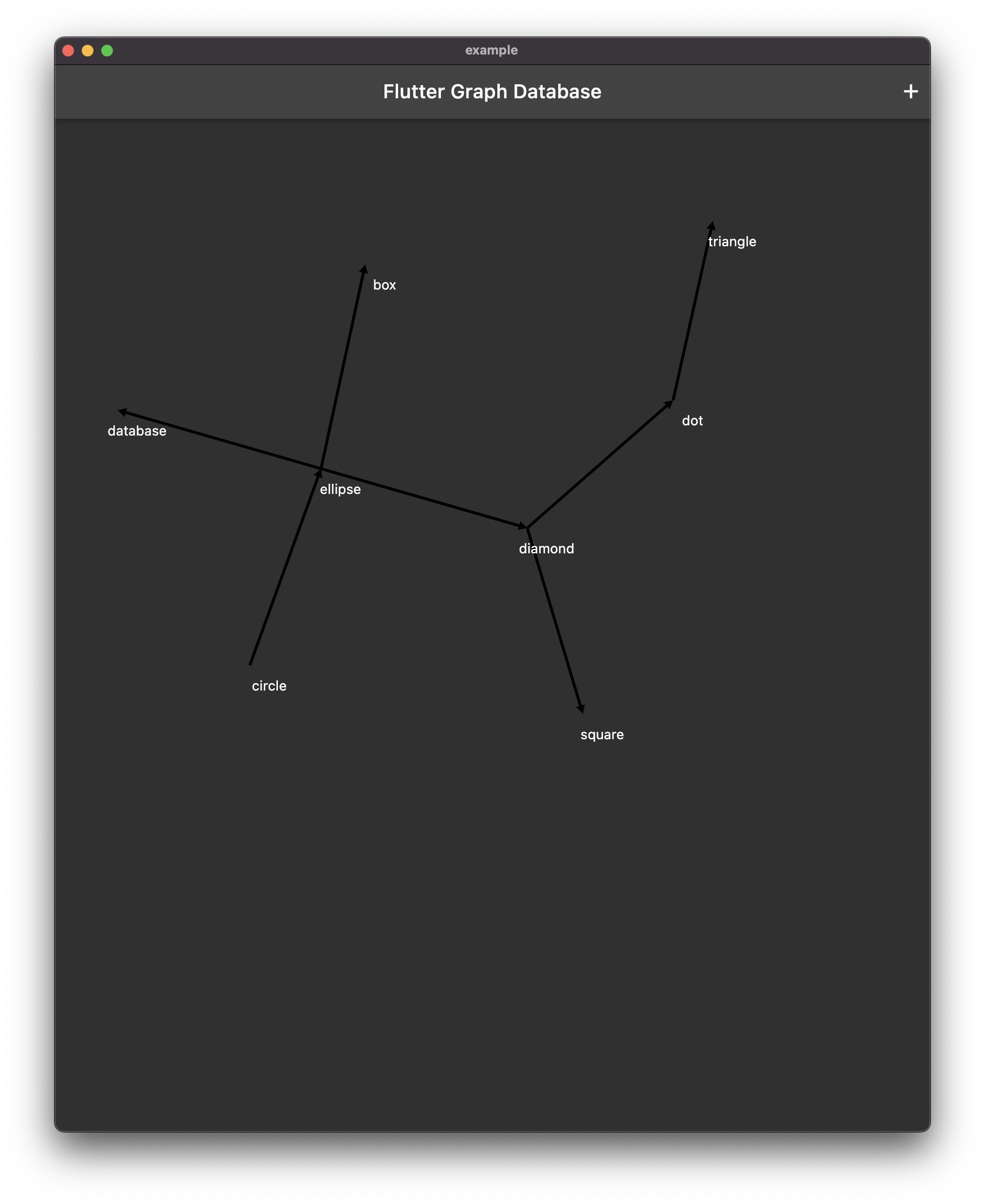
When you run the flutter app you should see the following:
在你的pubspec.yaml文件中添加一个新的依赖:
flutter pub add graphview这将用于图的可视化。在lib/main.dart路径下创建一个新文件,并更新内容如下:
import 'dart:convert';

import 'package:flutter/material.dart';
import 'package:flutter_graph_database/flutter_graph_database.dart' as db;
import 'package:graphview/GraphView.dart';

void main() {
  runApp(const MyApp());
}

class MyApp extends StatelessWidget {
  const MyApp({super.key});

  @override
  Widget build(BuildContext context) {
    return MaterialApp(
      title: 'Flutter Graph Database',
      debugShowCheckedModeBanner: false,
      theme: ThemeData.dark(),
      home: const Example(),
    );
  }
}

class Example extends StatefulWidget {
  const Example({Key? key}) : super(key: key);

  @override
  State<Example> createState() => _ExampleState();
}

class _ExampleState extends State<Example> {
  final database = db.GraphDatabase();
  Graph graph = Graph();
  Algorithm builder = FruchtermanReingoldAlgorithm();

  final nodes = <String, db.Node>{};
  bool loaded = false;

  @override
  void initState() {
    super.initState();
    WidgetsBinding.instance.addPostFrameCallback((_) => loadData());
  }

  @override
  void reassemble() {
    super.reassemble();
    // Needed to reset graph on hot reload
    loadData();
  }

  void setLoadedState(bool value) {
    if (mounted) {
      setState(() {
        loaded = value;
      });
    }
  }

  Future<void> addDummyData() async {
    // Load example data
    try {
      // Optionally reset data
      await database.deleteAll();
      // Add example data to database
      await database.addGraphData({
        "nodes": [
          {"id": '1', "label": 'circle'},
          {"id": '2', "label": 'ellipse'},
          {"id": '3', "label": 'database'},
          {"id": '4', "label": 'box'},
          {"id": '5', "label": 'diamond'},
          {"id": '6', "label": 'dot'},
          {"id": '7', "label": 'square'},
          {"id": '8', "label": 'triangle'},
          {"id": '9', "label": "star"},
        ],
        "edges": [
          {"from": '1', "to": '2'},
          {"from": '2', "to": '3'},
          {"from": '2', "to": '4'},
          {"from": '2', "to": '5'},
          {"from": '5', "to": '6'},
          {"from": '5', "to": '7'},
          {"from": '6', "to": '8'},
          {"from": '2', "to": '8'},
          {"from": '1', "to": '8'},
          {"from": '1', "to": '7'},
          {"from": '1', "to": '6'},
          {"from": '1', "to": '5'},
          {"from": '1', "to": '4'},
          {"from": '1', "to": '3'},
          {"from": '1', "to": '9'},
          {"from": '9', "to": '8'},
          {"from": '9', "to": '5'},
          {"from": '9', "to": '3'},
        ]
      });
      loadData();
    } catch (e) {
      debugPrint('Error loading example data: $e');
    }
  }

  Future<void> loadData() async {
    setLoadedState(false);

    final nodeMap = <String, Node>{};
    this.nodes.clear();
    graph = Graph();
    builder = FruchtermanReingoldAlgorithm();

    // Load graph data
    final nodes = await database.getAllNodes().get();
    final edges = await database.getAllEdges().get();

    for (final node in nodes) {
      final newNode = Node.Id(node.id);
      nodeMap[node.id] = newNode;
      this.nodes[node.id] = node;
      graph.addNode(newNode);
    }
    for (final edge in edges) {
      final source = nodeMap[edge.source];
      final target = nodeMap[edge.target];
      if (source != null && target != null) {
        graph.addEdge(source, target);
      }
    }

    setLoadedState(true);
  }

  Widget buildNode(Node node) {
    final dbNode = nodes[node.key!.value];
    final data = jsonDecode(dbNode?.body ?? '{}') as Map<String, dynamic>;
    final label = data['label'] ?? '';
    return SizedBox(
      width: 80,
      height: 80,
      child: Center(
        child: Text(
          label,
          textAlign: TextAlign.center,
        ),
      ),
    );
  }

  @override
  Widget build(BuildContext context) {
    return Scaffold(
      appBar: AppBar(
        title: const Text('Flutter Graph Database'),
        actions: [
          IconButton(
            icon: const Icon(Icons.restore),
            onPressed: addDummyData,
          ),
        ],
      ),
      body: !loaded
          ? const Center(child: CircularProgressIndicator())
          : nodes.isEmpty
              ? const Center(child: Text('No Data Loaded'))
              : LayoutBuilder(builder: (context, dimens) {
                  return SizedBox.expand(
                    child: InteractiveViewer(
                      constrained: false,
                      boundaryMargin: EdgeInsets.symmetric(
                        horizontal: dimens.maxWidth * 0.75,
                        vertical: dimens.maxHeight * 0.75,
                      ),
                      minScale: 0.01,
                      maxScale: 5.6,
                      child: GraphView(
                        key: UniqueKey(),
                        graph: graph,
                        algorithm: builder,
                        paint: Paint()
                          ..color = Colors.green
                          ..strokeWidth = 1
                          ..style = PaintingStyle.stroke,
                        builder: buildNode,
                      ),
                    ),
                  );
                }),
    );
  }
}
当你运行Flutter应用时,你应该会看到以下界面:
Conclusion
总结
If you want to learn more about building a graph database in Flutter, check out the source code.
如果你想了解更多关于在Flutter中构建图数据库的内容,请查看源码。