dynamic-themes-with-codemirror
Compare original and translation side by side
🇺🇸
Original
English🇨🇳
Translation
ChineseDynamic Themes with CodeMirror
基于CodeMirror的动态主题
In this article I will go over how to set up a Lit web component and use it to create a a code window that uses CodeMirror and apply a dynamic theme with Material Design.
Prerequisites
环境要求
- Vscode
- Node >= 16
- Typescript
- Vscode
- Node >= 16
- Typescript
Getting Started
开始上手
We can start off by navigating in terminal to the location of the project and run the following:
npm init @vitejs/app --template lit-tsThen enter a project name and now open the project in vscode and install the dependencies:
codemirror-dynamic-themecd codemirror-dynamic-theme
npm i lit codemirror @material/material-color-utilities
npm i -D @types/node @types/codemirror
code .Update the with the following:
vite.config.tsimport { defineConfig } from "vite";
import { resolve } from "path";
export default defineConfig({
base: "/codemirror-dynamic-theme/",
build: {
rollupOptions: {
input: {
main: resolve(__dirname, "index.html"),
},
},
},
});首先在终端导航到项目目录,执行以下命令:
npm init @vitejs/app --template lit-ts然后输入项目名称,打开项目并安装依赖:
codemirror-dynamic-themecd codemirror-dynamic-theme
npm i lit codemirror @material/material-color-utilities
npm i -D @types/node @types/codemirror
code .更新文件如下:
vite.config.tsimport { defineConfig } from "vite";
import { resolve } from "path";
export default defineConfig({
base: "/codemirror-dynamic-theme/",
build: {
rollupOptions: {
input: {
main: resolve(__dirname, "index.html"),
},
},
},
});Template
模板文件
Open up the and update it with the following:
index.html<!DOCTYPE html>
<html lang="en">
<head>
<meta charset="UTF-8" />
<link rel="icon" type="image/svg+xml" href="/src/favicon.svg" />
<meta name="viewport" content="width=device-width, initial-scale=1.0" />
<title>CodeMirror Dynamic Theme</title>
<script type="module" src="/src/code-window.ts"></script>
<style>
body {
margin: 0;
padding: 0;
}
</style>
</head>
<body>
<code-window> </code-window>
</body>
</html>打开并更新为以下内容:
index.html<!DOCTYPE html>
<html lang="en">
<head>
<meta charset="UTF-8" />
<link rel="icon" type="image/svg+xml" href="/src/favicon.svg" />
<meta name="viewport" content="width=device-width, initial-scale=1.0" />
<title>CodeMirror Dynamic Theme</title>
<script type="module" src="/src/code-window.ts"></script>
<style>
body {
margin: 0;
padding: 0;
}
</style>
</head>
<body>
<code-window> </code-window>
</body>
</html>Web Component
Web组件开发
Before we update our component we need to rename to
my-element.tscode-window.tsOpen up and update it with the following:
code-window.tsimport { html, css, LitElement, unsafeCSS } from "lit";
import { customElement, property } from "lit/decorators.js";
import {
applyTheme,
argbFromHex,
hexFromArgb,
themeFromSourceColor,
} from "@material/material-color-utilities";
import CodeMirror from "codemirror";
import codemirrorStyles from "codemirror/lib/codemirror.css";
@customElement("code-window")
export class CodeWindow extends LitElement {
static styles = css`
${unsafeCSS(codemirrorStyles)}
main {
width: 100vw;
height: 100vh;
background-color: var(--md-sys-color-background);
color: var(--md-sys-color-on-background);
--header-height: 48px;
--input-size: 32px;
}
.toolbar {
height: var(--header-height);
background-color: var(--md-sys-color-primary-container);
color: var(--md-sys-color-on-primary-container);
display: flex;
align-items: center;
}
.actions > * {
margin-left: 4px;
margin-right: 4px;
}
.toolbar .title {
font-family: sans-serif;
font-size: 18px;
padding-left: 4px;
}
.toolbar .actions {
display: flex;
align-items: center;
}
.toolbar a {
padding: 0;
margin: 0;
padding-left: 8px;
padding-right: 8px;
display: flex;
align-items: center;
cursor: pointer;
}
input[type="color"] {
width: calc(var(--input-size) * 2);
height: var(--input-size);
outline: none;
border: none;
border-radius: 50%;
background-color: var(--md-sys-color-primary-container);
}
input[type="color"]::-webkit-color-swatch-wrapper {
padding: 0;
}
input[type="color"]::-webkit-color-swatch {
border: none;
border-radius: var(--input-size);
border: var(--md-sys-color-outline) solid 1px;
}
button {
border: none;
border-radius: 4px;
padding: 8px;
}
.tertiary {
background-color: var(--md-sys-color-tertiary);
color: var(--md-sys-color-on-tertiary);
}
.secondary {
background-color: var(--md-sys-color-secondary);
color: var(--md-sys-color-on-secondary);
}
.spacer {
flex: 1;
}
.editor {
height: calc(100% - var(--header-height));
width: 100%;
}
`;
@property() value = [
`import {html, css, LitElement} from 'lit';`,
`import {customElement, property} from 'lit/decorators.js';`,
``,
`@customElement('simple-greeting')`,
`export class SimpleGreeting extends LitElement {`,
` static styles = css\`p { color: blue }\`;`,
``,
` @property()`,
` name = 'Somebody';`,
``,
` render() {`,
` return html\`<p>Hello, \${this.name}!</p>\`;`,
` }`,
`}`,
].join("\n");
@property() color = "#6750A4";
@property({ type: Boolean }) dark = window.matchMedia(
"(prefers-color-scheme: dark)"
).matches;
render() {
return html`<main>
<header class="toolbar">
<div class="title">${document.title}</div>
<div class="spacer"></div>
<div class="actions">
<button class="secondary" @click=${this.toggleDark.bind(this)}>
${this.dark ? "Light" : "Dark"}
</button>
<button class="tertiary" @click=${this.randomColor.bind(this)}>
Random
</button>
<input
type="color"
.value=${this.color}
@input=${this.onColor.bind(this)}
/>
</div>
</header>
<div class="editor"></div>
</main>`;
}
firstUpdated() {
const root = this.shadowRoot!.querySelector(".editor") as HTMLElement;
const editor = CodeMirror(root, {
value: this.value,
mode: "javascript",
lineNumbers: true,
lineWrapping: true,
indentUnit: 4,
tabSize: 4,
indentWithTabs: true,
autofocus: true,
});
console.debug(editor);
editor.setSize("100%", `100%`);
this.updateTheme();
window
.matchMedia("(prefers-color-scheme: dark)")
.addEventListener("change", (e) => {
this.dark = e.matches;
this.updateTheme();
});
}
private updateTheme() {
// TODO: Generate Theme
}
private setColor(val: string) {
this.color = val;
this.updateTheme();
}
private onColor(e: Event) {
const target = e.target as HTMLInputElement;
this.setColor(target.value);
}
private randomColor() {
const letters = "0123456789ABCDEF";
let color = "#";
for (let i = 0; i < 6; i++) {
color += letters[Math.floor(Math.random() * 16)];
}
this.setColor(color);
}
private toggleDark() {
this.dark = !this.dark;
this.updateTheme();
}
}
declare global {
interface HTMLElementTagNameMap {
"code-window": CodeWindow;
}
}Here we are setting up some of the editor basics to load in the styles needed for the basic layout.
There are also few methods that handle updating of properties on the element such as and . When you run the application you should see the following:
toggleDarksetColor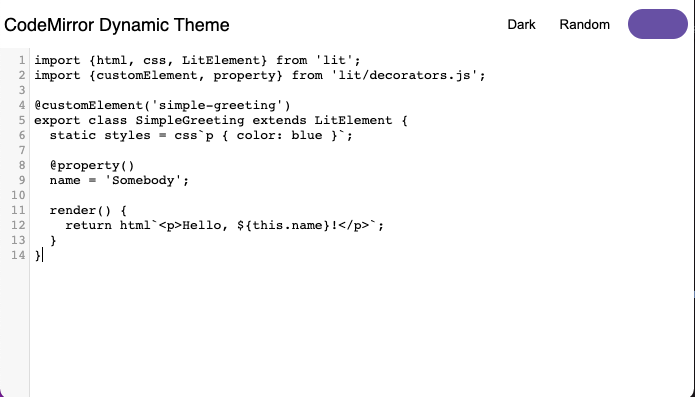
It doesn't look great yet, but now we can add a CodeMirror theme to import. Create a file and update it with the following:
src/theme.tsimport { css } from "lit";
export const codeMirrorTheme = css`
.CodeMirror {
background-color: var(--md-sys-color-background);
color: var(--md-sys-color-on-background);
}
.CodeMirror-gutters {
background: var(--md-sys-color-surface-variant);
color: var(--md-sys-color-on-surface-variant);
border: none;
}
.CodeMirror-guttermarker,
.CodeMirror-guttermarker-subtle,
.CodeMirror-linenumber {
color: var(--md-sys-color-on-background);
}
.CodeMirror-cursor {
border-left: 1px solid var(--md-sys-color-primary);
}
.cm-fat-cursor .CodeMirror-cursor {
background-color: var(--md-sys-color-background);
}
.cm-animate-fat-cursor {
background-color: var(--md-sys-color-background);
}
div.CodeMirror-selected {
background: var(--md-sys-color-surface-variant);
}
.CodeMirror-focused div.CodeMirror-selected {
background: var(--md-sys-color-surface-variant);
}
.CodeMirror-line::selection,
.CodeMirror-line > span::selection,
.CodeMirror-line > span > span::selection {
background: var(--md-sys-color-surface-variant);
}
.CodeMirror-line::-moz-selection,
.CodeMirror-line > span::-moz-selection,
.CodeMirror-line > span > span::-moz-selection {
background: var(--md-sys-color-surface-variant);
}
.CodeMirror-activeline-background {
background: var(--md-sys-color-surface);
}
.cm-keyword {
color: var(--md-custom-color-keyword) !important;
}
.cm-operator {
color: var(--md-custom-color-operator) !important;
}
.cm-variable-2 {
color: var(--md-custom-color-variable-2) !important;
}
.cm-variable-3,
.cm-type {
color: var(--md-custom-color-variable-3) !important;
}
.cm-builtin {
color: var(--md-custom-color-builtin) !important;
}
.cm-atom {
color: var(--md-custom-color-atom) !important;
}
.cm-number {
color: var(--md-custom-color-number) !important;
}
.cm-def {
color: var(--md-custom-color-def) !important;
}
.cm-string {
color: var(--md-custom-color-string) !important;
}
.cm-string-2 {
color: var(--md-custom-color-string-2) !important;
}
.cm-comment {
color: var(--md-custom-color-comment) !important;
}
.cm-variable {
color: var(--md-custom-color-variable) !important;
}
.cm-tag {
color: var(--md-custom-color-tag) !important;
}
.cm-meta {
color: var(--md-custom-color-meta) !important;
}
.cm-attribute {
color: var(--md-custom-color-attribute) !important;
}
.cm-property {
color: var(--md-custom-color-property) !important;
}
.cm-qualifier {
color: var(--md-custom-color-qualifier) !important;
}
.cm-variable-3,
.cm-type {
color: var(--md-custom-color-variable-3) !important;
}
.cm-error {
color: var(--md-sys-color-on-error);
background-color: var(--md-sys-color-error);
}
.CodeMirror-matchingbracket {
text-decoration: underline;
color: var(--md-sys-color-on-surface);
}
`;Here we are defining all the styles as CSS Custom Properties so we can easily update them.
Now import the theme and apply the styles in the component:
import { codeMirrorTheme } from "./theme";

@customElement("code-window")
export class CodeWindow extends LitElement {
  static styles = css`
    ${unsafeCSS(codemirrorStyles)}
    ${codeMirrorTheme}
    ...
Now we need to implement the method in our element:
updateThemeupdateTheme() {
const source = this.color;
const dark = this.dark;
const target = this.shadowRoot!.querySelector("main") as HTMLElement;
const properties = [
`--md-custom-color-keyword: #c75779;`,
`--md-custom-color-operator: #008800;`,
`--md-custom-color-variable: #90ccff;`,
`--md-custom-color-variable-2: #dd7700;`,
`--md-custom-color-variable-3: #3333bb;`,
`--md-custom-color-variable-3: #decb6b;`,
`--md-custom-color-builtin: #003388;`,
`--md-custom-color-atom: #bb4646;`,
`--md-custom-color-number: #b4c5ff;`,
`--md-custom-color-def: #82aaff;`,
`--md-custom-color-string: #ffb4a9;`,
`--md-custom-color-string-2: #ffb4a9;`,
`--md-custom-color-comment: #888888;`,
`--md-custom-color-tag: #000080;`,
`--md-custom-color-meta: #a9c7ff;`,
`--md-custom-color-attribute: #008080;`,
`--md-custom-color-property: #336699;`,
`--md-custom-color-qualifier: #690;`,
];
const customColors = properties.map((property) => {
const [key, value] = property.split(":");
const name = key.trim().replace(/^--md-custom-color-/, "");
const color = argbFromHex(value.trim().replace(";", ""));
return {
name,
value: color,
blend: true,
};
});
const theme = themeFromSourceColor(argbFromHex(source), customColors);
applyTheme(theme, { target, dark });
for (const custom of theme.customColors) {
const name = custom.color.name;
const section = dark ? custom.dark : custom.light;
target.style.setProperty(
`--md-custom-color-${name}`,
hexFromArgb(section.color)
);
}
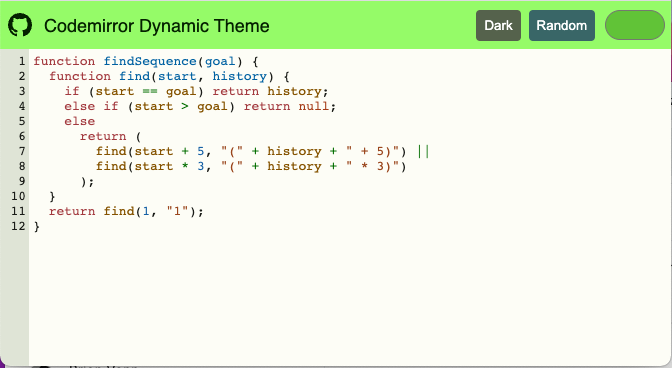
}Here we are using the Material Color Utilities package and generating a theme from a source color. We can take advantage of Custom Colors to blend the values to the theme.
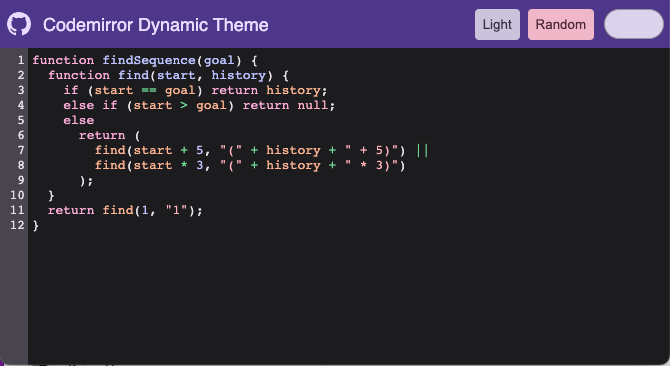
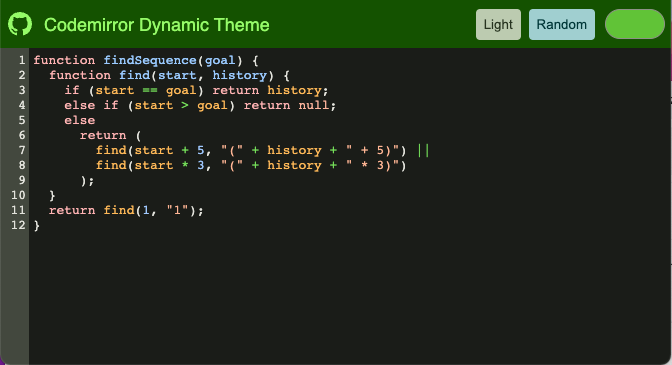
After the theme is generated we can apply them to the root element and have the custom properties update the editor.

Changing the source color can update the theme:
Changing the brightness can set the colors as well:
在更新组件前,先将重命名为
my-element.tscode-window.ts打开并更新为以下内容:
code-window.tsimport { html, css, LitElement, unsafeCSS } from "lit";
import { customElement, property } from "lit/decorators.js";
import {
applyTheme,
argbFromHex,
hexFromArgb,
themeFromSourceColor,
} from "@material/material-color-utilities";
import CodeMirror from "codemirror";
import codemirrorStyles from "codemirror/lib/codemirror.css";
@customElement("code-window")
export class CodeWindow extends LitElement {
static styles = css`
${unsafeCSS(codemirrorStyles)}
main {
width: 100vw;
height: 100vh;
background-color: var(--md-sys-color-background);
color: var(--md-sys-color-on-background);
--header-height: 48px;
--input-size: 32px;
}
.toolbar {
height: var(--header-height);
background-color: var(--md-sys-color-primary-container);
color: var(--md-sys-color-on-primary-container);
display: flex;
align-items: center;
}
.actions > * {
margin-left: 4px;
margin-right: 4px;
}
.toolbar .title {
font-family: sans-serif;
font-size: 18px;
padding-left: 4px;
}
.toolbar .actions {
display: flex;
align-items: center;
}
.toolbar a {
padding: 0;
margin: 0;
padding-left: 8px;
padding-right: 8px;
display: flex;
align-items: center;
cursor: pointer;
}
input[type="color"] {
width: calc(var(--input-size) * 2);
height: var(--input-size);
outline: none;
border: none;
border-radius: 50%;
background-color: var(--md-sys-color-primary-container);
}
input[type="color"]::-webkit-color-swatch-wrapper {
padding: 0;
}
input[type="color"]::-webkit-color-swatch {
border: none;
border-radius: var(--input-size);
border: var(--md-sys-color-outline) solid 1px;
}
button {
border: none;
border-radius: 4px;
padding: 8px;
}
.tertiary {
background-color: var(--md-sys-color-tertiary);
color: var(--md-sys-color-on-tertiary);
}
.secondary {
background-color: var(--md-sys-color-secondary);
color: var(--md-sys-color-on-secondary);
}
.spacer {
flex: 1;
}
.editor {
height: calc(100% - var(--header-height));
width: 100%;
}
`;
@property() value = [
`import {html, css, LitElement} from 'lit';`,
`import {customElement, property} from 'lit/decorators.js';`,
``,
`@customElement('simple-greeting')`,
`export class SimpleGreeting extends LitElement {`,
` static styles = css\`p { color: blue }\`;`,
``,
` @property()`,
` name = 'Somebody';`,
``,
` render() {`,
` return html\`<p>Hello, \${this.name}!</p>\`;`,
` }`,
`}`,
].join("\n");
@property() color = "#6750A4";
@property({ type: Boolean }) dark = window.matchMedia(
"(prefers-color-scheme: dark)"
).matches;
render() {
return html`<main>
<header class="toolbar">
<div class="title">${document.title}</div>
<div class="spacer"></div>
<div class="actions">
<button class="secondary" @click=${this.toggleDark.bind(this)}>
${this.dark ? "Light" : "Dark"}
</button>
<button class="tertiary" @click=${this.randomColor.bind(this)}>
Random
</button>
<input
type="color"
.value=${this.color}
@input=${this.onColor.bind(this)}
/>
</div>
</header>
<div class="editor"></div>
</main>`;
}
firstUpdated() {
const root = this.shadowRoot!.querySelector(".editor") as HTMLElement;
const editor = CodeMirror(root, {
value: this.value,
mode: "javascript",
lineNumbers: true,
lineWrapping: true,
indentUnit: 4,
tabSize: 4,
indentWithTabs: true,
autofocus: true,
});
console.debug(editor);
editor.setSize("100%", `100%`);
this.updateTheme();
window
.matchMedia("(prefers-color-scheme: dark)")
.addEventListener("change", (e) => {
this.dark = e.matches;
this.updateTheme();
});
}
private updateTheme() {
// TODO: Generate Theme
}
private setColor(val: string) {
this.color = val;
this.updateTheme();
}
private onColor(e: Event) {
const target = e.target as HTMLInputElement;
this.setColor(target.value);
}
private randomColor() {
const letters = "0123456789ABCDEF";
let color = "#";
for (let i = 0; i < 6; i++) {
color += letters[Math.floor(Math.random() * 16)];
}
this.setColor(color);
}
private toggleDark() {
this.dark = !this.dark;
this.updateTheme();
}
}
declare global {
interface HTMLElementTagNameMap {
"code-window": CodeWindow;
}
}这里我们配置了编辑器的基础样式,搭建了基本布局。
同时添加了几个用于更新组件属性的方法,比如和。运行应用后,你会看到如下界面:
toggleDarksetColor目前界面还不够完善,接下来我们添加一个CodeMirror主题文件。创建并更新为以下内容:
src/theme.tsimport { css } from "lit";
export const codeMirrorTheme = css`
.CodeMirror {
background-color: var(--md-sys-color-background);
color: var(--md-sys-color-on-background);
}
.CodeMirror-gutters {
background: var(--md-sys-color-surface-variant);
color: var(--md-sys-color-on-surface-variant);
border: none;
}
.CodeMirror-guttermarker,
.CodeMirror-guttermarker-subtle,
.CodeMirror-linenumber {
color: var(--md-sys-color-on-background);
}
.CodeMirror-cursor {
border-left: 1px solid var(--md-sys-color-primary);
}
.cm-fat-cursor .CodeMirror-cursor {
background-color: var(--md-sys-color-background);
}
.cm-animate-fat-cursor {
background-color: var(--md-sys-color-background);
}
div.CodeMirror-selected {
background: var(--md-sys-color-surface-variant);
}
.CodeMirror-focused div.CodeMirror-selected {
background: var(--md-sys-color-surface-variant);
}
.CodeMirror-line::selection,
.CodeMirror-line > span::selection,
.CodeMirror-line > span > span::selection {
background: var(--md-sys-color-surface-variant);
}
.CodeMirror-line::-moz-selection,
.CodeMirror-line > span::-moz-selection,
.CodeMirror-line > span > span::-moz-selection {
background: var(--md-sys-color-surface-variant);
}
.CodeMirror-activeline-background {
background: var(--md-sys-color-surface);
}
.cm-keyword {
color: var(--md-custom-color-keyword) !important;
}
.cm-operator {
color: var(--md-custom-color-operator) !important;
}
.cm-variable-2 {
color: var(--md-custom-color-variable-2) !important;
}
.cm-variable-3,
.cm-type {
color: var(--md-custom-color-variable-3) !important;
}
.cm-builtin {
color: var(--md-custom-color-builtin) !important;
}
.cm-atom {
color: var(--md-custom-color-atom) !important;
}
.cm-number {
color: var(--md-custom-color-number) !important;
}
.cm-def {
color: var(--md-custom-color-def) !important;
}
.cm-string {
color: var(--md-custom-color-string) !important;
}
.cm-string-2 {
color: var(--md-custom-color-string-2) !important;
}
.cm-comment {
color: var(--md-custom-color-comment) !important;
}
.cm-variable {
color: var(--md-custom-color-variable) !important;
}
.cm-tag {
color: var(--md-custom-color-tag) !important;
}
.cm-meta {
color: var(--md-custom-color-meta) !important;
}
.cm-attribute {
color: var(--md-custom-color-attribute) !important;
}
.cm-property {
color: var(--md-custom-color-property) !important;
}
.cm-qualifier {
color: var(--md-custom-color-qualifier) !important;
}
.cm-variable-3,
.cm-type {
color: var(--md-custom-color-variable-3) !important;
}
.cm-error {
color: var(--md-sys-color-on-error);
background-color: var(--md-sys-color-error);
}
.CodeMirror-matchingbracket {
text-decoration: underline;
color: var(--md-sys-color-on-surface);
}
`;这里我们将所有样式定义为CSS自定义属性,以便后续轻松更新。
现在在组件中导入主题并应用样式:
import { codeMirrorTheme } from "./theme";

@customElement("code-window")
export class CodeWindow extends LitElement {
  static styles = css`
    ${unsafeCSS(codemirrorStyles)}
    ${codeMirrorTheme}
...接下来实现组件中的方法:
updateThemeupdateTheme() {
const source = this.color;
const dark = this.dark;
const target = this.shadowRoot!.querySelector("main") as HTMLElement;
const properties = [
`--md-custom-color-keyword: #c75779;`,
`--md-custom-color-operator: #008800;`,
`--md-custom-color-variable: #90ccff;`,
`--md-custom-color-variable-2: #dd7700;`,
`--md-custom-color-variable-3: #3333bb;`,
`--md-custom-color-variable-3: #decb6b;`,
`--md-custom-color-builtin: #003388;`,
`--md-custom-color-atom: #bb4646;`,
`--md-custom-color-number: #b4c5ff;`,
`--md-custom-color-def: #82aaff;`,
`--md-custom-color-string: #ffb4a9;`,
`--md-custom-color-string-2: #ffb4a9;`,
`--md-custom-color-comment: #888888;`,
`--md-custom-color-tag: #000080;`,
`--md-custom-color-meta: #a9c7ff;`,
`--md-custom-color-attribute: #008080;`,
`--md-custom-color-property: #336699;`,
`--md-custom-color-qualifier: #690;`,
];
const customColors = properties.map((property) => {
const [key, value] = property.split(":");
const name = key.trim().replace(/^--md-custom-color-/, "");
const color = argbFromHex(value.trim().replace(";", ""));
return {
name,
value: color,
blend: true,
};
});
const theme = themeFromSourceColor(argbFromHex(source), customColors);
applyTheme(theme, { target, dark });
for (const custom of theme.customColors) {
const name = custom.color.name;
const section = dark ? custom.dark : custom.light;
target.style.setProperty(
`--md-custom-color-${name}`,
hexFromArgb(section.color)
);
}
}这里我们使用Material Color Utilities包,通过源色生成主题。我们可以利用自定义颜色功能,将颜色值与主题融合。
主题生成后,将其应用到根元素,自定义属性会自动更新编辑器样式。
修改源色即可更新主题:
调整明暗模式也会同步更新颜色: