draggable-dom-with-lit
Compare original and translation side by side
🇺🇸
Original
English🇨🇳
Translation
ChineseDraggable DOM with Lit
基于Lit的可拖拽DOM
In this article I will go over how to set up a Lit web component and use it to create a interactive dom with CSS transforms and slots.
Prerequisites
前置要求
- Vscode
- Node >= 16
- Typescript
- Vscode
- Node >= 16
- Typescript
Getting Started
开始上手
We can start off by navigating in terminal to the location of the project and run the following:
npm init @vitejs/app --template lit-tsThen enter a project name and now open the project in vscode and install the dependencies:
lit-draggable-domcd lit-draggable-dom
npm i lit
npm i -D @types/node
code .Update the with the following:
vite.config.tsimport { defineConfig } from "vite";
import { resolve } from "path";
export default defineConfig({
base: "/lit-draggable-dom/",
build: {
rollupOptions: {
input: {
main: resolve(__dirname, "index.html"),
},
},
},
});我们可以先在终端导航到项目目录,然后运行以下命令:
npm init @vitejs/app --template lit-ts然后输入项目名称,现在在Vscode中打开项目并安装依赖:
lit-draggable-domcd lit-draggable-dom
npm i lit
npm i -D @types/node
code .更新为以下内容:
vite.config.tsimport { defineConfig } from "vite";
import { resolve } from "path";
export default defineConfig({
base: "/lit-draggable-dom/",
build: {
rollupOptions: {
input: {
main: resolve(__dirname, "index.html"),
},
},
},
});Template
模板
Open up the and update it with the following:
index.html<!DOCTYPE html>
<html lang="en">
<head>
<meta charset="UTF-8" />
<link rel="icon" type="image/svg+xml" href="/src/favicon.svg" />
<meta name="viewport" content="width=device-width, initial-scale=1.0" />
<title>Lit Draggable DOM</title>
<style>
body {
margin: 0;
padding: 0;
width: 100%;
height: 100vh;
}
</style>
<script type="module" src="/src/draggable-dom.ts"></script>
</head>
<body>
<draggable-dom>
<img
src="https://lit.dev/images/logo.svg"
alt="Lit Logo"
width="500"
height="333"
style="--dx: 59.4909px; --dy: 32.8429px"
/>
<svg width="400" height="110" style="--dx: 230.057px; --dy: 33.6257px">
<rect
width="400"
height="100"
style="fill: rgb(0, 0, 255); stroke-width: 3; stroke: rgb(0, 0, 0)"
/>
</svg>
<svg height="100" width="100">
<circle
cx="50"
cy="50"
r="40"
stroke="black"
stroke-width="3"
fill="red"
/>
</svg>
</draggable-dom>
</body>
</html>We are setting up the to have a few slots which can be any valid HTML or SVG Elements.
lit-elementIt is optional to set the css custom properties and as this is just the initial positions on the canvas.
--dx--dy打开并更新为以下内容:
index.html<!DOCTYPE html>
<html lang="en">
<head>
<meta charset="UTF-8" />
<link rel="icon" type="image/svg+xml" href="/src/favicon.svg" />
<meta name="viewport" content="width=device-width, initial-scale=1.0" />
<title>Lit Draggable DOM</title>
<style>
body {
margin: 0;
padding: 0;
width: 100%;
height: 100vh;
}
</style>
<script type="module" src="/src/draggable-dom.ts"></script>
</head>
<body>
<draggable-dom>
<img
src="https://lit.dev/images/logo.svg"
alt="Lit Logo"
width="500"
height="333"
style="--dx: 59.4909px; --dy: 32.8429px"
/>
<svg width="400" height="110" style="--dx: 230.057px; --dy: 33.6257px">
<rect
width="400"
height="100"
style="fill: rgb(0, 0, 255); stroke-width: 3; stroke: rgb(0, 0, 0)"
/>
</svg>
<svg height="100" width="100">
<circle
cx="50"
cy="50"
r="40"
stroke="black"
stroke-width="3"
fill="red"
/>
</svg>
</draggable-dom>
</body>
</html>我们正在设置使其包含几个插槽,这些插槽可以是任何有效的HTML或SVG元素。
lit-element可以选择设置CSS自定义属性和,这只是元素在画布上的初始位置。
--dx--dyWeb Component
Web组件
Before we update our component we need to rename to
my-element.tsdraggable-dom.tsOpen up and update it with the following:
draggable-dom.tsimport { html, css, LitElement } from "lit";
import { customElement, query } from "lit/decorators.js";
type DragType = "none" | "canvas" | "element";
type SupportedNode = HTMLElement | SVGElement;
@customElement("draggable-dom")
export class CSSCanvas extends LitElement {
@query("main") root!: HTMLElement;
@query("#children") container!: HTMLElement;
@query("canvas") canvas!: HTMLCanvasElement;
dragType: DragType = "none";
offset: Offset = { x: 0, y: 0 };
pointerMap: Map<number, PointerData> = new Map();
static styles = css`
:host {
--offset-x: 0;
--offset-y: 0;
--grid-background-color: white;
--grid-color: black;
--grid-size: 40px;
--grid-dot-size: 1px;
}
main {
overflow: hidden;
}
canvas {
background-size: var(--grid-size) var(--grid-size);
background-image: radial-gradient(
circle,
var(--grid-color) var(--grid-dot-size),
var(--grid-background-color) var(--grid-dot-size)
);
background-position: var(--offset-x) var(--offset-y);
z-index: 0;
}
.full-size {
width: 100%;
height: 100%;
position: fixed;
}
.child {
--dx: 0px;
--dy: 0px;
position: fixed;
flex-shrink: 1;
z-index: var(--layer, 0);
transform: translate(var(--dx), var(--dy));
}
@media (prefers-color-scheme: dark) {
main {
--grid-background-color: black;
--grid-color: grey;
}
}
`;
render() {
return html`
<main class="full-size">
<canvas class="full-size"></canvas>
<div id="children" class="full-size"></div>
</main>
`;
}
}
interface Offset {
x: number;
y: number;
}
interface PointerData {
id: number;
startPos: Offset;
currentPos: Offset;
}Here we are just setting up some boilerplate to render a element with a element as a background and the element to contain the canvas elements.
maincanvasdivWe are also making sure to clip and only render what is visible.
The and interfaces will be used for storing the location of each pointer interacting with the screen.
OffsetPointerDataWhen the user has dark mode enabled for the system it will change the colors of the canvas grid.
Now let's add the slot children to the canvas by adding the following to the class:
async firstUpdated() {
    const items = Array.from(this.childNodes);
    let i = 0;
    for (const node of items) {
        if (node instanceof SVGElement || node instanceof HTMLElement) {
            const child = node as SupportedNode;
            child.classList.add("child");
            child.style.setProperty("--layer", `${i}`);
            this.container.append(child);
            child.addEventListener("pointerdown", (e: any) => {
                // Pointer Down for Child
            });
            child.addEventListener("pointermove", (e: any) => {
                // Pointer Move for Child
            });
            i++;
        }
    }
    this.requestUpdate();
    this.root.addEventListener("pointerdown", (e: any) => {
        // Pointer Down for Canvas
    });
    this.root.addEventListener("pointermove", (e: any) => {
        // Pointer Move for Canvas
    });
    this.root.addEventListener("pointerup", (e: any) => {
        // Pointer Up for Canvas
    });
}
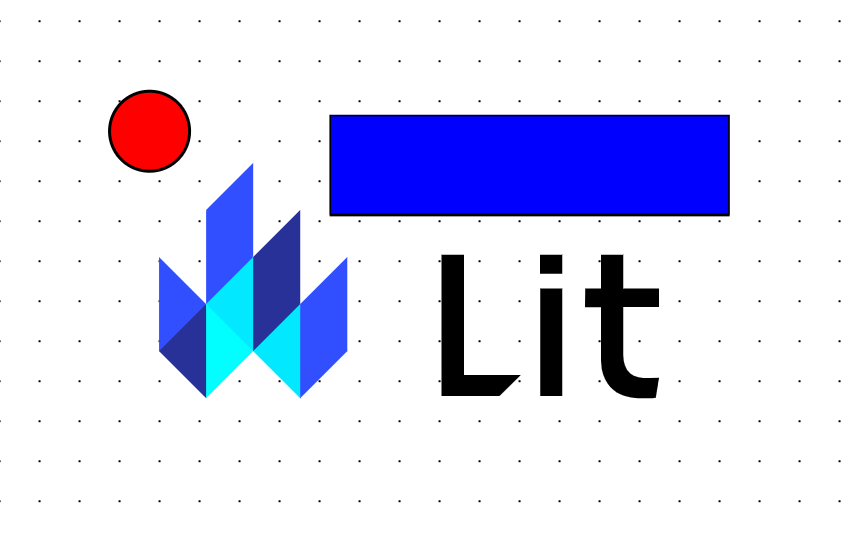
The order of the slots defines what renders on top of each other. For each item in the slot it sets and to the current index.
--layerz-indexCurrently nothing is happening when we interact with the elements but things should be rendering.
Now let's add the event handlers for the pointer events by appending the following to the class:
handleDown(event: PointerEvent, type: DragType) {
    if (this.dragType === "none") {
        event.preventDefault();
        this.dragType = type;
        (event.target as Element).setPointerCapture(event.pointerId);
        this.pointerMap.set(event.pointerId, {
            id: event.pointerId,
            startPos: { x: event.clientX, y: event.clientY },
            currentPos: { x: event.clientX, y: event.clientY },
        });
    }
}

handleMove(
    event: PointerEvent,
    type: DragType,
    onMove: (delta: Offset) => void
) {
    if (this.dragType === type) {
        event.preventDefault();
        const saved = this.pointerMap.get(event.pointerId)!;
        const current = { ...saved.currentPos };
        saved.currentPos = { x: event.clientX, y: event.clientY };
        const delta = {
            x: saved.currentPos.x - current.x,
            y: saved.currentPos.y - current.y,
        };
        onMove(delta);
    }
}

handleUp(event: PointerEvent) {
    this.dragType = "none";
    (event.target as Element).releasePointerCapture(event.pointerId);
}
For each event we want to check if the current event or so if we start moving an element it doesn't move the canvas and vice versa.
canvaselementWhen we have a pointer interact with the screen we will add it to the pointer map (since it can be multi touch) and start tracking the offset.
The delta is calculated to move the elements but a global offset is used for the canvas background.
We are setting the pointer capture events so if the mouse is not perfectly on the item it won't lose tracking.
Now let's add methods for moving the canvas and elements by appending the following to the class:
moveCanvas(delta: Offset) {
    this.offset.x += delta.x;
    this.offset.y += delta.y;
    this.root.style.setProperty("--offset-x", `${this.offset.x}px`);
    this.root.style.setProperty("--offset-y", `${this.offset.y}px`);
}

moveElement(child: SupportedNode, delta: Offset) {
    const getNumber = (key: "--dx" | "--dy", fallback: number) => {
      const saved = child.style.getPropertyValue(key);
      if (saved.length > 0) {
        return parseFloat(saved.replace("px", ""));
      }
      return fallback;
    };
    const dx = getNumber("--dx", 0) + delta.x;
    const dy = getNumber("--dy", 0) + delta.y;
    child.style.transform = `translate(${dx}px, ${dy}px)`;
    child.style.setProperty("--dx", `${dx}px`);
    child.style.setProperty("--dy", `${dy}px`);
}
For the canvas it will set a global offset for the CSS and update the saved offset.
background-positionFor the element we want to transform by the delta so the animation is smooth thanks to hardware acceleration. After the transform it will store the offset as CSS custom properties.
Now let's add the event handlers to the canvas and elements by adjusting the following:
async firstUpdated() {
    const items = Array.from(this.childNodes);
    let i = 0;
    for (const node of items) {
      if (node instanceof SVGElement || node instanceof HTMLElement) {
        const child = node as SupportedNode;
        child.classList.add("child");
        child.style.setProperty("--layer", `${i}`);
        this.container.append(child);
        child.addEventListener("pointerdown", (e: any) => {
          this.handleDown(e, "element");
        });
        child.addEventListener("pointermove", (e: any) => {
          this.handleMove(e, "element", (delta) => {
            this.moveElement(child, delta);
          });
        });
        i++;
      }
    }
    this.requestUpdate();
    this.root.addEventListener("pointerdown", (e: any) => {
      this.handleDown(e, "canvas");
    });
    this.root.addEventListener("pointermove", (e: any) => {
      this.handleMove(e, "canvas", (delta) => {
        this.moveCanvas(delta);
        for (const node of Array.from(this.container.children)) {
          if (node instanceof SVGElement || node instanceof HTMLElement) {
            this.moveElement(node, delta);
          }
        }
      });
    });
    this.root.addEventListener("pointerup", (e: any) => {
      this.handleUp(e);
    });
}
Everything should work as expected now and the final code should look like the following:
import { html, css, LitElement } from "lit";
import { customElement, query } from "lit/decorators.js";

type DragType = "none" | "canvas" | "element";
type SupportedNode = HTMLElement | SVGElement;

@customElement("draggable-dom")
export class DraggableDOM extends LitElement {
  @query("main") root!: HTMLElement;
  @query("#children") container!: HTMLElement;
  @query("canvas") canvas!: HTMLCanvasElement;
  dragType: DragType = "none";
  offset: Offset = { x: 0, y: 0 };
  pointerMap: Map<number, PointerData> = new Map();

  static styles = css`
    :host {
      --offset-x: 0;
      --offset-y: 0;
      --grid-background-color: white;
      --grid-color: black;
      --grid-size: 40px;
      --grid-dot-size: 1px;
    }
    main {
      overflow: hidden;
    }
    canvas {
      background-size: var(--grid-size) var(--grid-size);
      background-image: radial-gradient(
        circle,
        var(--grid-color) var(--grid-dot-size),
        var(--grid-background-color) var(--grid-dot-size)
      );
      background-position: var(--offset-x) var(--offset-y);
      z-index: 0;
    }
    .full-size {
      width: 100%;
      height: 100%;
      position: fixed;
    }
    .child {
      --dx: 0px;
      --dy: 0px;
      position: fixed;
      flex-shrink: 1;
      z-index: var(--layer, 0);
      transform: translate(var(--dx), var(--dy));
    }
    @media (prefers-color-scheme: dark) {
      main {
        --grid-background-color: black;
        --grid-color: grey;
      }
    }
  `;

  render() {
    console.log("render");
    return html`
      <main class="full-size">
        <canvas class="full-size"></canvas>
        <div id="children" class="full-size"></div>
      </main>
    `;
  }

  handleDown(event: PointerEvent, type: DragType) {
    if (this.dragType === "none") {
      event.preventDefault();
      this.dragType = type;
      (event.target as Element).setPointerCapture(event.pointerId);
      this.pointerMap.set(event.pointerId, {
        id: event.pointerId,
        startPos: { x: event.clientX, y: event.clientY },
        currentPos: { x: event.clientX, y: event.clientY },
      });
    }
  }

  handleMove(
    event: PointerEvent,
    type: DragType,
    onMove: (delta: Offset) => void
  ) {
    if (this.dragType === type) {
      event.preventDefault();
      const saved = this.pointerMap.get(event.pointerId)!;
      const current = { ...saved.currentPos };
      saved.currentPos = { x: event.clientX, y: event.clientY };
      const delta = {
        x: saved.currentPos.x - current.x,
        y: saved.currentPos.y - current.y,
      };
      onMove(delta);
    }
  }

  handleUp(event: PointerEvent) {
    this.dragType = "none";
    (event.target as Element).releasePointerCapture(event.pointerId);
  }

  moveCanvas(delta: Offset) {
    this.offset.x += delta.x;
    this.offset.y += delta.y;
    this.root.style.setProperty("--offset-x", `${this.offset.x}px`);
    this.root.style.setProperty("--offset-y", `${this.offset.y}px`);
  }

  moveElement(child: SupportedNode, delta: Offset) {
    const getNumber = (key: "--dx" | "--dy", fallback: number) => {
      const saved = child.style.getPropertyValue(key);
      if (saved.length > 0) {
        return parseFloat(saved.replace("px", ""));
      }
      return fallback;
    };
    const dx = getNumber("--dx", 0) + delta.x;
    const dy = getNumber("--dy", 0) + delta.y;
    child.style.transform = `translate(${dx}px, ${dy}px)`;
    child.style.setProperty("--dx", `${dx}px`);
    child.style.setProperty("--dy", `${dy}px`);
  }

  async firstUpdated() {
    const items = Array.from(this.childNodes);
    let i = 0;
    for (const node of items) {
      if (node instanceof SVGElement || node instanceof HTMLElement) {
        const child = node as SupportedNode;
        child.classList.add("child");
        child.style.setProperty("--layer", `${i}`);
        this.container.append(child);
        child.addEventListener("pointerdown", (e: any) => {
          this.handleDown(e, "element");
        });
        child.addEventListener("pointermove", (e: any) => {
          this.handleMove(e, "element", (delta) => {
            this.moveElement(child, delta);
          });
        });
        child.setAttribute("draggable", "false");
        i++;
      }
    }
    this.requestUpdate();
    this.root.addEventListener("pointerdown", (e: any) => {
      this.handleDown(e, "canvas");
    });
    this.root.addEventListener("pointermove", (e: any) => {
      this.handleMove(e, "canvas", (delta) => {
        this.moveCanvas(delta);
        for (const node of Array.from(this.container.children)) {
          if (node instanceof SVGElement || node instanceof HTMLElement) {
            this.moveElement(node, delta);
          }
        }
      });
    });
    this.root.addEventListener("touchstart", function (e) {
      e.preventDefault();
    });
    this.root.addEventListener("pointerup", (e: any) => {
      this.handleUp(e);
    });
  }
}

interface Offset {
  x: number;
  y: number;
}

interface PointerData {
  id: number;
  startPos: Offset;
  currentPos: Offset;
}在更新组件之前,我们需要将重命名为
my-element.tsdraggable-dom.ts打开并更新为以下内容:
draggable-dom.tsimport { html, css, LitElement } from "lit";
import { customElement, query } from "lit/decorators.js";
type DragType = "none" | "canvas" | "element";
type SupportedNode = HTMLElement | SVGElement;
@customElement("draggable-dom")
export class CSSCanvas extends LitElement {
@query("main") root!: HTMLElement;
@query("#children") container!: HTMLElement;
@query("canvas") canvas!: HTMLCanvasElement;
dragType: DragType = "none";
offset: Offset = { x: 0, y: 0 };
pointerMap: Map<number, PointerData> = new Map();
static styles = css`
:host {
--offset-x: 0;
--offset-y: 0;
--grid-background-color: white;
--grid-color: black;
--grid-size: 40px;
--grid-dot-size: 1px;
}
main {
overflow: hidden;
}
canvas {
background-size: var(--grid-size) var(--grid-size);
background-image: radial-gradient(
circle,
var(--grid-color) var(--grid-dot-size),
var(--grid-background-color) var(--grid-dot-size)
);
background-position: var(--offset-x) var(--offset-y);
z-index: 0;
}
.full-size {
width: 100%;
height: 100%;
position: fixed;
}
.child {
--dx: 0px;
--dy: 0px;
position: fixed;
flex-shrink: 1;
z-index: var(--layer, 0);
transform: translate(var(--dx), var(--dy));
}
@media (prefers-color-scheme: dark) {
main {
--grid-background-color: black;
--grid-color: grey;
}
}
`;
render() {
return html`
<main class="full-size">
<canvas class="full-size"></canvas>
<div id="children" class="full-size"></div>
</main>
`;
}
}
interface Offset {
x: number;
y: number;
}
interface PointerData {
id: number;
startPos: Offset;
currentPos: Offset;
}这里我们只是设置一些基础代码,渲染一个包含元素作为背景的元素,以及一个用于容纳画布元素的元素。
canvasmaindiv我们还确保只裁剪并渲染可见的内容。
OffsetPointerData当用户系统启用暗色模式时,画布网格的颜色会随之改变。
现在让我们通过向类中添加以下代码,将插槽子元素添加到画布中:
async firstUpdated() {
    const items = Array.from(this.childNodes);
    let i = 0;
    for (const node of items) {
        if (node instanceof SVGElement || node instanceof HTMLElement) {
            const child = node as SupportedNode;
            child.classList.add("child");
            child.style.setProperty("--layer", `${i}`);
            this.container.append(child);
            child.addEventListener("pointerdown", (e: any) => {
                // Pointer Down for Child
            });
            child.addEventListener("pointermove", (e: any) => {
                // Pointer Move for Child
            });
            i++;
        }
    }
    this.requestUpdate();
    this.root.addEventListener("pointerdown", (e: any) => {
        // Pointer Down for Canvas
    });
    this.root.addEventListener("pointermove", (e: any) => {
        // Pointer Move for Canvas
    });
    this.root.addEventListener("pointerup", (e: any) => {
        // Pointer Up for Canvas
    });
}插槽的顺序决定了元素的层级关系。对于插槽中的每个元素,我们会设置和为当前索引值。
--layerz-index目前当我们与元素交互时还没有任何响应,但元素应该已经可以正常渲染了。
现在让我们通过向类中添加以下代码,为指针事件添加事件处理程序:
handleDown(event: PointerEvent, type: DragType) {
    if (this.dragType === "none") {
        event.preventDefault();
        this.dragType = type;
        (event.target as Element).setPointerCapture(event.pointerId);
        this.pointerMap.set(event.pointerId, {
            id: event.pointerId,
            startPos: { x: event.clientX, y: event.clientY },
            currentPos: { x: event.clientX, y: event.clientY },
        });
    }
}

handleMove(
    event: PointerEvent,
    type: DragType,
    onMove: (delta: Offset) => void
) {
    if (this.dragType === type) {
        event.preventDefault();
        const saved = this.pointerMap.get(event.pointerId)!;
        const current = { ...saved.currentPos };
        saved.currentPos = { x: event.clientX, y: event.clientY };
        const delta = {
            x: saved.currentPos.x - current.x,
            y: saved.currentPos.y - current.y,
        };
        onMove(delta);
    }
}

handleUp(event: PointerEvent) {
    this.dragType = "none";
    (event.target as Element).releasePointerCapture(event.pointerId);
}对于每个事件,我们需要检查当前事件是针对还是,这样当我们开始移动元素时,就不会同时移动画布,反之亦然。
canvaselement当指针与屏幕交互时,我们会将其添加到指针映射中(因为支持多点触控)并开始跟踪偏移量。
通过计算增量来移动元素,而画布背景则使用全局偏移量。
我们设置了指针捕获事件,这样即使鼠标没有完全停留在元素上,也不会失去跟踪。
现在让我们通过向类中添加以下代码,添加移动画布和元素的方法:
moveCanvas(delta: Offset) {
    this.offset.x += delta.x;
    this.offset.y += delta.y;
    this.root.style.setProperty("--offset-x", `${this.offset.x}px`);
    this.root.style.setProperty("--offset-y", `${this.offset.y}px`);
}

moveElement(child: SupportedNode, delta: Offset) {
    const getNumber = (key: "--dx" | "--dy", fallback: number) => {
      const saved = child.style.getPropertyValue(key);
      if (saved.length > 0) {
        return parseFloat(saved.replace("px", ""));
      }
      return fallback;
    };
    const dx = getNumber("--dx", 0) + delta.x;
    const dy = getNumber("--dy", 0) + delta.y;
    child.style.transform = `translate(${dx}px, ${dy}px)`;
    child.style.setProperty("--dx", `${dx}px`);
    child.style.setProperty("--dy", `${dy}px`);
}对于画布,我们会为CSS设置全局偏移量,并更新保存的偏移值。
background-position对于元素,我们希望通过增量进行变换,借助硬件加速让动画更流畅。变换完成后,我们会将偏移量存储为CSS自定义属性。
现在让我们调整以下代码,为画布和元素添加事件处理程序:
async firstUpdated() {
    const items = Array.from(this.childNodes);
    let i = 0;
    for (const node of items) {
      if (node instanceof SVGElement || node instanceof HTMLElement) {
        const child = node as SupportedNode;
        child.classList.add("child");
        child.style.setProperty("--layer", `${i}`);
        this.container.append(child);
        child.addEventListener("pointerdown", (e: any) => {
          this.handleDown(e, "element");
        });
        child.addEventListener("pointermove", (e: any) => {
          this.handleMove(e, "element", (delta) => {
            this.moveElement(child, delta);
          });
        });
        i++;
      }
    }
    this.requestUpdate();
    this.root.addEventListener("pointerdown", (e: any) => {
      this.handleDown(e, "canvas");
    });
    this.root.addEventListener("pointermove", (e: any) => {
      this.handleMove(e, "canvas", (delta) => {
        this.moveCanvas(delta);
        for (const node of Array.from(this.container.children)) {
          if (node instanceof SVGElement || node instanceof HTMLElement) {
            this.moveElement(node, delta);
          }
        }
      });
    });
    this.root.addEventListener("pointerup", (e: any) => {
      this.handleUp(e);
    });
}
现在所有功能都应该正常工作了,最终代码如下所示:
import { html, css, LitElement } from "lit";
import { customElement, query } from "lit/decorators.js";

type DragType = "none" | "canvas" | "element";
type SupportedNode = HTMLElement | SVGElement;

@customElement("draggable-dom")
export class DraggableDOM extends LitElement {
  @query("main") root!: HTMLElement;
  @query("#children") container!: HTMLElement;
  @query("canvas") canvas!: HTMLCanvasElement;
  dragType: DragType = "none";
  offset: Offset = { x: 0, y: 0 };
  pointerMap: Map<number, PointerData> = new Map();

  static styles = css`
    :host {
      --offset-x: 0;
      --offset-y: 0;
      --grid-background-color: white;
      --grid-color: black;
      --grid-size: 40px;
      --grid-dot-size: 1px;
    }
    main {
      overflow: hidden;
    }
    canvas {
      background-size: var(--grid-size) var(--grid-size);
      background-image: radial-gradient(
        circle,
        var(--grid-color) var(--grid-dot-size),
        var(--grid-background-color) var(--grid-dot-size)
      );
      background-position: var(--offset-x) var(--offset-y);
      z-index: 0;
    }
    .full-size {
      width: 100%;
      height: 100%;
      position: fixed;
    }
    .child {
      --dx: 0px;
      --dy: 0px;
      position: fixed;
      flex-shrink: 1;
      z-index: var(--layer, 0);
      transform: translate(var(--dx), var(--dy));
    }
    @media (prefers-color-scheme: dark) {
      main {
        --grid-background-color: black;
        --grid-color: grey;
      }
    }
  `;

  render() {
    console.log("render");
    return html`
      <main class="full-size">
        <canvas class="full-size"></canvas>
        <div id="children" class="full-size"></div>
      </main>
    `;
  }

  handleDown(event: PointerEvent, type: DragType) {
    if (this.dragType === "none") {
      event.preventDefault();
      this.dragType = type;
      (event.target as Element).setPointerCapture(event.pointerId);
      this.pointerMap.set(event.pointerId, {
        id: event.pointerId,
        startPos: { x: event.clientX, y: event.clientY },
        currentPos: { x: event.clientX, y: event.clientY },
      });
    }
  }

  handleMove(
    event: PointerEvent,
    type: DragType,
    onMove: (delta: Offset) => void
  ) {
    if (this.dragType === type) {
      event.preventDefault();
      const saved = this.pointerMap.get(event.pointerId)!;
      const current = { ...saved.currentPos };
      saved.currentPos = { x: event.clientX, y: event.clientY };
      const delta = {
        x: saved.currentPos.x - current.x,
        y: saved.currentPos.y - current.y,
      };
      onMove(delta);
    }
  }

  handleUp(event: PointerEvent) {
    this.dragType = "none";
    (event.target as Element).releasePointerCapture(event.pointerId);
  }

  moveCanvas(delta: Offset) {
    this.offset.x += delta.x;
    this.offset.y += delta.y;
    this.root.style.setProperty("--offset-x", `${this.offset.x}px`);
    this.root.style.setProperty("--offset-y", `${this.offset.y}px`);
  }

  moveElement(child: SupportedNode, delta: Offset) {
    const getNumber = (key: "--dx" | "--dy", fallback: number) => {
      const saved = child.style.getPropertyValue(key);
      if (saved.length > 0) {
        return parseFloat(saved.replace("px", ""));
      }
      return fallback;
    };
    const dx = getNumber("--dx", 0) + delta.x;
    const dy = getNumber("--dy", 0) + delta.y;
    child.style.transform = `translate(${dx}px, ${dy}px)`;
    child.style.setProperty("--dx", `${dx}px`);
    child.style.setProperty("--dy", `${dy}px`);
  }

  async firstUpdated() {
    const items = Array.from(this.childNodes);
    let i = 0;
    for (const node of items) {
      if (node instanceof SVGElement || node instanceof HTMLElement) {
        const child = node as SupportedNode;
        child.classList.add("child");
        child.style.setProperty("--layer", `${i}`);
        this.container.append(child);
        child.addEventListener("pointerdown", (e: any) => {
          this.handleDown(e, "element");
        });
        child.addEventListener("pointermove", (e: any) => {
          this.handleMove(e, "element", (delta) => {
            this.moveElement(child, delta);
          });
        });
        child.setAttribute("draggable", "false");
        i++;
      }
    }
    this.requestUpdate();
    this.root.addEventListener("pointerdown", (e: any) => {
      this.handleDown(e, "canvas");
    });
    this.root.addEventListener("pointermove", (e: any) => {
      this.handleMove(e, "canvas", (delta) => {
        this.moveCanvas(delta);
        for (const node of Array.from(this.container.children)) {
          if (node instanceof SVGElement || node instanceof HTMLElement) {
            this.moveElement(node, delta);
          }
        }
      });
    });
    this.root.addEventListener("touchstart", function (e) {
      e.preventDefault();
    });
    this.root.addEventListener("pointerup", (e: any) => {
      this.handleUp(e);
    });
  }
}

interface Offset {
  x: number;
  y: number;
}

interface PointerData {
  id: number;
  startPos: Offset;
  currentPos: Offset;
}