building-a-rich-text-editor-with-lit
Compare original and translation side by side
🇺🇸
Original
English🇨🇳
Translation
ChineseBuilding a Rich Text Editor with Lit
使用Lit构建富文本编辑器
In this article I will go over how to set up a Lit web component and use it to create a rich text editor.
Prerequisites
前提条件
- Vscode
- Node >= 16
- Typescript
- Vscode
- Node >= 16
- Typescript
Getting Started
开始上手
We can start off by navigating in terminal to the location of the project and run the following:
npm init @vitejs/app --template lit-tsThen enter a project name and now open the project in vscode and install the dependencies:
lit-rich-text-editorcd lit-rich-text-editor
npm i @material/mwc-icon-button
npm i -D @types/node
code .Update the with the following:
vite.config.tsimport { defineConfig } from "vite";
import { resolve } from "path";
export default defineConfig({
base: '/lit-rich-text-editor/',
build: {
lib: {
entry: "src/lit-rich-text-editor.ts",
formats: ["es"],
},
rollupOptions: {
input: {
main: resolve(__dirname, "index.html"),
},
},
},
});我们可以先在终端中导航到项目目录,然后运行以下命令:
npm init @vitejs/app --template lit-ts然后输入项目名称,现在在vscode中打开项目并安装依赖:
lit-rich-text-editorcd lit-rich-text-editor
npm i @material/mwc-icon-button
npm i -D @types/node
code .更新文件内容如下:
vite.config.tsimport { defineConfig } from "vite";
import { resolve } from "path";
export default defineConfig({
base: '/lit-rich-text-editor/',
build: {
lib: {
entry: "src/lit-rich-text-editor.ts",
formats: ["es"],
},
rollupOptions: {
input: {
main: resolve(__dirname, "index.html"),
},
},
},
});Template
模板
Open up the and update it with the following:
index.html<!DOCTYPE html>
<html lang="en">
<head>
<meta charset="UTF-8" />
<link rel="icon" type="image/svg+xml" href="/src/favicon.svg" />
<meta name="viewport" content="width=device-width, initial-scale=1.0" />
<link
href="https://fonts.googleapis.com/css?family=Material+Icons&display=block"
rel="stylesheet"
/>
<title>Lit Rich Text Editor</title>
<script type="module" src="/src/lit-rich-text-editor.ts"></script>
<style>
body {
padding: 0;
margin: 0;
}
lit-rich-text-editor {
--editor-width: 100%;
--editor-height: 100vh;
}
</style>
</head>
<body>
<lit-rich-text-editor>
<template>
<h1>Headline 1</h1>
<p>This is a paragraph.</p>
<p>
<span style="background-color: rgb(255, 0, 0)"
><font color="#ffffff">Styled Text</font></span
>
</p>
<p>
Lorem ipsum dolor sit amet, consectetur adipiscing elit, sed do
eiusmod tempor incididunt ut labore et dolore magna aliqua. Ut enim ad
minim veniam, quis nostrud exercitation ullamco laboris nisi ut
aliquip ex ea commodo consequat. Duis aute irure dolor in
reprehenderit in voluptate velit esse cillum dolore eu fugiat nulla
pariatur. Excepteur sint occaecat cupidatat non proident, sunt in
culpa qui officia deserunt mollit anim id est laborum.
</p>
</template>
</lit-rich-text-editor>
</body>
</html>The important things to take away are the styles added to remove the body padding and send size CSS Custom Properties to the editor to take up the full viewport.
Inside the tags there is a passed as a slot to provide html that will not be rendered but can be accessed.
lit-rich-text-editortemplateThere is also an import for the Material Icons so it can be used in the editor later.
打开文件并更新内容如下:
index.html<!DOCTYPE html>
<html lang="en">
<head>
<meta charset="UTF-8" />
<link rel="icon" type="image/svg+xml" href="/src/favicon.svg" />
<meta name="viewport" content="width=device-width, initial-scale=1.0" />
<link
href="https://fonts.googleapis.com/css?family=Material+Icons&display=block"
rel="stylesheet"
/>
<title>Lit Rich Text Editor</title>
<script type="module" src="/src/lit-rich-text-editor.ts"></script>
<style>
body {
padding: 0;
margin: 0;
}
lit-rich-text-editor {
--editor-width: 100%;
--editor-height: 100vh;
}
</style>
</head>
<body>
<lit-rich-text-editor>
<template>
<h1>Headline 1</h1>
<p>This is a paragraph.</p>
<p>
<span style="background-color: rgb(255, 0, 0)"
><font color="#ffffff">Styled Text</font></span
>
</p>
<p>
Lorem ipsum dolor sit amet, consectetur adipiscing elit, sed do
eiusmod tempor incididunt ut labore et dolore magna aliqua. Ut enim ad
minim veniam, quis nostrud exercitation ullamco laboris nisi ut
aliquip ex ea commodo consequat. Duis aute irure dolor in
reprehenderit in voluptate velit esse cillum dolore eu fugiat nulla
pariatur. Excepteur sint occaecat cupidatat non proident, sunt in
culpa qui officia deserunt mollit anim id est laborum.
</p>
</template>
</lit-rich-text-editor>
</body>
</html>需要重点关注的是添加的样式:移除body的内边距,并通过CSS自定义属性向编辑器传递尺寸参数,使其占满整个视口。
在标签内部,有一个元素作为插槽传入,它提供的HTML不会被渲染,但可以被访问。
lit-rich-text-editortemplate此外,还引入了Material Icons,以便后续在编辑器中使用。
Editor
编辑器
The next thing to create is the editor itself. Open up and update it with the following:
src/lit-rich-text-editor.tsimport { html, css, LitElement } from "lit";
import { customElement, property, state } from "lit/decorators.js";
import "@material/mwc-icon-button";
@customElement("lit-rich-text-editor")
export class LitRichTextEditor extends LitElement {
@state() content: string = "";
@state() root: Element | null = null;
static styles = css`
:host {
--editor-width: 600px;
--editor-height: 600px;
--editor-background: #f1f1f1;
--editor-toolbar-height: 33px;
--editor-toolbar-background: black;
--editor-toolbar-on-background: white;
--editor-toolbar-on-active-background: #a4a4a4;
}
main {
width: var(--editor-width);
height: var(--editor-height);
display: grid;
grid-template-areas:
"toolbar toolbar"
"editor editor";
grid-template-rows: var(--editor-toolbar-height) auto;
grid-template-columns: auto auto;
}
#editor-actions {
grid-area: toolbar;
width: var(--editor-width);
height: var(--editor-toolbar-height);
background-color: var(--editor-toolbar-background);
color: var(--editor-toolbar-on-background);
overscroll-behavior: contain;
overflow-y: auto;
-ms-overflow-style: none;
scrollbar-width: none;
}
#editor-actions::-webkit-scrollbar {
display: none;
}
#editor {
width: var(--editor-width);
grid-area: editor;
background-color: var(--editor-background);
}
#toolbar {
width: 1090px;
height: var(--editor-toolbar-height);
}
[contenteditable] {
outline: 0px solid transparent;
}
#toolbar > mwc-icon-button {
color: var(--editor-toolbar-on-background);
--mdc-icon-size: 20px;
--mdc-icon-button-size: 30px;
cursor: pointer;
}
#toolbar > .active {
color: var(--editor-toolbar-on-active-background);
}
select {
margin-top: 5px;
height: calc(var(--editor-toolbar-height) - 10px);
}
input[type="color"] {
height: calc(var(--editor-toolbar-height) - 15px);
-webkit-appearance: none;
border: none;
width: 22px;
}
input[type="color"]::-webkit-color-swatch-wrapper {
padding: 0;
}
input[type="color"]::-webkit-color-swatch {
border: none;
}
`;
render() {
return html`<main>
<input id="bg" type="color" style="display:none" />
<input id="fg" type="color" style="display:none" />
<div id="editor-actions">
<div id="toolbar">
</div>
</div>
<div id="editor">${this.root}</div>
</main> `;
}
async firstUpdated() {
const elem = this.parentElement!.querySelector("lit-rich-text-editor template");
this.content = elem?.innerHTML ?? "";
this.reset();
}
reset() {
const parser = new DOMParser();
const doc = parser.parseFromString(this.content, "text/html");
document.execCommand("defaultParagraphSeparator", false, "br");
document.addEventListener("selectionchange", () => {
this.requestUpdate();
});
const root = doc.querySelector("body");
root!.setAttribute("contenteditable", "true");
this.root = root;
}
}With everything updated run and the following should appear in the browser:
npm run dev
Nothing special is happening yet, but the template is being read and passed into the element, parsed and setting the attribute to .
contenteditabletrueThis is a way to access the slots and use the nodes to hold data that are not used for rendering. Doing it this way allows for a transformation of the HTML source into a format that can be used.
接下来要创建编辑器本身。打开文件并更新内容如下:
src/lit-rich-text-editor.tsimport { html, css, LitElement } from "lit";
import { customElement, property, state } from "lit/decorators.js";
import "@material/mwc-icon-button";
@customElement("lit-rich-text-editor")
export class LitRichTextEditor extends LitElement {
@state() content: string = "";
@state() root: Element | null = null;
static styles = css`
:host {
--editor-width: 600px;
--editor-height: 600px;
--editor-background: #f1f1f1;
--editor-toolbar-height: 33px;
--editor-toolbar-background: black;
--editor-toolbar-on-background: white;
--editor-toolbar-on-active-background: #a4a4a4;
}
main {
width: var(--editor-width);
height: var(--editor-height);
display: grid;
grid-template-areas:
"toolbar toolbar"
"editor editor";
grid-template-rows: var(--editor-toolbar-height) auto;
grid-template-columns: auto auto;
}
#editor-actions {
grid-area: toolbar;
width: var(--editor-width);
height: var(--editor-toolbar-height);
background-color: var(--editor-toolbar-background);
color: var(--editor-toolbar-on-background);
overscroll-behavior: contain;
overflow-y: auto;
-ms-overflow-style: none;
scrollbar-width: none;
}
#editor-actions::-webkit-scrollbar {
display: none;
}
#editor {
width: var(--editor-width);
grid-area: editor;
background-color: var(--editor-background);
}
#toolbar {
width: 1090px;
height: var(--editor-toolbar-height);
}
[contenteditable] {
outline: 0px solid transparent;
}
#toolbar > mwc-icon-button {
color: var(--editor-toolbar-on-background);
--mdc-icon-size: 20px;
--mdc-icon-button-size: 30px;
cursor: pointer;
}
#toolbar > .active {
color: var(--editor-toolbar-on-active-background);
}
select {
margin-top: 5px;
height: calc(var(--editor-toolbar-height) - 10px);
}
input[type="color"] {
height: calc(var(--editor-toolbar-height) - 15px);
-webkit-appearance: none;
border: none;
width: 22px;
}
input[type="color"]::-webkit-color-swatch-wrapper {
padding: 0;
}
input[type="color"]::-webkit-color-swatch {
border: none;
}
`;
render() {
return html`<main>
<input id="bg" type="color" style="display:none" />
<input id="fg" type="color" style="display:none" />
<div id="editor-actions">
<div id="toolbar">
</div>
</div>
<div id="editor">${this.root}</div>
</main> `;
}
async firstUpdated() {
const elem = this.parentElement!.querySelector("lit-rich-text-editor template");
this.content = elem?.innerHTML ?? "";
this.reset();
}
reset() {
const parser = new DOMParser();
const doc = parser.parseFromString(this.content, "text/html");
document.execCommand("defaultParagraphSeparator", false, "br");
document.addEventListener("selectionchange", () => {
this.requestUpdate();
});
const root = doc.querySelector("body");
root!.setAttribute("contenteditable", "true");
this.root = root;
}
}完成所有更新后,运行,浏览器中会显示以下内容:
npm run dev目前还没有特别的功能,但模板内容已被读取并传入组件,经过解析后设置了属性为。
contenteditabletrue这种方式可以访问插槽并使用节点存储非渲染数据,通过这种方式可以将HTML源码转换为可用格式。
Toolbar
工具栏
At the bottom of the class before the last add the following:
}renderToolbar(command: (c: string, val: string | undefined) => void) {
// TODO: Selection does not work on Safari iOS
const selection = this.shadowRoot?.getSelection
? this.shadowRoot!.getSelection()
: null;
const tags: string[] = [];
if (selection?.type === "Range") {
// @ts-ignore
let parentNode = selection?.baseNode;
if (parentNode) {
const checkNode = () => {
const parentTagName = parentNode?.tagName?.toLowerCase()?.trim();
if (parentTagName) tags.push(parentTagName);
};
while (parentNode != null) {
checkNode();
parentNode = parentNode?.parentNode;
}
}
}
const commands: {
icon: string;
command: string | (() => void);
active?: boolean;
type?: string;
values?: { value: string; name: string; font?: boolean }[];
command_value?: string;
}[] = [
{
icon: "format_clear",
command: "removeFormat",
},
{
icon: "format_bold",
command: "bold",
active: tags.includes("b"),
},
{
icon: "format_italic",
command: "italic",
active: tags.includes("i"),
},
{
icon: "format_underlined",
command: "underline",
active: tags.includes("u"),
},
{
icon: "format_align_left",
command: "justifyleft",
},
{
icon: "format_align_center",
command: "justifycenter",
},
{
icon: "format_align_right",
command: "justifyright",
},
{
icon: "format_list_numbered",
command: "insertorderedlist",
active: tags.includes("ol"),
},
{
icon: "format_list_bulleted",
command: "insertunorderedlist",
active: tags.includes("ul"),
},
{
icon: "format_quote",
command: "formatblock",
command_value: "blockquote",
},
{
icon: "format_indent_decrease",
command: "outdent",
},
{
icon: "format_indent_increase",
command: "indent",
},
{
icon: "add_link",
command: () => {
const newLink = prompt("Write the URL here", "http://");
if (newLink && newLink != "" && newLink != "http://") {
command("createlink", newLink);
}
},
},
{ icon: "link_off", command: "unlink" },
{
icon: "format_color_text",
command: () => {
const input = this.shadowRoot!.querySelector(
"#fg"
)! as HTMLInputElement;
input.addEventListener("input", (e: any) => {
const val = e.target.value;
command("forecolor", val);
});
input.click();
},
type: "color",
},
{
icon: "border_color",
command: () => {
const input = this.shadowRoot!.querySelector(
"#bg"
)! as HTMLInputElement;
input.addEventListener("input", (e: any) => {
const val = e.target.value;
command("backcolor", val);
});
input.click();
},
type: "color",
},
{
icon: "title",
command: "formatblock",
values: [
{ name: "Normal Text", value: "--" },
{ name: "Heading 1", value: "h1" },
{ name: "Heading 2", value: "h2" },
{ name: "Heading 3", value: "h3" },
{ name: "Heading 4", value: "h4" },
{ name: "Heading 5", value: "h5" },
{ name: "Heading 6", value: "h6" },
{ name: "Paragraph", value: "p" },
{ name: "Pre-Formatted", value: "pre" },
],
},
{
icon: "text_format",
command: "fontname",
values: [
{ name: "Font Name", value: "--" },
...[...checkFonts()].map((f) => ({
name: f,
value: f,
font: true,
})),
],
},
{
icon: "format_size",
command: "fontsize",
values: [
{ name: "Font Size", value: "--" },
{ name: "Very Small", value: "1" },
{ name: "Small", value: "2" },
{ name: "Normal", value: "3" },
{ name: "Medium Large", value: "4" },
{ name: "Large", value: "5" },
{ name: "Very Large", value: "6" },
{ name: "Maximum", value: "7" },
],
},
{
icon: "undo",
command: "undo",
},
{
icon: "redo",
command: "redo",
},
{
icon: "content_cut",
command: "cut",
},
{
icon: "content_copy",
command: "copy",
},
{
icon: "content_paste",
command: "paste",
},
];
return html`
${commands.map((n) => {
return html`
${n.values
? html` <select
id="${n.icon}"
@change=${(e: any) => {
const val = e.target.value;
if (val === "--") {
command("removeFormat", undefined);
} else if (typeof n.command === "string") {
command(n.command, val);
}
}}
>
${n.values.map(
(v) => html` <option value=${v.value}>${v.name}</option>`
)}
</select>`
: html` <mwc-icon-button
icon="${n.icon}"
class="${n.active ? "active" : "inactive"}"
@click=${() => {
if (n.values) {
} else if (typeof n.command === "string") {
command(n.command, n.command_value);
} else {
n.command();
}
}}
></mwc-icon-button>`}
`;
})}
`;
}This takes an array of objects that we can map to or depending on the passed values. This will also set up the event listeners and execute the command for the given action.
mwc-icon-buttonselectInside the tag add the following:
<div id="toolbar">${this.renderToolbar((command, val) => {
document.execCommand(command, false, val);
console.log("command", command, val);
})}This will listen for the callback and fire the command on the document and log it to the console.
And finally at the bottom of the file add the following:
export function checkFonts(): string[] {
  const fontCheck = new Set(
    [
      // Windows 10
      "Arial",
      "Arial Black",
      "Bahnschrift",
      "Calibri",
      "Cambria",
      "Cambria Math",
      "Candara",
      "Comic Sans MS",
      "Consolas",
      "Constantia",
      "Corbel",
      "Courier New",
      "Ebrima",
      "Franklin Gothic Medium",
      "Gabriola",
      "Gadugi",
      "Georgia",
      "HoloLens MDL2 Assets",
      "Impact",
      "Ink Free",
      "Javanese Text",
      "Leelawadee UI",
      "Lucida Console",
      "Lucida Sans Unicode",
      "Malgun Gothic",
      "Marlett",
      "Microsoft Himalaya",
      "Microsoft JhengHei",
      "Microsoft New Tai Lue",
      "Microsoft PhagsPa",
      "Microsoft Sans Serif",
      "Microsoft Tai Le",
      "Microsoft YaHei",
      "Microsoft Yi Baiti",
      "MingLiU-ExtB",
      "Mongolian Baiti",
      "MS Gothic",
      "MV Boli",
      "Myanmar Text",
      "Nirmala UI",
      "Palatino Linotype",
      "Segoe MDL2 Assets",
      "Segoe Print",
      "Segoe Script",
      "Segoe UI",
      "Segoe UI Historic",
      "Segoe UI Emoji",
      "Segoe UI Symbol",
      "SimSun",
      "Sitka",
      "Sylfaen",
      "Symbol",
      "Tahoma",
      "Times New Roman",
      "Trebuchet MS",
      "Verdana",
      "Webdings",
      "Wingdings",
      "Yu Gothic",
      // macOS
      "American Typewriter",
      "Andale Mono",
      "Arial",
      "Arial Black",
      "Arial Narrow",
      "Arial Rounded MT Bold",
      "Arial Unicode MS",
      "Avenir",
      "Avenir Next",
      "Avenir Next Condensed",
      "Baskerville",
      "Big Caslon",
      "Bodoni 72",
      "Bodoni 72 Oldstyle",
      "Bodoni 72 Smallcaps",
      "Bradley Hand",
      "Brush Script MT",
      "Chalkboard",
      "Chalkboard SE",
      "Chalkduster",
      "Charter",
      "Cochin",
      "Comic Sans MS",
      "Copperplate",
      "Courier",
      "Courier New",
      "Didot",
      "DIN Alternate",
      "DIN Condensed",
      "Futura",
      "Geneva",
      "Georgia",
      "Gill Sans",
      "Helvetica",
      "Helvetica Neue",
      "Herculanum",
      "Hoefler Text",
      "Impact",
      "Lucida Grande",
      "Luminari",
      "Marker Felt",
      "Menlo",
      "Microsoft Sans Serif",
      "Monaco",
      "Noteworthy",
      "Optima",
      "Palatino",
      "Papyrus",
      "Phosphate",
      "Rockwell",
      "Savoye LET",
      "SignPainter",
      "Skia",
      "Snell Roundhand",
      "Tahoma",
      "Times",
      "Times New Roman",
      "Trattatello",
      "Trebuchet MS",
      "Verdana",
      "Zapfino",
    ].sort()
  );
  const fontAvailable = new Set<string>();
  // @ts-ignore
  for (const font of fontCheck.values()) {
    // @ts-ignore
    if (document.fonts.check(`12px "${font}"`)) {
      fontAvailable.add(font);
    }
  }
  // @ts-ignore
  return fontAvailable.values();
}
Following this great suggestion here the document checks to see all the avaliable fonts for the browser and given document.
在类的最后一个之前添加以下代码:
}renderToolbar(command: (c: string, val: string | undefined) => void) {
// TODO: Selection does not work on Safari iOS
const selection = this.shadowRoot?.getSelection
? this.shadowRoot!.getSelection()
: null;
const tags: string[] = [];
if (selection?.type === "Range") {
// @ts-ignore
let parentNode = selection?.baseNode;
if (parentNode) {
const checkNode = () => {
const parentTagName = parentNode?.tagName?.toLowerCase()?.trim();
if (parentTagName) tags.push(parentTagName);
};
while (parentNode != null) {
checkNode();
parentNode = parentNode?.parentNode;
}
}
}
const commands: {
icon: string;
command: string | (() => void);
active?: boolean;
type?: string;
values?: { value: string; name: string; font?: boolean }[];
command_value?: string;
}[] = [
{
icon: "format_clear",
command: "removeFormat",
},
{
icon: "format_bold",
command: "bold",
active: tags.includes("b"),
},
{
icon: "format_italic",
command: "italic",
active: tags.includes("i"),
},
{
icon: "format_underlined",
command: "underline",
active: tags.includes("u"),
},
{
icon: "format_align_left",
command: "justifyleft",
},
{
icon: "format_align_center",
command: "justifycenter",
},
{
icon: "format_align_right",
command: "justifyright",
},
{
icon: "format_list_numbered",
command: "insertorderedlist",
active: tags.includes("ol"),
},
{
icon: "format_list_bulleted",
command: "insertunorderedlist",
active: tags.includes("ul"),
},
{
icon: "format_quote",
command: "formatblock",
command_value: "blockquote",
},
{
icon: "format_indent_decrease",
command: "outdent",
},
{
icon: "format_indent_increase",
command: "indent",
},
{
icon: "add_link",
command: () => {
const newLink = prompt("Write the URL here", "http://");
if (newLink && newLink != "" && newLink != "http://") {
command("createlink", newLink);
}
},
},
{ icon: "link_off", command: "unlink" },
{
icon: "format_color_text",
command: () => {
const input = this.shadowRoot!.querySelector(
"#fg"
)! as HTMLInputElement;
input.addEventListener("input", (e: any) => {
const val = e.target.value;
command("forecolor", val);
});
input.click();
},
type: "color",
},
{
icon: "border_color",
command: () => {
const input = this.shadowRoot!.querySelector(
"#bg"
)! as HTMLInputElement;
input.addEventListener("input", (e: any) => {
const val = e.target.value;
command("backcolor", val);
});
input.click();
},
type: "color",
},
{
icon: "title",
command: "formatblock",
values: [
{ name: "Normal Text", value: "--" },
{ name: "Heading 1", value: "h1" },
{ name: "Heading 2", value: "h2" },
{ name: "Heading 3", value: "h3" },
{ name: "Heading 4", value: "h4" },
{ name: "Heading 5", value: "h5" },
{ name: "Heading 6", value: "h6" },
{ name: "Paragraph", value: "p" },
{ name: "Pre-Formatted", value: "pre" },
],
},
{
icon: "text_format",
command: "fontname",
values: [
{ name: "Font Name", value: "--" },
...[...checkFonts()].map((f) => ({
name: f,
value: f,
font: true,
})),
],
},
{
icon: "format_size",
command: "fontsize",
values: [
{ name: "Font Size", value: "--" },
{ name: "Very Small", value: "1" },
{ name: "Small", value: "2" },
{ name: "Normal", value: "3" },
{ name: "Medium Large", value: "4" },
{ name: "Large", value: "5" },
{ name: "Very Large", value: "6" },
{ name: "Maximum", value: "7" },
],
},
{
icon: "undo",
command: "undo",
},
{
icon: "redo",
command: "redo",
},
{
icon: "content_cut",
command: "cut",
},
{
icon: "content_copy",
command: "copy",
},
{
icon: "content_paste",
command: "paste",
},
];
return html`
${commands.map((n) => {
return html`
${n.values
? html` <select
id="${n.icon}"
@change=${(e: any) => {
const val = e.target.value;
if (val === "--") {
command("removeFormat", undefined);
} else if (typeof n.command === "string") {
command(n.command, val);
}
}}
>
${n.values.map(
(v) => html` <option value=${v.value}>${v.name}</option>`
)}
</select>`
: html` <mwc-icon-button
icon="${n.icon}"
class="${n.active ? "active" : "inactive"}"
@click=${() => {
if (n.values) {
} else if (typeof n.command === "string") {
command(n.command, n.command_value);
} else {
n.command();
}
}}
></mwc-icon-button>`}
`;
})}
`;
}这段代码接收一个命令回调函数,遍历命令数组并将其映射为或元素,具体取决于传入的参数。同时会设置事件监听器,并在触发时执行对应的命令。
mwc-icon-buttonselect在标签内部添加以下内容:
<div id="toolbar">${this.renderToolbar((command, val) => {
document.execCommand(command, false, val);
console.log("command", command, val);
})}这部分代码会监听回调,在文档上执行对应的命令,并将命令信息打印到控制台。
最后,在文件底部添加以下代码:
export function checkFonts(): string[] {
  const fontCheck = new Set(
    [
      // Windows 10
      "Arial",
      "Arial Black",
      "Bahnschrift",
      "Calibri",
      "Cambria",
      "Cambria Math",
      "Candara",
      "Comic Sans MS",
      "Consolas",
      "Constantia",
      "Corbel",
      "Courier New",
      "Ebrima",
      "Franklin Gothic Medium",
      "Gabriola",
      "Gadugi",
      "Georgia",
      "HoloLens MDL2 Assets",
      "Impact",
      "Ink Free",
      "Javanese Text",
      "Leelawadee UI",
      "Lucida Console",
      "Lucida Sans Unicode",
      "Malgun Gothic",
      "Marlett",
      "Microsoft Himalaya",
      "Microsoft JhengHei",
      "Microsoft New Tai Lue",
      "Microsoft PhagsPa",
      "Microsoft Sans Serif",
      "Microsoft Tai Le",
      "Microsoft YaHei",
      "Microsoft Yi Baiti",
      "MingLiU-ExtB",
      "Mongolian Baiti",
      "MS Gothic",
      "MV Boli",
      "Myanmar Text",
      "Nirmala UI",
      "Palatino Linotype",
      "Segoe MDL2 Assets",
      "Segoe Print",
      "Segoe Script",
      "Segoe UI",
      "Segoe UI Historic",
      "Segoe UI Emoji",
      "Segoe UI Symbol",
      "SimSun",
      "Sitka",
      "Sylfaen",
      "Symbol",
      "Tahoma",
      "Times New Roman",
      "Trebuchet MS",
      "Verdana",
      "Webdings",
      "Wingdings",
      "Yu Gothic",
      // macOS
      "American Typewriter",
      "Andale Mono",
      "Arial",
      "Arial Black",
      "Arial Narrow",
      "Arial Rounded MT Bold",
      "Arial Unicode MS",
      "Avenir",
      "Avenir Next",
      "Avenir Next Condensed",
      "Baskerville",
      "Big Caslon",
      "Bodoni 72",
      "Bodoni 72 Oldstyle",
      "Bodoni 72 Smallcaps",
      "Bradley Hand",
      "Brush Script MT",
      "Chalkboard",
      "Chalkboard SE",
      "Chalkduster",
      "Charter",
      "Cochin",
      "Comic Sans MS",
      "Copperplate",
      "Courier",
      "Courier New",
      "Didot",
      "DIN Alternate",
      "DIN Condensed",
      "Futura",
      "Geneva",
      "Georgia",
      "Gill Sans",
      "Helvetica",
      "Helvetica Neue",
      "Herculanum",
      "Hoefler Text",
      "Impact",
      "Lucida Grande",
      "Luminari",
      "Marker Felt",
      "Menlo",
      "Microsoft Sans Serif",
      "Monaco",
      "Noteworthy",
      "Optima",
      "Palatino",
      "Papyrus",
      "Phosphate",
      "Rockwell",
      "Savoye LET",
      "SignPainter",
      "Skia",
      "Snell Roundhand",
      "Tahoma",
      "Times",
      "Times New Roman",
      "Trattatello",
      "Trebuchet MS",
      "Verdana",
      "Zapfino",
    ].sort()
  );
  const fontAvailable = new Set<string>();
  // @ts-ignore
  for (const font of fontCheck.values()) {
    // @ts-ignore
    if (document.fonts.check(`12px "${font}"`)) {
      fontAvailable.add(font);
    }
  }
  // @ts-ignore
  return fontAvailable.values();
}这段代码参考了此处的优秀方案,会检查浏览器和当前文档中可用的所有字体。
Running
运行项目
If everything went well when the command is run the following should appear in the viewport:
npm run dev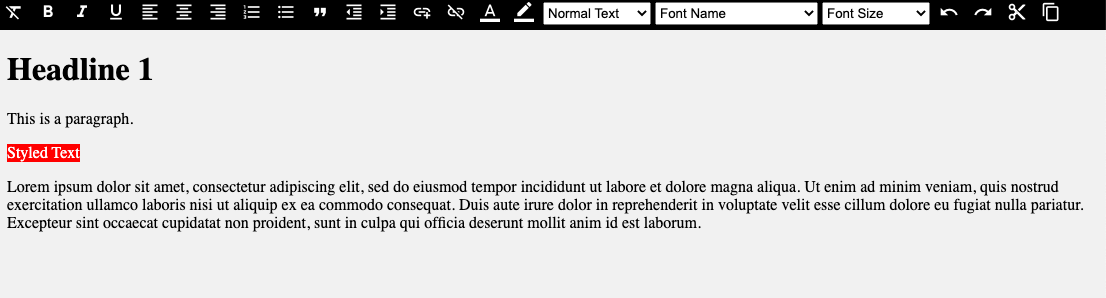
如果所有步骤都正确完成,运行命令后,视口中会显示以下内容:
npm run dev