iblai-profile
Compare original and translation side by side
🇺🇸
Original
English🇨🇳
Translation
Chinese/iblai-profile
/iblai-profile
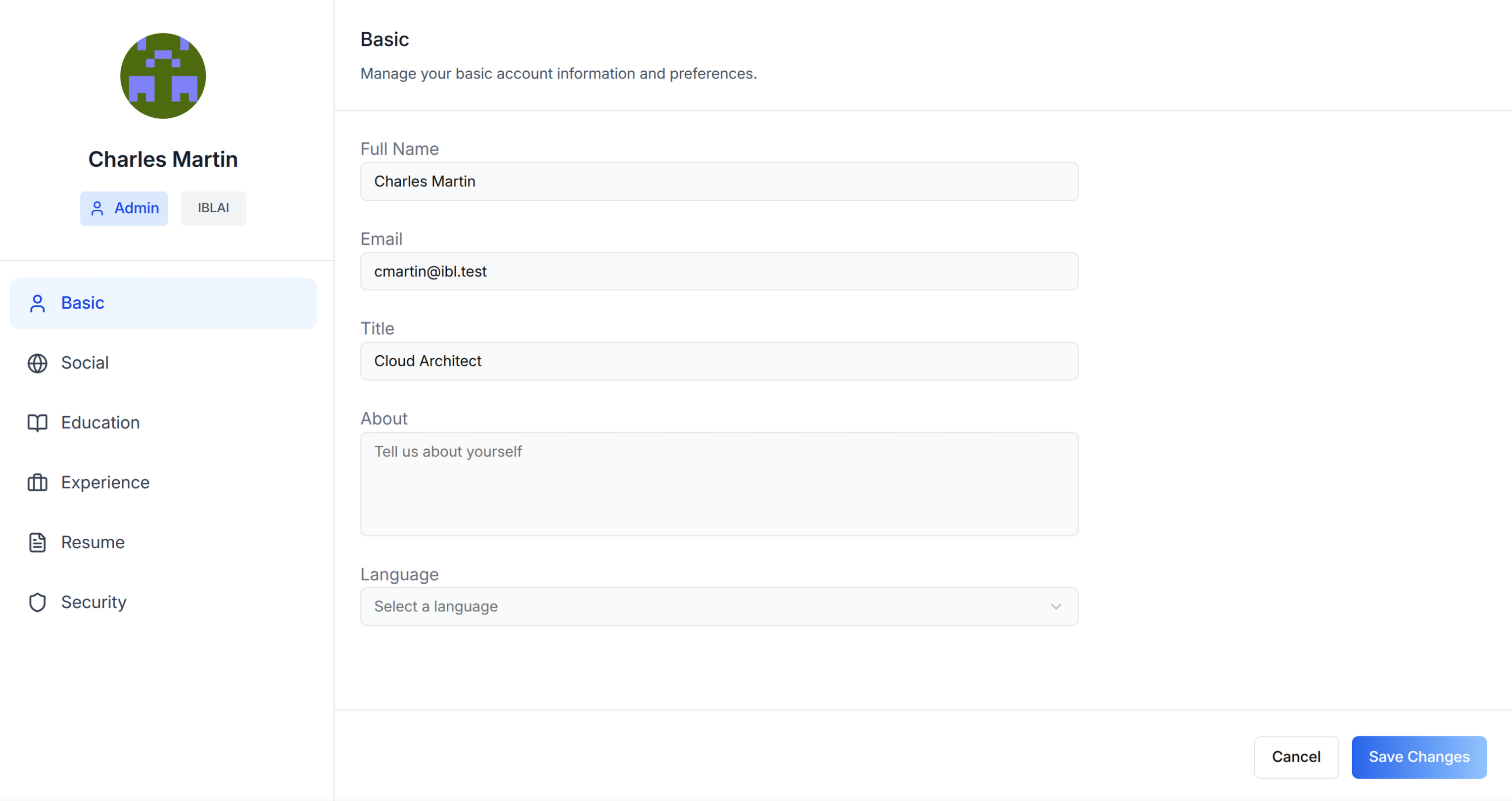
Add user profile features -- a compact avatar dropdown for your navbar and
a full settings page with tabs for Basic info, Social links, Education,
Experience, Resume, and Security.
AI Assistant: Do NOT add custom styles, colors, or CSS overrides to ibl.ai SDK components. They ship with their own styling. Keep the components as-is. Do NOT implement dark mode unless the user explicitly asks for it.When building custom UI around SDK components, use the ibl.ai brand:
- Primary:
, Gradient:#0058cclinear-gradient(135deg, #00b0ef, #0058cc)- Button:
bg-gradient-to-r from-[#2563EB] to-[#93C5FD] text-white- Font: System sans-serif stack, Style: shadcn/ui new-york variant
- Use shadcn components for custom UI -- they share the same Tailwind theme and render in ibl.ai brand colors automatically.
You MUST runbefore telling the user the work is ready./iblai-testAfter all work is complete, start a dev server () so the user can see the result at http://localhost:3000.pnpm devis NOT aiblai.envreplacement — it only holds the 3 shorthand variables (.env.local,DOMAIN,PLATFORM). Next.js still reads its runtime env vars fromTOKEN..env.localUseas the default package manager. Fall back topnpmif pnpm is not installed. The generated app should live in the current directory, not in a subdirectory.npm
添加用户个人资料功能——导航栏的紧凑头像下拉菜单,以及包含基础信息、社交链接、教育经历、工作经验、简历、安全选项卡的完整设置页面。
AI助手: 不要为ibl.ai SDK组件添加自定义样式、颜色或CSS覆盖。它们自带样式,保持组件原样即可。除非用户明确要求,否则不要实现深色模式。在SDK组件外围构建自定义UI时,请使用ibl.ai品牌规范:
- 主色:
, 渐变色:#0058cclinear-gradient(135deg, #00b0ef, #0058cc)- 按钮:
bg-gradient-to-r from-[#2563EB] to-[#93C5FD] text-white- 字体: 系统无衬线字体栈,风格: shadcn/ui new-york变体
- 自定义UI请使用shadcn组件——它们共享相同的Tailwind主题,会自动渲染为ibl.ai品牌色。
在告知用户工作已完成前,你必须运行。/iblai-test所有工作完成后,启动开发服务器(),这样用户可以在http://localhost:3000查看结果。pnpm dev不是iblai.env的替代品——它仅存储3个简写变量(.env.local、DOMAIN、PLATFORM)。Next.js仍然从TOKEN读取运行时环境变量。.env.local请使用作为默认包管理器。如果未安装pnpm则回退到pnpm。生成的应用应该放在当前目录下,不要放在子目录中。npm
Prerequisites
前置条件
- Auth must be set up first ()
/iblai-auth - MCP and skills must be set up:
iblai add mcp
- 必须先完成Auth配置()
/iblai-auth - 必须先配置MCP和skills:
iblai add mcp
Step 0: Check for CLI Updates
步骤0:检查CLI更新
Before running any command, ensure the CLI is
up to date. Run to check the current version, then
upgrade directly:
iblaiiblai --version- pip:
pip install --upgrade iblai-app-cli - npm:
npm install -g @iblai/cli@latest
This is safe to run even if already at the latest version.
运行任何命令前,请确保CLI是最新版本。运行查看当前版本,然后直接升级:
iblaiiblai --version- pip:
pip install --upgrade iblai-app-cli - npm:
npm install -g @iblai/cli@latest
即使已经是最新版本,运行该命令也是安全的。
Step 1: Check Environment
步骤1:检查环境
Before proceeding, check for a
in the project root. Look for , , and variables.
If the file does not exist or is missing these variables, tell the user:
"You need an with your platform configuration. Download the
template and fill in your values:
"
iblai.envPLATFORMDOMAINTOKENiblai.envcurl -o iblai.env https://raw.githubusercontent.com/iblai/vibe/refs/heads/main/iblai.env继续操作前,请检查项目根目录下是否有文件,确认存在、和变量。如果文件不存在或缺少这些变量,请告知用户:
"你需要一个包含平台配置的文件。下载模板并填写你的配置值:
"
iblai.envPLATFORMDOMAINTOKENiblai.envcurl -o iblai.env https://raw.githubusercontent.com/iblai/vibe/refs/heads/main/iblai.envStep 2: Run the Generator
步骤2:运行生成器
bash
iblai add profilebash
iblai add profileWhat Was Generated
生成的内容
| File | Purpose |
|---|---|
| Avatar dropdown for navbar with profile, organization, and logout |
The dropdown reads , /, and from
localStorage. Admin status is derived from the array by matching
the current tenant key against .
userDatatenantcurrent_tenanttenantstenantsis_adminThe dropdown shows three items: Profile (links to ),
Organization (links to ), and Logout.
/profile/account| 文件 | 用途 |
|---|---|
| 导航栏的头像下拉菜单,包含个人资料、组织和退出登录功能 |
该下拉菜单从localStorage读取、/和。管理员身份通过将当前租户key与字段匹配从数组中推导。
userDatatenantcurrent_tenanttenantsis_admintenants下拉菜单显示三个选项:个人资料(链接到)、组织(链接到)和退出登录。
/profile/accountStep 3: Use MCP Tools for Customization
步骤3:使用MCP工具自定义
get_component_info("UserProfileDropdown")get_component_info("UserProfileDropdown")<UserProfileDropdown>
Props
<UserProfileDropdown><UserProfileDropdown>
Props
<UserProfileDropdown>The generated dropdown component. Import from .
@iblai/iblai-js/web-containers/next| Prop | Type | Description |
|---|---|---|
| | Username |
| | Tenant/org key |
| | Shows admin badge + settings |
| | Show profile link |
| | Show account settings link |
| | Show tenant switcher |
| | Show logout button |
| | Auth service URL |
| | Logout callback |
| | Additional CSS class |
生成的下拉菜单组件。从导入。
@iblai/iblai-js/web-containers/next| 属性 | 类型 | 描述 |
|---|---|---|
| | 用户名 |
| | 租户/组织key |
| | 显示管理员徽章+设置 |
| | 显示个人资料链接 |
| | 显示账户设置链接 |
| | 显示租户切换器 |
| | 显示退出登录按钮 |
| | 认证服务URL |
| | 退出登录回调 |
| | 额外CSS类 |
<UserProfileModal>
Props (Profile + Account Modal)
<UserProfileModal><UserProfileModal>
Props(个人资料+账户模态框)
<UserProfileModal>For a profile editing modal (used by the MentorAI reference app), import
from . This is a
dialog that combines profile editing and account settings in one overlay.
UserProfileModal@iblai/iblai-js/web-containers/next如果需要个人资料编辑模态框(MentorAI参考应用使用),可从导入。这是一个对话框,在一个浮层中整合了个人资料编辑和账户设置功能。
@iblai/iblai-js/web-containers/nextUserProfileModalRequired
必填项
| Prop | Type | Description |
|---|---|---|
| | Whether the modal is visible |
| | Close callback |
| | Tenant key, optional mentor ID and admin flag |
| | Auth service URL (from |
| 属性 | 类型 | 描述 |
|---|---|---|
| | 模态框是否可见 |
| | 关闭回调 |
| | 租户key,可选的导师ID和管理员标识 |
| | 认证服务URL(来自 |
Optional
可选项
| Prop | Type | Description |
|---|---|---|
| | Full list of user tenants from localStorage |
| | Initial tab: |
| | Show tenant name badge |
| | Use Gravatar when no profile pic |
| | Current app identifier (e.g., |
| | Base domain for custom domain settings |
| | Called when tenant is updated |
| | Called after account deletion |
| 属性 | 类型 | 描述 |
|---|---|---|
| | 来自localStorage的用户租户完整列表 |
| | 初始选项卡: |
| | 显示租户名称徽章 |
| | 无头像时使用Gravatar |
| | 当前应用标识符(例如 |
| | 自定义域名设置的基础域名 |
| | 租户更新时调用 |
| | 账户删除后调用 |
Step 4: Verify
步骤4:验证
Run before telling the user the work is ready:
/iblai-test- -- must pass with zero errors
pnpm build - -- vitest must pass
pnpm test - Start dev server and touch test:
bash
pnpm dev &
npx playwright screenshot http://localhost:3000/profile /tmp/profile.png
告知用户工作完成前请运行:
/iblai-test- -- 必须零错误通过
pnpm build - -- vitest必须通过
pnpm test - 启动开发服务器并触摸测试:
bash
pnpm dev &
npx playwright screenshot http://localhost:3000/profile /tmp/profile.png
Important Notes
重要提示
- Redux store: Must include and
mentorReducermentorMiddleware - : 5 args (v1.2+)
initializeDataLayer() - : Deduplicated via webpack aliases in
@reduxjs/toolkitnext.config.ts - Admin detection: Derived from array in localStorage
tenants - Brand guidelines: BRAND.md
- Redux store: 必须包含和
mentorReducermentorMiddleware - : 5个参数(v1.2及以上版本)
initializeDataLayer() - : 通过
@reduxjs/toolkit中的webpack别名去重next.config.ts - 管理员检测: 从localStorage的数组推导
tenants - 品牌规范: BRAND.md